Gmail Snippets by cloudHQ icon

Gmail Snippets by cloudHQ Chrome Extension Analysis

Automation & Workflow Efficiency

Chrome extension ID: aaogcnhlejoiamoopmnieonhbgajndlc

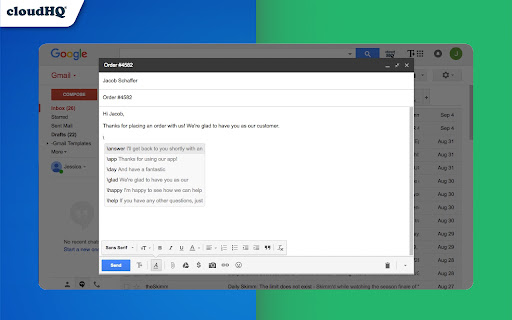
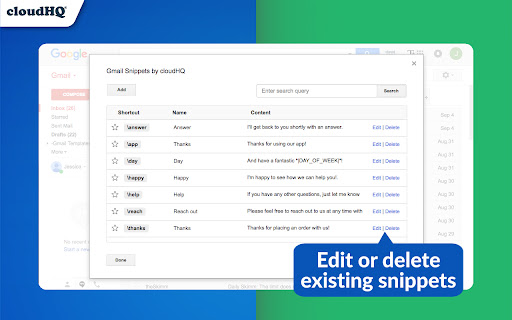
A Chrome extension for Gmail that enables the creation of text snippets triggered by shortcuts. Users can utilize pre-populated templates or create customized snippets to streamline their email workflow.

Developer:cloudHQ
Version:1.0.1.8
Size:752KiB
Last updated:

Overview

Installs

10K+

Rating

4.0

48 reviews

Languages

1 locales

Includes English

Market analysis

Review-backed positioning, friction, and market signals for this Chrome extension.

Backed by review samples

Macro category

Automation & Workflow Efficiency

Pricing friction

High review signal

Complaint intensity

High review signal

Listing & review signals
Observed signals from store listing text and review samples.

Listing positioning

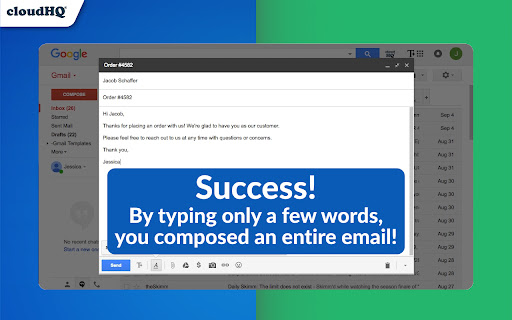
The product is positioned as a time-saving utility that allows users to compose entire emails using short keyboard shortcuts. It emphasizes increasing productivity and maintaining message consistency for repetitive tasks like product pitches and Q&As.

Inferred product pattern

A productivity utility transitioning from a free tool to a paid SaaS model, leading to significant user churn and sentiment decline.

Review-backed pain points

Users report significant frustration over a shift to a $4.99/month subscription model, with some describing the change as dishonest given previous '100% free' claims. Additionally, users note a lack of support for bold/italic formatting and limitations on the number of snippets that can be saved.

Observed feature gaps

The extension lacks support for text formatting (bold, italics, colors) and appears to have limitations on snippet storage capacity based on browser local storage.

Tags
Gmail ExtensionEmail TemplatesProductivity ToolText Expansion
Target users

- Sales professionals

- Customer support teams

- Frequent Gmail users

- Business owners

Primary use cases

- Sending repetitive introductions

- Standardizing product pitches

- Quickly inserting common Q&A responses

- Managing consistent email signatures

Positive themes

- Ease of use for basic snippet functionality

- Effective time-saving for repetitive typing

Negative themes

- Unexpected transition to paid subscription

- Perceived dishonesty regarding 'free' claims

- Lack of rich text formatting

- Technical glitches with shortcut activation

Observed friction

- Payment required for meaningful usage

- Free-tier complaints detected

- Performance complaints detected

- High friction caused by a shift to a monthly subscription ($4.99), resulting in accusations of deceptive marketing and annoyance over 'nag screens' for non-paying users.

Evidence boundary: Extracted from the official store listing and a sample of helpful low-rating reviews highlighting pricing and technical gaps. The review sample is heavily weighted toward negative sentiment regarding a recent pricing change, which may not reflect the historical user experience.
Complaint summaries
Review-backed complaint signals grouped by operational area.

Support

Some users report that snippets went missing even after transitioning to the paid version.

Reliability

Reports of the extension failing to load, the Tab key not consistently triggering snippets, and errors when attempting to save new snippets.

Privacy

No privacy or security complaints observed in the provided samples.

Access & pricing

- Subscription model observed

- Account required for core usage

- Trial or limited free usage before paid plan

Store listing facts

Listing assets

- Screenshots: 4

- Videos: 1

- Languages: 1

Trust signals

- Privacy policy

- Developer contact

- Official website

- Support link

Store metadata

- Version: 1.0.1.8

- Size: 752KiB

- Last updated:

Listing SEO keywords

Search intent keywords
Keyword signals for evaluating how users may discover, compare, or search for this extension category.

Core discovery

Gmail snippetsGmail email shortcutsemail text expander for GmailGmail templates extension

Comparison

Gmail Snippets vs free alternativesbest Gmail snippet tool

Problem

writing same emails over and overrepetitive email typingslow email composition

Alternative

free Gmail snippet extensionGmail template alternatives

Similar extensions

Jump to related discovery paths:

Screenshots

Gmail Snippets by cloudHQ screenshot

Links

Recommended Chrome extensions

Related listings from the same category, trending peers, and the same publisher portfolio.

Browse communication
Gmail™ Email Templates by cloudHQ icon

Gmail™ Email Templates by cloudHQ

cloudHQ

Beautiful email templates for Gmail. Design your templates or import templates from Mailchimp. With team sharing!

Installs

100K+

Rating

4.2

Save Emails as PDF by cloudHQ icon

Save Emails as PDF by cloudHQ

cloudHQ

Export, convert and save Gmail™ emails as a PDF document

Installs

100K+

Rating

4.3

TWP - Translate [BETA] icon

TWP - Translate [BETA]

Filipe Dev

THIS EXTENSION IS FOR BETA TESTING

Installs

100K+

Rating

4.8

ScreenPal - Screen Recorder & Video Editor icon

ScreenPal - Screen Recorder & Video Editor

ScreenPal (formerly Screencast-O-Matic)

Record your screen & webcam, take screenshots, edit videos & images - easy & free!

Installs

100K+

Rating

4.3

WEB.DE MailCheck icon

WEB.DE MailCheck

1&1 Mail & Media GmbH

Der sichere Klick in Dein Postfach.

Installs

90K+

Rating

3.4

HyperWrite: AI Writing Assistant and Autocomplete App icon

HyperWrite: AI Writing Assistant and Autocomplete App

Otherside AI

Smart autocomplete for Gmail, Google Docs, ChatGPT, and more. An AI writing assistant that predicts words and sentences.

Installs

80K+

Rating

4.2

Zight Screen Recorder, Screenshot App icon

Zight Screen Recorder, Screenshot App

Zight

The best screen recorder for Chrome. Capture your screen, webcam, and instantly share videos and screenshots in seconds.

Installs

80K+

Rating

4.5

Voila – AI Assistant, Copilot and AI Writer icon

Voila – AI Assistant, Copilot and AI Writer

Initial condition

Seamless personal AI assistant powered by GPT-5 to help you create, write, summarize, brainstorm, and research on any website.

Installs

80K+

Rating

4.7

Multi Email Forward by cloudHQ icon

Multi Email Forward by cloudHQ

cloudHQ

Forward multiple Gmail™ emails with one click. Transfer or migrate your Gmail™ emails.

Installs

80K+

Rating

4.1

FlowCrypt: Encrypt Gmail with PGP icon

FlowCrypt: Encrypt Gmail with PGP

flowcrypt-release

Simple end-to-end encryption to secure email and attachments on Google.

Installs

70K+

Rating

4.7