WP Message Text Blur icon

WP Message Text Blur Chrome Extension Analysis

Privacy, Security & Ad Blockers

Chrome extension ID: abkljlaboekmiiiechgdcchaomkhbaij

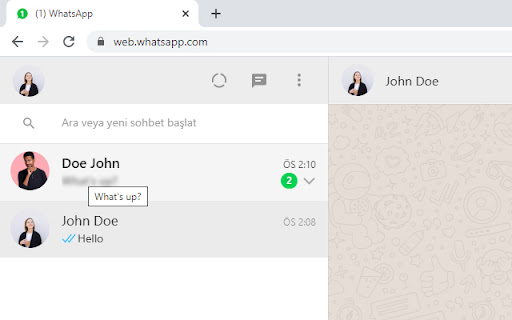
WP Message Text Blur is a lightweight Chrome extension that applies a visual blur to unselected WhatsApp Web chat previews, names, and profile pictures. It aims to prevent shoulder surfing and accidental exposure of personal chat details in public or office environments. The active chat window remains unblurred for normal use.

Developer:Emre AKKAYA
Version:3.0.5
Size:6.69KiB
Last updated:

Overview

Installs

6K+

Rating

4.5

16 reviews

Languages

1 locales

Includes English (United States)

Market analysis

Review-backed positioning, friction, and market signals for this Chrome extension.

Backed by review samples

Macro category

Privacy, Security & Ad Blockers

Pricing friction

Low review signal

Complaint intensity

Moderate review signal

Listing & review signals
Observed signals from store listing text and review samples.

Listing positioning

The store listing positions WP Message Text Blur as a privacy-first utility that blurs WhatsApp Web message previews. It highlights its security-focused engineering, claiming it operates entirely via CSS without accessing JS files. This design is promoted as a way to ensure user messages are never read while avoiding browser slowdowns.

Inferred product pattern

A lightweight CSS injection tool designed to target and blur specific elements on popular web application interfaces for local privacy.

Review-backed pain points

The primary user pain point is that the extension occasionally stops working, likely because WhatsApp Web updates its DOM structure or CSS selectors, which breaks the static CSS rules used by the extension to apply the blur.

Observed feature gaps

Based on user complaints about the tool breaking, there is a gap in dynamic selector adaptation or automated fallback mechanisms to handle WhatsApp Web updates.

Tags
WhatsApp BlurScreen PrivacyChat BlurPrivacy Tool
Target users

- Office workers

- Remote professionals working in public spaces

- Users who share their screens with clients or colleagues

Primary use cases

- Preventing coworkers from reading incoming WhatsApp message previews in shared offices

- Hiding private chat details when opening WhatsApp Web during screen-sharing sessions

Positive themes

- Effective blurring of names, profile pictures, and message previews

- Increased sense of privacy and safety when using WhatsApp Web in the workplace

Negative themes

- Extension breaking or failing to apply blur after WhatsApp Web updates

- Lack of immediate updates when the tool stops working

Observed friction

- There are no pricing complaints, as the extension appears to be fully free with no paywalls or monetization observed.

Evidence boundary: The analysis uses the store listing claims of a CSS-only, zero-JS-access privacy tool alongside 10 user reviews. Positive feedback highlights office privacy utility, while negative feedback centers on breakage due to external web updates. The dataset is constrained by a low total count of 16 reviews and lacks developer documentation regarding update cycles or bug tracking.
Complaint summaries
Review-backed complaint signals grouped by operational area.

Support

No support or account-related complaints were found, though users post public store reviews urging the developer to release fixes when the extension stops working.

Reliability

Several recent reviews indicate the plugin stopped working, with users requesting updates to restore compatibility with the latest version of WhatsApp Web.

Privacy

No privacy complaints were identified; reviews and listing details praise its lightweight, CSS-only approach that avoids script injection.

Access & pricing

- Free usage observed

- No account requirement observed

- Free plan or free usage claimed

Store listing facts

Listing assets

- Screenshots: 1

- Videos: 0

- Languages: 1

Trust signals

- Privacy policy

- Developer contact

- Official website

Store metadata

- Version: 3.0.5

- Size: 6.69KiB

- Last updated:

Listing SEO keywords

Search intent keywords
Keyword signals for evaluating how users may discover, compare, or search for this extension category.

Core discovery

whatsapp web blur extensionblur whatsapp chat previewhow to hide whatsapp messages on screen

Comparison

wp message text blur vs privacy extensionwhatsapp blur vs screen hider

Problem

whatsapp messages visible on screenhide chat preview whatsapp webstop shoulder surfing whatsapp

Alternative

whatsapp web privacy extensionblur whatsapp screenchat hider for whatsapp web

Similar extensions

Jump to related discovery paths:

Screenshots

WP Message Text Blur screenshot

Links

Recommended Chrome extensions

Related listings from the same category, trending peers, and the same publisher portfolio.

Browse social