OPFS Explorer icon

OPFS Explorer Chrome Extension Analysis

Developer & Designer Tools

Chrome extension ID: acndjpgkpaclldomagafnognkcgjignd

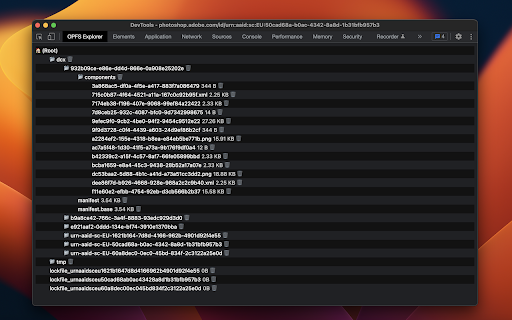
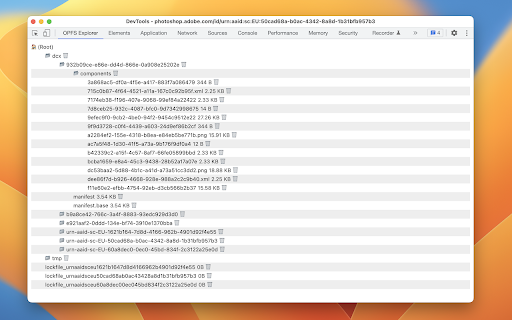
This extension integrates directly into Chrome DevTools to enable developers to view, download, and delete files stored within an application's Origin Private File System. It is primarily used for debugging storage-heavy web applications and handles specific metadata for sqlite3 OPFS configurations.

Developer:Thomas Steiner
Version:1.11.0
Size:15.1KiB
Last updated:

Overview

Installs

10K+

Rating

4.2

18 reviews

Languages

1 locales

Includes English

Market analysis

Review-backed positioning, friction, and market signals for this Chrome extension.

Backed by review samples

Macro category

Developer & Designer Tools

Pricing friction

Low review signal

Complaint intensity

Moderate review signal

Listing & review signals
Observed signals from store listing text and review samples.

Listing positioning

OPFS Explorer is positioned as a specialized Chrome DevTools extension for inspecting the Origin Private File System (OPFS). It provides a necessary visual interface for managing file hierarchies in web applications where native DevTools support is currently lacking.

Inferred product pattern

Utility-focused DevTools extension offering a bridge to missing browser capability.

Review-backed pain points

Users report the tool hangs indefinitely on pages without OPFS usage, crashes the browser on macOS, and fails to load the DevTools menu intermittently.

Observed feature gaps

Lacks support for file creation, file copying into the OPFS, and struggles to inspect storage used by other browser extensions.

Tags
DevToolsOPFSFile SystemWeb Debugging
Target users

- Web Developers

- Frontend Engineers

- Storage API Researchers

Primary use cases

- Inspecting OPFS file structures

- Downloading stored files

- Debugging SQLite OPFS SAH-Pool databases

Positive themes

- Indispensable tool for OPFS debugging

- Helpful for viewing SQL metadata

- Simple and straightforward interface

Negative themes

- Frequent hanging or infinite loading

- Crashes on certain OS platforms

- Lack of advanced features like file creation or copying

Observed friction

- Performance complaints detected

- None; the product is free and open-source.

Evidence boundary: Analysis based on 10 user reviews and official extension description, showing a mix of high praise for utility and critical feedback on performance stability. Review sample size is small; performance reports may be environment-specific to browser versions or OS.
Complaint summaries
Review-backed complaint signals grouped by operational area.

Support

No official support complaints; users generally provide feedback via store reviews regarding technical bugs.

Reliability

Reports of browser freezes, crashes, and failure to initialize on non-OPFS pages or specific browser versions.

Privacy

None observed.

Access & pricing

- Free usage observed

- No account requirement observed

- Free plan or free usage claimed

Store listing facts

Listing assets

- Screenshots: 2

- Videos: 0

- Languages: 1

Trust signals

- Privacy policy

- Developer contact

- Official website

- Support link

Store metadata

- Version: 1.11.0

- Size: 15.1KiB

- Last updated:

Listing SEO keywords

Search intent keywords
Keyword signals for evaluating how users may discover, compare, or search for this extension category.

Core discovery

OPFS viewerChrome extension file systemdebug OPFSOrigin Private File System tool

Comparison

Chrome DevTools extensionOPFS inspector

Problem

OPFS not showingdebug OPFS Chrome

Alternative

Web storage inspectorFile system debugging

Similar extensions

Jump to related discovery paths:

Screenshots

OPFS Explorer screenshot

Links

Recommended Chrome extensions

Related listings from the same category, trending peers, and the same publisher portfolio.

Browse developer