Browser Support Kit icon

Browser Support Kit Chrome Extension Analysis

Automation & Workflow Efficiency

Chrome extension ID: acpcoboneepbdjdlnofnjenghdpkpina

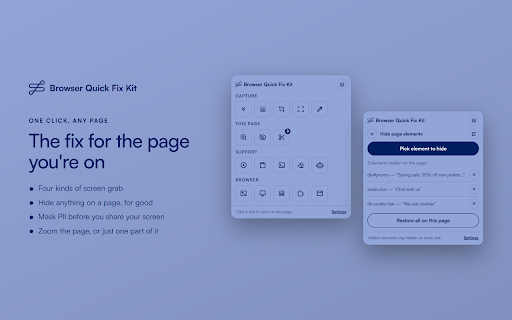
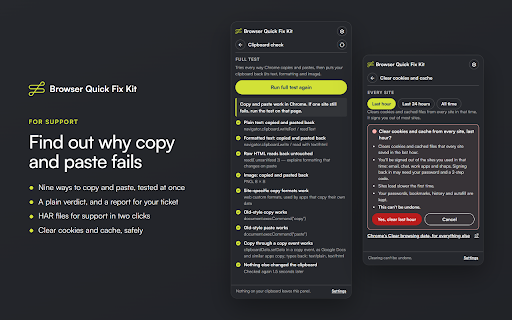
This extension provides a consolidated suite of browser utilities for screen capturing, page element masking, and technical troubleshooting. It includes advanced features like network traffic (HAR) recording, clipboard diagnostic testing, and experimental on-device AI for resolving site-specific technical issues.

Developer:URLflows
Version:0.6.1
Size:385KiB
Last updated:

Overview

Installs

4

Rating

★ —

0 reviews

Languages

1 locales

Includes English (United States)

Market analysis

Review-backed positioning, friction, and market signals for this Chrome extension.

No review samples found

Macro category

Automation & Workflow Efficiency

Pricing friction

Low review signal

Complaint intensity

Low review signal

Listing & review signals
Observed signals from store listing text and review samples.

Listing positioning

Browser Quick Fix Kit positions itself as an all-in-one Swiss Army knife for browser-based support and productivity. It aggregates diverse utility tasks like screen grabbing, PII masking, HAR recording, and console inspection into a single toolbar panel to reduce reliance on multiple separate extensions.

Inferred product pattern

Utility suite consolidation tool focused on technical support workflows.

Review-backed pain points

Review-backed data is not available.

Observed feature gaps

Review-backed data is not available.

Tags
TroubleshootingPrivacyScreenshotSupport ToolsWeb Development
Target users

- Customer support agents

- Technical support staff

- Web developers

- Quality assurance testers

Primary use cases

- Redacting sensitive information before screen sharing

- Generating support tickets with technical logs

- Troubleshooting site-specific copy/paste and rendering issues

Positive themes

No positive theme data.

Negative themes

No negative theme data.

Observed friction

- The extension claims to be private by design with no account requirement; there is no mention of monetization or paid tiers.

Evidence boundary: The data is extracted from the provided Chrome Web Store manifest and long-form description. No user reviews exist to validate performance or sentiment. The analysis relies entirely on self-reported developer descriptions as there are currently no public user reviews available.
Complaint summaries
Review-backed complaint signals grouped by operational area.

Support

Review-backed data is not available.

Reliability

Review-backed data is not available.

Privacy

Review-backed data is not available.

Access & pricing

- Free usage observed

- No account requirement observed

- Free plan or free usage claimed

Store listing facts

Listing assets

- Screenshots: 3

- Videos: 0

- Languages: 1

Trust signals

- Privacy policy

- Developer contact

Store metadata

- Version: 0.6.1

- Size: 385KiB

- Last updated:

Listing SEO keywords

Search intent keywords
Keyword signals for evaluating how users may discover, compare, or search for this extension category.

Core discovery

browser troubleshooting toolHAR recorder extensionPII masking toolchrome support assistantweb page diagnostic tool

Comparison

Stitch Fix browser toolsall in one chrome extension for developers

Problem

troubleshoot website issueshide sensitive screen informationchrome console error logger

Alternative

browser diagnostic toolkitscreen capture and redaction

Similar extensions

Jump to related discovery paths:

Screenshots

Browser Support Kit screenshot

Links

Recommended Chrome extensions

Related listings from the same category, trending peers, and the same publisher portfolio.

Browse workflow