Server IP icon

Server IP Chrome Extension Analysis

Developer & Designer Tools

Chrome extension ID: adcbaggcjppnkmhfmjcdgagmggnfeikh

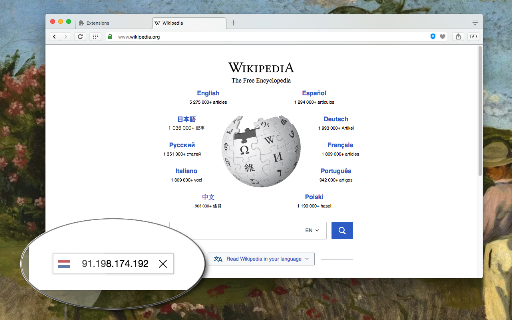
Server IP is a browser tool that displays a country flag on visited webpages representing the server's geographic location. It provides additional network diagnostics like Whois and domain information, allowing users to understand legal and linguistic jurisdictions of the websites they visit.

Developer:yokris.dev
Version:0.2.8
Size:4.78MiB
Last updated:

Overview

Installs

5K+

Rating

4.0

9 reviews

Languages

1 locales

Includes English

Market analysis

Review-backed positioning, friction, and market signals for this Chrome extension.

Backed by review samples

Macro category

Developer & Designer Tools

Pricing friction

Low review signal

Complaint intensity

Moderate review signal

Listing & review signals
Observed signals from store listing text and review samples.

Listing positioning

The extension positions itself as a lightweight, privacy-focused utility for developers and users to identify server locations via IP addresses. It emphasizes offline functionality using local MaxMind databases and minimal resource consumption via Manifest V3 compliance.

Inferred product pattern

Free, local-first browser utility tool for network transparency.

Review-backed pain points

Users express confusion between the extension's purpose (server IP) and personal IP identification, along with occasional console error noise and requests for more granular control over overlay visibility.

Observed feature gaps

Lack of a native feature to show the user's personal/external IP address and inability to toggle off the persistent screen overlay without user interaction.

Tags
Ip GeolocationServer InfoWeb DevelopmentNetwork Tools
Target users

- Web Developers

- Network Administrators

- Privacy-conscious Users

- Security Researchers

Primary use cases

- Identifying server location

- Accessing Whois data

- Analyzing website jurisdiction

Positive themes

- Utility for server tracking

- Useful diagnostic tool

- Functional simplicity

Negative themes

- User frustration regarding IP display confusion

- Console errors

- Lack of display customization (persistent overlay)

Observed friction

- Performance complaints detected

- No pricing friction identified; product is presented as free.

Evidence boundary: Analysis based on user reviews highlighting UI preferences and technical feedback, combined with provided store metadata. Review sample size is small (8 total), limiting the scope of sentiment analysis.
Complaint summaries
Review-backed complaint signals grouped by operational area.

Support

No direct support complaints observed, though users request feature updates.

Reliability

Minor reliability issues noted regarding console errors and UI persistence preferences.

Privacy

No privacy concerns raised; user base appreciates offline operation.

Access & pricing

- Free usage observed

- No account requirement observed

- Free plan or free usage claimed

Store listing facts

Listing assets

- Screenshots: 1

- Videos: 0

- Languages: 1

Trust signals

- Privacy policy

- Developer contact

- Official website

Store metadata

- Version: 0.2.8

- Size: 4.78MiB

- Last updated:

Listing SEO keywords

Search intent keywords
Keyword signals for evaluating how users may discover, compare, or search for this extension category.

Core discovery

find website server locationip geolocation chrome extensionwebsite server ip lookupwhois lookup tool

Comparison

vs country flags ip whoisserver ip extension alternative

Problem

find server IP addresscheck website hosting location

Alternative

ip address trackernetwork information tool

Similar extensions

Jump to related discovery paths:

Screenshots

Server IP screenshot

Links

Recommended Chrome extensions

Related listings from the same category, trending peers, and the same publisher portfolio.

Browse tools