YouTube Mini Player icon

YouTube Mini Player Chrome Extension Analysis

Automation & Workflow Efficiency

Chrome extension ID: aebidfeikndkapbilgnhbedgilbcngok

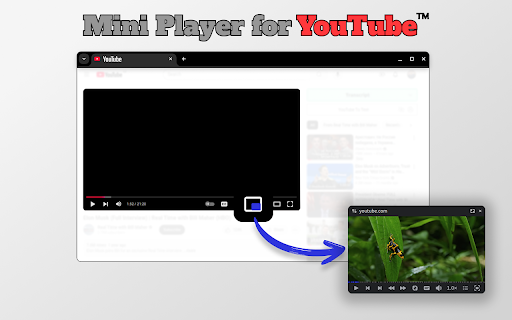
A browser extension that adds a Picture-in-Picture (PiP) button to YouTube videos. It allows the video to remain on top of other tabs and applications, with features for resizing, dragging, and basic playback control.

Developer:Anton Khoteev
Version:3.1.0
Size:145KiB
Last updated:

Overview

Installs

70K+

Rating

4.9

1,579 reviews

Languages

52 locales

Includes Deutsch, English, Filipino, Indonesia...

Market analysis

Review-backed positioning, friction, and market signals for this Chrome extension.

Backed by review samples

Macro category

Automation & Workflow Efficiency

Pricing friction

Low review signal

Complaint intensity

Moderate review signal

Listing & review signals
Observed signals from store listing text and review samples.

Listing positioning

The extension positions itself as a lightweight tool for multitaskers, enabling a floating window for YouTube videos. It emphasizes a seamless experience that allows users to browse other sites without interrupting their video playback.

Inferred product pattern

Single-purpose utility extending native browser PiP functionality for a specific platform.

Review-backed pain points

Users report frustration with frequent pop-ups asking for reviews and a volume slider that disappears or is difficult to manipulate. Some users dislike the 'YouTube' header bar on the window.

Observed feature gaps

Lack of a truly borderless viewing mode, missing keyboard shortcuts for pausing, and limited ability to customize subtitle size.

Tags
YouTube PiPMini PlayerMultitaskingFloating VideoProductivity
Target users

- Multitaskers

- Students

- Remote Workers

- Content Consumers

Primary use cases

- Watching tutorials while taking notes

- Monitoring videos while working in other tabs

- Using YouTube for background noise while browsing

Positive themes

- Seamless multitasking

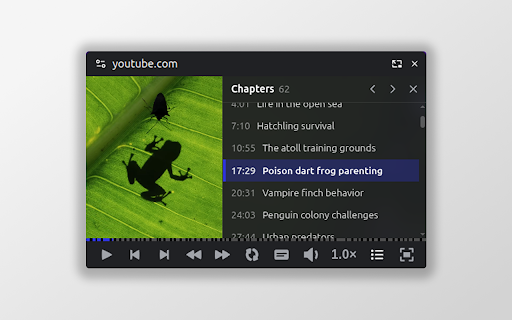
- Useful playback controls (loop, speed, skip)

- Smooth performance

- Ability to overlay on top of other applications

Negative themes

- Intrusive review prompts

- Buggy volume slider UI

- Unwanted title bar on the mini player

- Initial installation failures

Observed friction

- Performance complaints detected

- Privacy complaints detected

- No pricing friction observed as the extension is claimed to be free.

Evidence boundary: Analysis based on the official store listing and a sample of 30 user reviews across multiple languages. Review data is based on a sample and may not represent the full user base; some technical complaints are isolated.
Complaint summaries
Review-backed complaint signals grouped by operational area.

Support

No direct support complaints, but users expressed annoyance at aggressive requests for reviews.

Reliability

A few users reported that the extension failed to load or the PiP button did not appear after installation.

Privacy

Minimal concerns raised by users regarding the collection of personal information/emails.

Access & pricing

- Free usage observed

- No account requirement observed

- Free plan or free usage claimed

Store listing facts

Listing assets

- Screenshots: 1

- Videos: 0

- Languages: 52

Trust signals

- Privacy policy

- Developer contact

- Official website

Store metadata

- Version: 3.1.0

- Size: 145KiB

- Last updated:

Listing SEO keywords

Search intent keywords
Keyword signals for evaluating how users may discover, compare, or search for this extension category.

Core discovery

YouTube picture in pictureYouTube mini playerfloating window for YouTube

Comparison

best YouTube PiP extensionYouTube mini player vs native PiP

Problem

how to watch YouTube while browsingYouTube background play Chrome

Alternative

YouTube PiP alternativesChrome floating video player

Similar extensions

Jump to related discovery paths:

Screenshots

YouTube Mini Player screenshot

Links

Recommended Chrome extensions

Related listings from the same category, trending peers, and the same publisher portfolio.

Browse workflow