Zipper icon

Zipper Chrome Extension Analysis

Automation & Workflow Efficiency

Chrome extension ID: afjpeecdeggoakbcpgpdkcbgmlkkieea

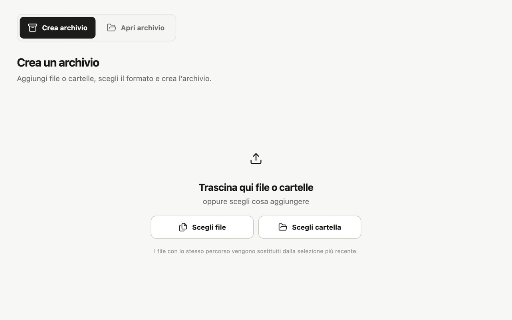
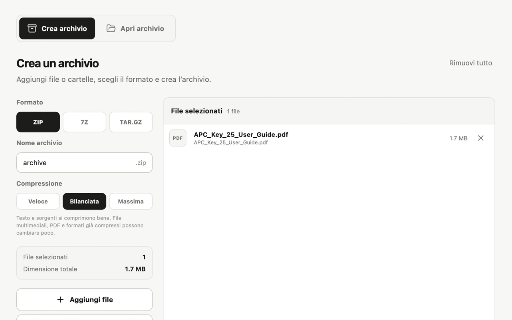
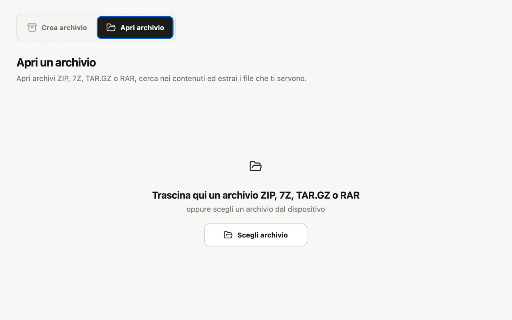
Zipper is a Chrome extension designed to handle file compression and decompression locally on a user's device. It supports creating archives in ZIP, 7Z, and TAR.GZ formats with customizable compression levels, and extracts common file formats including RAR. It features drag-and-drop file adding, folder structure preservation, and support for both light and dark UI themes.

Developer:RealrecordzLab
Version:2.0.1
Size:1.23MiB
Last updated:

Overview

Installs

55

Rating

★ —

0 reviews

Languages

5 locales

Includes Deutsch, English, español, français...

Market analysis

Review-backed positioning, friction, and market signals for this Chrome extension.

No review samples found

Macro category

Automation & Workflow Efficiency

Pricing friction

Low review signal

Complaint intensity

Low review signal

Listing & review signals
Observed signals from store listing text and review samples.

Listing positioning

Zipper is positioned as a lightweight, local archive utility that enables users to work with compressed files directly in the browser. It claims to eliminate the need for external desktop software by allowing users to create ZIP, 7Z, and TAR.GZ files, and extract formats like RAR. The developer emphasizes offline privacy, highlighting that all file processing occurs locally on the device without requiring an account.

Inferred product pattern

A local, browser-based file manipulation utility built using WebAssembly or packaged open-source archive libraries to perform offline decompression and compression.

Review-backed pain points

Review-backed data is not available because the extension currently has no reviews.

Observed feature gaps

Review-backed data is not available. Based on the store listing, the extension cannot write or create RAR archives, only read and extract them.

Tags
Archive UtilityZip ExtractorFile Compression7z Opener
Target users

- Chromebook users requiring offline file extraction

- Office workers needing quick archive management

- Developers working with tar.gz and 7z packages in-browser

- Privacy-conscious users who avoid uploading files to online conversion sites

Primary use cases

- Compressing folders into a ZIP, 7Z, or TAR.GZ archive with drag-and-drop

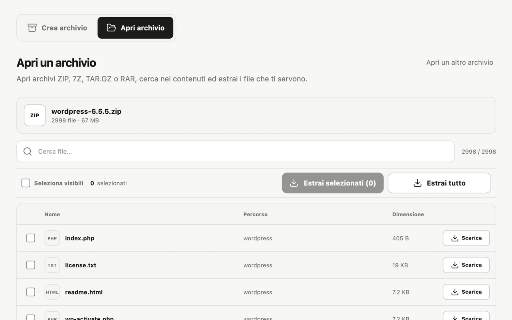
- Extracting specific files from a downloaded RAR archive directly in Chrome

- Searching and previewing file structures inside archives before extraction

Positive themes

- Review-backed data is not available as no reviews have been found.

Negative themes

- Review-backed data is not available as no reviews have been found.

Observed friction

- No pricing friction has been reported. Review-backed data is not available.

Evidence boundary: The analysis is based on the official Chrome Web Store metadata, including the extension's short and long descriptions, feature claims, and technical constraints. No reviews or user feedback were available for evaluation. The lack of user reviews and low active user count (11 users) limits the ability to evaluate real-world performance, potential bugs, file size limits, or compatibility issues.
Complaint summaries
Review-backed complaint signals grouped by operational area.

Support

No support or account complaints have been reported. Review-backed data is not available.

Reliability

No performance or reliability issues have been reported. Review-backed data is not available.

Privacy

No privacy complaints have been reported. The listing claims the extension processes all archives locally on the user's device.

Access & pricing

- Free usage observed

- No account requirement observed

- Free plan or free usage claimed

Store listing facts

Listing assets

- Screenshots: 4

- Videos: 0

- Languages: 5

Trust signals

- Developer contact

- Official website

Store metadata

- Version: 2.0.1

- Size: 1.23MiB

- Last updated:

Listing SEO keywords

Search intent keywords
Keyword signals for evaluating how users may discover, compare, or search for this extension category.

Core discovery

unzip files in chromecreate zip archive chromeextract rar onlineopen 7z file in browsertar.gz extractor extension

Comparison

zipper vs winrarzipper chrome extension vs 7-zip

Problem

how to open rar on chromebookcompress files without desktop appextract zip files offline

Alternative

winrar chrome extension alternative7zip extensiononline zip extractor

Similar extensions

Jump to related discovery paths:

Screenshots

Zipper screenshot
Zipper screenshot
Zipper screenshot
Zipper screenshot

Links

Recommended Chrome extensions

Related listings from the same category, trending peers, and the same publisher portfolio.

Browse tools