Japanese Font Finder — Detect Any Web Font icon

Japanese Font Finder Chrome Extension Analysis

Developer & Designer Tools

Store listing title: Japanese Font Finder — Detect Any Web Font

Chrome extension ID: ageolfjmheacenbkgiahlkhkogcnocip

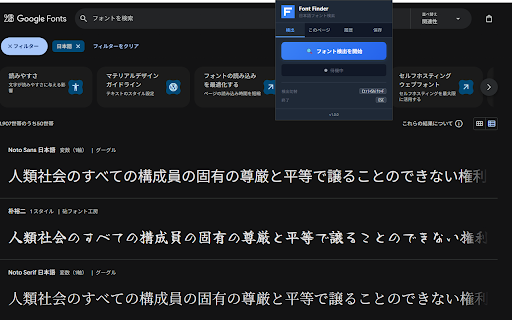
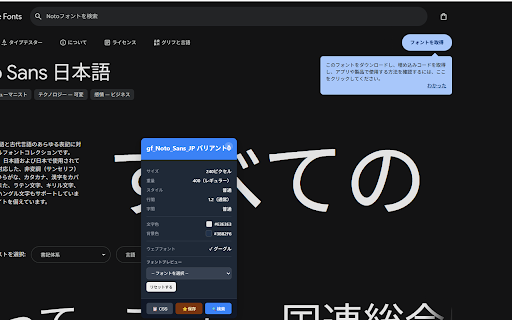
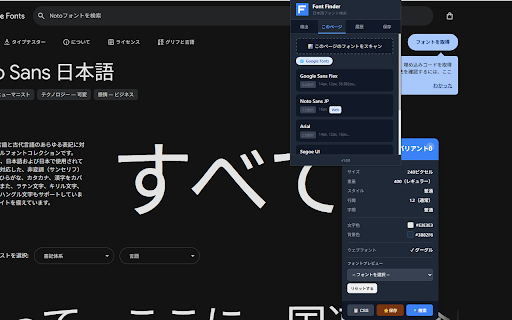
A browser extension designed to identify fonts on any webpage with a focus on Japanese language support. Users can hover over text to see font details, copy CSS code, and bookmark favorite fonts for later use.

Developer:ktg
Version:2.4.1 — popup subscription management link (cancellation-flow Wave 1)
Size:94.2KiB
Last updated:

Overview

Installs

40

Rating

5.0

1 reviews

Languages

9 locales

Includes Deutsch, English, español, français...

Market analysis

Review-backed positioning, friction, and market signals for this Chrome extension.

No review samples found

Macro category

Developer & Designer Tools

Pricing friction

Low review signal

Complaint intensity

Low review signal

Listing & review signals
Observed signals from store listing text and review samples.

Listing positioning

The product positions itself as a specialized tool for identifying web fonts, specifically highlighting superior detection capabilities for Japanese typefaces. It emphasizes ease of use through hover detection and quick CSS extraction for designers and developers.

Inferred product pattern

Niche utility tool targeting specific linguistic typography needs within the design and development workflow.

Review-backed pain points

review-backed data is not available

Observed feature gaps

The listing implies a potential limitation in the free tier, restricting users to 5 font detections per day.

Tags
Font DetectorJapanese TypographyWeb Design ToolCSS Tool
Target users

- Web Designers

- UI/UX Designers

- Frontend Developers

- Typography Enthusiasts

Primary use cases

- Identifying Japanese web fonts

- Extracting font CSS properties

- Typography research

Positive themes

- review-backed data is not available

Negative themes

- review-backed data is not available

Observed friction

- The tool uses a freemium model with a strict limit of 5 free detections per day, necessitating a subscription for unlimited use.

Evidence boundary: Analysis based on the official Chrome Web Store product description and pricing structure. No user reviews were available to provide actual sentiment or performance verification.
Complaint summaries
Review-backed complaint signals grouped by operational area.

Support

No support complaints observed.

Reliability

No reliability complaints observed.

Privacy

No privacy complaints observed; the developer claims the tool runs locally without external data collection.

Access & pricing

- Free entry with paid features

- No clear access signal

- Limited free usage observed

Store listing facts

Listing assets

- Screenshots: 3

- Videos: 0

- Languages: 9

Trust signals

- Privacy policy

- Developer contact

- Official website

Store metadata

- Version: 2.4.1 — popup subscription management link (cancellation-flow Wave 1)

- Size: 94.2KiB

- Last updated:

Listing SEO keywords

Search intent keywords
Keyword signals for evaluating how users may discover, compare, or search for this extension category.

Core discovery

Japanese font detectordetect web fontscopy font CSSidentify Japanese typefaces

Comparison

WhatFontFont Ninja

Problem

identify Japanese fontsdetect web font sizecopy font CSS

Alternative

Font FinderTypography inspector

Similar extensions

Jump to related discovery paths:

Screenshots

Japanese Font Finder — Detect Any Web Font screenshot

Links

Recommended Chrome extensions

Related listings from the same category, trending peers, and the same publisher portfolio.

Browse developer