Photo SlideShow icon

Photo SlideShow Chrome Extension Analysis

Niche Lifestyle & Gaming Hacks

Chrome extension ID: alkcfedbkhjolgpgpnbnlaggfnkifhlb

Photo SlideShow allows users to display local images in a browser-based slideshow format. It supports sequential or random image playback, full-screen options, and various folder access configurations for home displays.

Developer:MSTECH
Version:32.6
Size:96.65KiB
Last updated:

Overview

Installs

7K+

Rating

★ 4.5

4 reviews

Languages

1 locales

Includes English

Market analysis

Review-backed positioning, friction, and market signals for this Chrome extension.

Backed by review samples

Macro category

Niche Lifestyle & Gaming Hacks

Pricing friction

Low review signal

Complaint intensity

Moderate review signal

Listing & review signals
Observed signals from store listing text and review samples.

Listing positioning

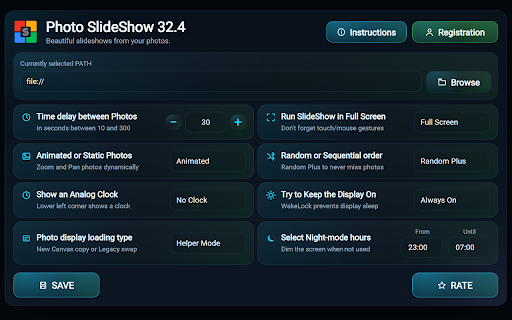
The product positions itself as a utility to transform standard web browsers into digital photo frames. It emphasizes compatibility across Chromebooks, PCs, and tablets, highlighting features like custom transition delays and night mode.

Inferred product pattern

Utility extension providing browser-based media display features for local file systems.

Review-backed pain points

Users report difficulty with file path configuration and occasional regressions in core features like random playback after updates.

Observed feature gaps

Lack of visual transition effects and constrained time-interval settings for slideshow progression.

Tags
Digital FramePhoto SlideshowScreensaverBrowser Utility
Target users

- Home users with digital screens

- Chromebook enthusiasts

- Digital signage hobbyists

Primary use cases

- Converting kitchen TVs or computers into digital photo frames

- Displaying vacation photo collections

- Automated image rotation

Positive themes

- Effective performance with large photo libraries

- Responsive developer support

- Useful night mode functionality

Negative themes

- Potential bugs following updates

- High technical configuration barrier

- Limited customization for transition timings

Observed friction

- No explicit pricing friction reported, though one user questioned if a feature loss was tied to a trial period.

Evidence boundary: Analysis based on four user reviews and store description details confirming functionality and ease of use, with notes on configuration complexity. Limited review sample size (4 reviews) may not represent the full user experience of the 6,000 listed users.
Complaint summaries
Review-backed complaint signals grouped by operational area.

Support

Developer support is explicitly praised by users for being helpful.

Reliability

Minor issues reported with random playback stability after updates.

Privacy

No privacy complaints; the extension requires file URL access permissions to function.

Access & pricing

- No clear monetization signal

- No account requirement observed

- No clear pricing signal

Store listing facts

Listing assets

- Screenshots: 2

- Videos: 1

- Languages: 1

Trust signals

- Privacy policy

- Developer contact

- Official website

Store metadata

- Version: 32.6

- Size: 96.65KiB

- Last updated:

Listing SEO keywords

Search intent keywords
Keyword signals for evaluating how users may discover, compare, or search for this extension category.

Core discovery

Chrome digital photo framebrowser slideshow extensiondisplay local photos in browser

Comparison

Photo SlideShow alternativesdigital frame software comparison

Problem

how to show local photos in browserbrowser slideshow error

Alternative

slideshow screen saverphoto viewer extension

Similar extensions

Jump to related discovery paths:

Screenshots

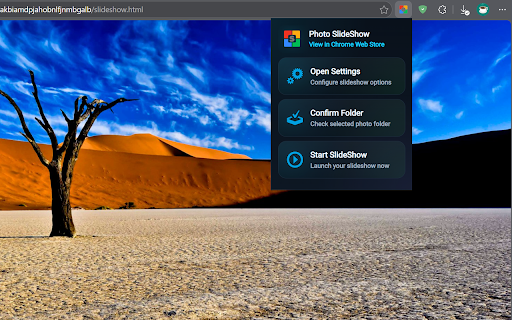
Photo SlideShow screenshot

Links

Website: sermak.ca

Privacy policy: https://www.sermak.ca/Privacy.pdf

Videos: Watch

Recommended Chrome extensions

Related listings from the same category, trending peers, and the same publisher portfolio.

Browse entertainment