ACCELQ - View Recorder icon

ACCELQ Chrome Extension Analysis

Developer & Designer Tools

Store listing title: ACCELQ - View Recorder

Chrome extension ID: bbnlmjmabffkmgdidgknggloohdoadfi

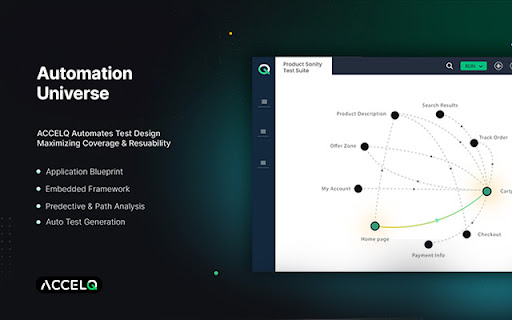
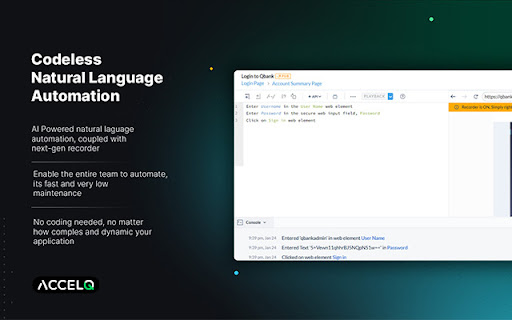
This extension is a specialized utility that records and captures web page views, including complex DOM structures, shadow DOMs, and nested frames. It allows QA professionals and developers to easily identify UI elements for building test automation logic. The captured metadata is seamlessly transferred into the ACCELQ ecosystem to streamline testing workflows.

Developer:ACCELQ
Version:5.0.2
Size:36.65MiB
Last updated:

Overview

Installs

10K+

Rating

4.9

28 reviews

Languages

1 locales

Includes English (United States)

Market analysis

Review-backed positioning, friction, and market signals for this Chrome extension.

Backed by review samples

Macro category

Developer & Designer Tools

Pricing friction

Moderate review signal

Complaint intensity

Low review signal

Listing & review signals
Observed signals from store listing text and review samples.

Listing positioning

The ACCELQ View Recorder is positioned as a companion tool that analyzes the DOM structure of web pages to enable automated web application testing. It is designed to work directly in conjunction with ACCELQ's subscription-based test automation platform. By capturing views, it aims to eliminate manual element identification, thereby saving time and reducing testing errors.

Inferred product pattern

Enterprise QA test automation companion extension for DOM structure extraction.

Review-backed pain points

The primary user-reported pain point is an occasional functional hiccup where the extension fails to capture the correct view on the first attempt, requiring the user to execute the capture command twice.

Observed feature gaps

While the extension handles deep DOM structures well, some review signals point to minor inconsistencies in capture reliability, suggesting a need for real-time validation or progress feedback during view capture.

Tags
Test AutomationDOM CaptureQA TestingView Recorder
Target users

- QA Automation Engineers

- Software Testers

- Software Developers

- ACCELQ Platform Subscribers

Primary use cases

- Capturing web page views and DOM structures for test automation

- Identifying web elements within shadow DOMs and frames

- Developing automated testing logic without manual element selector writing

Positive themes

- Seamless integration with the ACCELQ test automation suite

- Saves testing time by eliminating manual element identification

- Excellent capability to handle complex structures like frames and shadow DOMs

- Enables offline testing productivity by capturing DOMs for offline workflow design

Negative themes

- Occasional capture failures requiring a secondary capture attempt to register properly

Observed friction

- Payment required for meaningful usage

- Performance complaints detected

- No user complaints were found regarding pricing or subscription management, though the extension requires an active ACCELQ subscription to be useful.

Evidence boundary: Analysis is based on the official Chrome Web Store metadata, publisher descriptions from ACCELQ, and 10 detailed user reviews spanning 2018 to 2024. The review sample represents a small fraction of the total user base, and pricing-related feedback is limited due to the product being bundled with a broader enterprise subscription.
Complaint summaries
Review-backed complaint signals grouped by operational area.

Support

There are no complaints regarding customer support, account blocking, or refund processes in the analyzed reviews.

Reliability

A minor reliability complaint highlights that users occasionally need to trigger the capture action twice to successfully register the complete DOM view.

Privacy

No security, data leakage, or privacy concerns were reported by users.

Access & pricing

- Subscription model observed

- Login needed for core features

- Paid-only usage observed

Store listing facts

Listing assets

- Screenshots: 5

- Videos: 1

- Languages: 1

Trust signals

- Privacy policy

- Developer contact

- Official website

- Support link

Store metadata

- Version: 5.0.2

- Size: 36.65MiB

- Last updated:

Listing SEO keywords

Search intent keywords
Keyword signals for evaluating how users may discover, compare, or search for this extension category.

Core discovery

accelq view recorderdom capture chrome extensionqa test automation toolweb element recorder

Comparison

accelq vs selenium recorderaccelq smart capture vs cypress

Problem

how to record web elements for qaautomate shadow dom element identification

Alternative

selenium ide alternativekatalon recordertestim extension

Similar extensions

Jump to related discovery paths:

Screenshots

ACCELQ - View Recorder screenshot

Links

Recommended Chrome extensions

Related listings from the same category, trending peers, and the same publisher portfolio.

Browse developer
Cookie-Editor icon

Cookie-Editor

cgagnier

Simple yet powerful Cookie Editor that allow you to quickly create, edit and delete cookies without leaving your tab.

Installs

2.0M+

Rating

4.4

Chromebook Recovery Utility icon

Chromebook Recovery Utility

google.com

Create recovery media for your Chromebook.

Installs

2.0M+

Rating

2.6

CRXLauncher icon

CRXLauncher

CRXLauncher

Effortlessly Launch Chrome Extensions with CRXLauncher

Installs

1.0M+

Rating

4.6

Stylus icon

Stylus

stylus.openstyles

Redesign the web with Stylus, a user styles manager. Stylus allows you to easily install themes and skins for many popular sites.

Installs

1.0M+

Rating

4.5

SEOquake: On-Page SEO Checker icon

SEOquake: On-Page SEO Checker

SEOquake

Run page-level SEO audits, check technical issues, analyze links and keyword density, and view Semrush metrics.

Installs

1.0M+

Rating

4.5

Similarweb - Website Traffic, AI Traffic & SEO Checker icon

Similarweb - Website Traffic, AI Traffic & SEO Checker

Similarweb

Instant website analysis, AI traffic insights, and SEO metrics at your fingertips.

Installs

1.0M+

Rating

4.6

Eye Dropper icon

Eye Dropper

Eye Dropper

Pick colors from any website.

Installs

1.0M+

Rating

4.3

Lighthouse icon

Lighthouse

lighthouse-extension-owners

Lighthouse is an open-source, automated tool for improving the performance, quality, and correctness of your web apps.

Installs

1.0M+

Rating

4.4

Topaz SigPlusExtLite Extension icon

Topaz SigPlusExtLite Extension

Topaz Systems Inc

The Topaz SigPlusExtLite Chrome Extension enables users to capture signatures on a wide variety of Topaz signature pads.

Installs

1.0M+

Rating

4.0

Контур.Плагин icon

Контур.Плагин

kontur.extension

Расширение браузера, выполняющее криптографические операции в сервисах СКБ Контур

Installs

1.0M+

Rating

3.3