MyGlue Chrome Extension icon

MyGlue Chrome Extension Chrome Extension Analysis

Privacy, Security & Ad Blockers

Chrome extension ID: bfcdaalpeodhimbiipneeaoeogkkminc

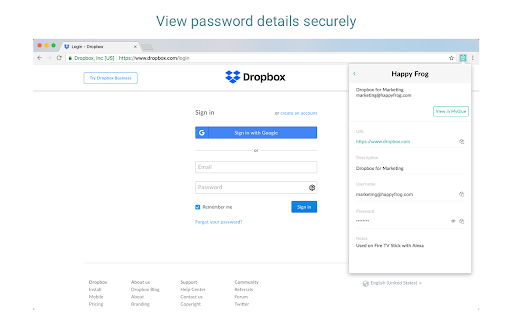
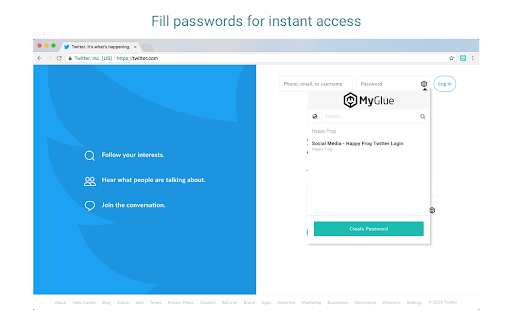
MyGlue Chrome Extension is a security tool designed to give users immediate access to their stored MyGlue passwords and assets. It provides autofill capabilities for login forms, options to create new personal or team-based passwords, and a quick-search utility inside the browser. It functions as a companion extension to the broader MyGlue enterprise platform.

Developer:IT Glue
Version:2.7.0
Size:2.62MiB
Last updated:

Overview

Installs

40K+

Rating

2.9

18 reviews

Languages

1 locales

Includes English

Market analysis

Review-backed positioning, friction, and market signals for this Chrome extension.

Backed by review samples

Macro category

Privacy, Security & Ad Blockers

Pricing friction

Moderate review signal

Complaint intensity

High review signal

Listing & review signals
Observed signals from store listing text and review samples.

Listing positioning

The store listing positions the MyGlue Chrome Extension as a secure and efficient way to access passwords, documents, and assets directly within Chrome. It highlights productivity benefits like eliminating the need to copy/paste credentials and switch pages. The extension emphasizes enterprise readiness with Single Sign-On (SSO) support and secure data encryption at rest and in transit.

Inferred product pattern

An enterprise-grade credential vault companion extension with notable layout-rendering and authentication flow issues.

Review-backed pain points

The most severe pain points stem from the extension failing to autofill credentials, forcing users to constantly copy and paste manually. Additionally, users experience a broken login flow where SSO authentication fails to persist, alongside invasive styling bugs where the extension injects global CSS that alters or breaks third-party website layouts.

Observed feature gaps

Reviewers highlight a key feature gap in the inability to edit or update existing passwords directly from the extension UI, which instead redirects them to the web portal. Users also note the absence of duplicate account flags and the lack of a manual matching tool to force autofill on unrecognized form fields.

Tags
Password ManagerCredential AutofillEnterprise Security
Target users

- Enterprise IT teams

- Corporate employees using MyGlue

- Organizations requiring shared password management

Primary use cases

- Autofilling credentials on website login pages

- Searching stored assets and passwords from any browser tab

- Creating and saving new team or personal passwords

Positive themes

- Saves significant workflow time when locating passwords

- Convenient quick search feature directly within the extension popup

Negative themes

- Autofill failing to recognize or populate fields on various web pages

- Single Sign-On (SSO) authentication loop issues that prevent logging into the extension

- Global CSS injection that overrides fonts and styles of unrelated websites

- Inability to edit or update passwords directly from the extension interface

- Extension causing login inputs or password boxes on third-party sites to disappear

Observed friction

- Payment required for meaningful usage

- Performance complaints detected

- No direct pricing complaints were observed, as the extension is utilized as a pre-paid enterprise utility linked to active MyGlue corporate subscriptions.

Evidence boundary: Based on the official MyGlue Chrome Web Store listing details and 10 detailed user reviews ranging from 2019 to 2025. The findings are limited to public listing data and a relatively small sample of 10 feedback items, which may lean heavily toward users experiencing critical bugs.
Complaint summaries
Review-backed complaint signals grouped by operational area.

Support

There are no direct mentions of customer support or refund disputes in the reviewed feedback.

Reliability

Reliability complaints are highly prevalent, with multiple users reporting that the extension regularly fails to autofill, enters infinite SSO login loops, and breaks target website layouts by injecting global CSS rules or rendering login input fields entirely invisible.

Privacy

While no explicit data leaks are noted, several technical users express security-adjacent frustrations regarding the extension injecting unregulated styles into the global scope of third-party websites.

Access & pricing

- Enterprise pricing observed

- Account required for core usage

- Paid-only usage observed

Store listing facts

Listing assets

- Screenshots: 2

- Videos: 0

- Languages: 1

Trust signals

- Privacy policy

- Developer contact

- Support link

Store metadata

- Version: 2.7.0

- Size: 2.62MiB

- Last updated:

Listing SEO keywords

Search intent keywords
Keyword signals for evaluating how users may discover, compare, or search for this extension category.

Core discovery

myglue chrome extensionmyglue password managerit glue extensionmyglue login autofill

Comparison

myglue vs lastpassmyglue vs chrome password manager

Problem

myglue sso login loopmyglue extension not autofillingmyglue css inject bugmyglue password disappearing

Alternative

lastpassit glue1password

Similar extensions

Jump to related discovery paths:

Screenshots

MyGlue Chrome Extension screenshot

Links

Recommended Chrome extensions

Related listings from the same category, trending peers, and the same publisher portfolio.

Browse workflow