WebWatch - Browser Screen Time icon

WebWatch Chrome Extension Analysis

Automation & Workflow Efficiency

Store listing title: WebWatch - Browser Screen Time

Chrome extension ID: bimcdfieepjcmljimkmmnaodpcoikepi

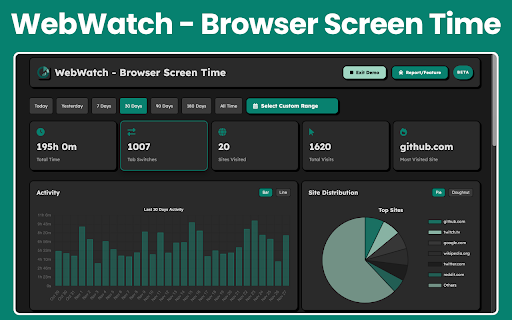
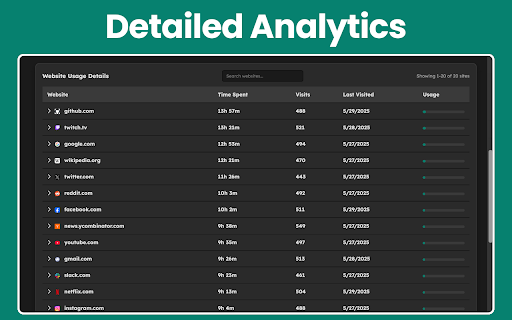
WebWatch is a Chrome extension that tracks time spent on websites and visualizes browsing patterns through an interactive dashboard that replaces the browser's new tab page. It features site categorization, visit counting, and historical data filtering without requiring external accounts.

Developer:Krishna Rathore
Version:1.0
Size:386KiB
Last updated:

Overview

Installs

5

Rating

0 reviews

Languages

1 locales

Includes English

Market analysis

Review-backed positioning, friction, and market signals for this Chrome extension.

No review samples found

Macro category

Automation & Workflow Efficiency

Pricing friction

Low review signal

Complaint intensity

Low review signal

Listing & review signals
Observed signals from store listing text and review samples.

Listing positioning

WebWatch positions itself as a privacy-focused, local-only tool for tracking browser usage habits. It highlights detailed analytics and visualization capabilities to help users understand and optimize their digital life.

Inferred product pattern

Local-first browser productivity dashboard and analytics tracker.

Review-backed pain points

Review-backed data is not available.

Observed feature gaps

Review-backed data is not available.

Tags
Screen Time TrackerDigital WellnessProductivityWeb AnalyticsNew Tab Dashboard
Target users

- Professionals

- Students

- Digital Wellness Seekers

- Data Enthusiasts

Primary use cases

- Monitoring work-life balance

- Tracking study vs. leisure time

- Analyzing browsing habits

- Building digital wellness habits

Positive themes

No positive theme data.

Negative themes

No negative theme data.

Observed friction

- Review-backed data is not available; listing implies a free, local-only utility.

Evidence boundary: Evidence is derived exclusively from the Chrome Web Store listing details as no user reviews are available. The lack of public reviews limits insight into real-world performance, bug prevalence, and user sentiment.
Complaint summaries
Review-backed complaint signals grouped by operational area.

Support

Review-backed data is not available.

Reliability

Review-backed data is not available.

Privacy

Review-backed data is not available.

Access & pricing

- Free usage observed

- No account requirement observed

- Free plan or free usage claimed

Store listing facts

Listing assets

- Screenshots: 2

- Videos: 0

- Languages: 1

Trust signals

- Developer contact

- Official website

Store metadata

- Version: 1.0

- Size: 386KiB

- Last updated:

Listing SEO keywords

Search intent keywords
Keyword signals for evaluating how users may discover, compare, or search for this extension category.

Core discovery

browser screen time trackerchrome usage monitorweb activity analyzernew tab productivity extension

Comparison

WebWatch vs RescueTimeChrome screen time extension alternatives

Problem

how to track website timemonitor browser habitsreduce digital distraction

Alternative

WebTime TrackerBrowser habits extension

Similar extensions

Jump to related discovery paths:

Screenshots

WebWatch - Browser Screen Time screenshot

Links

Website: bojita.com

Recommended Chrome extensions

Related listings from the same category, trending peers, and the same publisher portfolio.

Browse workflow