SubPIP (Picture-in-Picture) icon

SubPIP (Picture-in-Picture) Chrome Extension Analysis

Video & Image Downloaders

Chrome extension ID: cajeijlommigmipnnhemgopednbpmnjg

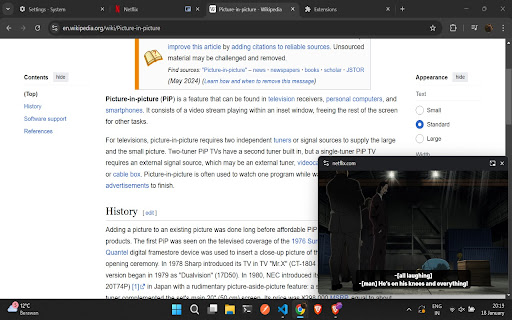
SubPIP is a browser extension that enables subtitle rendering within a floating Picture-in-Picture (PiP) window. It is designed to allow users to watch streaming content while multitasking without losing accessibility or dialogue context.

Developer:tmonga2208
Version:3.2
Size:36.53KiB
Last updated:

Overview

Installs

930

Rating

3.8

15 reviews

Languages

1 locales

Includes English (United States)

Market analysis

Review-backed positioning, friction, and market signals for this Chrome extension.

Backed by review samples

Macro category

Video & Image Downloaders

Pricing friction

Low review signal

Complaint intensity

Moderate review signal

Listing & review signals
Observed signals from store listing text and review samples.

Listing positioning

SubPIP positions itself as a specialized utility to bridge the gap between standard browser Picture-in-Picture mode and the need for visible subtitles. It emphasizes compatibility with major streaming platforms like Netflix and YouTube.

Inferred product pattern

Utility overlay extension enhancing native browser media capabilities.

Review-backed pain points

Users struggle with inconsistent site support (JWPlayer, Disney+) and UI issues such as the loss of aspect ratio when resizing the PiP window.

Observed feature gaps

The extension lacks support for a wide range of third-party video players and experiences technical instability regarding seek bars and window resizing logic.

Tags
Picture In PictureSubtitlesNetflixYouTubeBrowser Extension
Target users

- Streaming enthusiasts

- Multitaskers

- Users requiring subtitles for accessibility

Primary use cases

- Watching Netflix or YouTube in a detached window

- Viewing content with active subtitles while using other browser tabs

Positive themes

- Successfully adds subtitles to PiP mode

- High satisfaction for core Netflix and YouTube functionality

- Simple and non-intrusive design

Negative themes

- Incompatibility with specific video players like JWPlayer

- Feature failure on Disney+

- Lack of aspect ratio preservation when resizing the window

Observed friction

- Performance complaints detected

- None observed; the extension is presented without explicit mention of paid tiers in user reviews or store text.

Evidence boundary: Evidence is drawn from 10 user reviews and the developer-provided store listing detailing current site compatibility and known issues. Review volume is relatively low, and reports of breakage on specific sites like Disney+ or JWPlayer may be subject to platform-side code changes that affect the extension's script.
Complaint summaries
Review-backed complaint signals grouped by operational area.

Support

No specific complaints regarding support response times, though users express dissatisfaction with the development pace regarding new site compatibility.

Reliability

Users report inconsistent performance across different streaming sites and technical bugs related to UI rendering during resizing.

Privacy

No privacy-related complaints found.

Access & pricing

- No clear monetization signal

- No account requirement observed

- Free plan or free usage claimed

Store listing facts

Listing assets

- Screenshots: 1

- Videos: 0

- Languages: 1

Trust signals

- Privacy policy

- Developer contact

- Official website

Store metadata

- Version: 3.2

- Size: 36.53KiB

- Last updated:

Listing SEO keywords

Search intent keywords
Keyword signals for evaluating how users may discover, compare, or search for this extension category.

Core discovery

Picture in Picture with subtitlesChrome extension for Netflix subtitlesPiP mode subtitle viewerYouTube PiP with captions

Comparison

SubPIP vs native browser PiPbest subtitle extension for PiP

Problem

subtitles not showing in PiPDisney Plus PiP not workingJWPlayer subtitle support

Alternative

browser extension for floating video

Similar extensions

Jump to related discovery paths:

Screenshots

SubPIP (Picture-in-Picture) screenshot

Links

Recommended Chrome extensions

Related listings from the same category, trending peers, and the same publisher portfolio.

Browse entertainment