JSON Formatter icon

JSON Formatter Chrome Extension Analysis

Developer & Designer Tools

Chrome extension ID: cfaihfocdnniaholfnjcemnfhcjchohb

This extension is a lightweight and open-source JSON viewer that automatically formats raw JSON data into a structured, readable hierarchy. It provides developers with essential tools like dark mode and custom font configurations to ease local API debugging.

Developer:Jumkey
Version:0.7.0
Size:28.31KiB
Last updated:

Overview

Installs

9K+

Rating

4.5

23 reviews

Languages

2 locales

Includes English, 中文(中国)

Market analysis

Review-backed positioning, friction, and market signals for this Chrome extension.

Backed by review samples

Macro category

Developer & Designer Tools

Pricing friction

Low review signal

Complaint intensity

Moderate review signal

Listing & review signals
Observed signals from store listing text and review samples.

Listing positioning

The store listing positions this extension as an open-source, developer-focused utility designed to make raw JSON highly readable in the browser. It builds upon a popular existing formatter by adding features like forcing application/json content-type actions, custom font settings, a dark mode, and a fix for JSONP bugs.

Inferred product pattern

A client-side utility that intercepts and reformats JSON responses rendered in the active browser tab.

Review-backed pain points

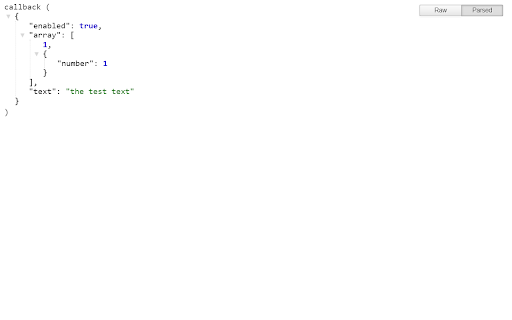
A major pain point highlighted by users is a parser issue where JSON documents containing unquoted boolean values (e.g., 'enabled': true) fail to format entirely. Additionally, visual regressions have occurred in newer versions of Chrome's native dark mode, blacking out the screen render.

Observed feature gaps

Based on user feedback, the extension lacks robust parsing support for standard boolean primitive types under certain conditions, and lacks an adaptable theme engine that plays well with Chrome's native developer tool dark mode updates.

Tags
JSON FormatterDeveloper ToolsJSON ViewerOpen Source
Target users

- Web Developers

- API Engineers

- Computer Science Students

Primary use cases

- Formatting raw JSON API payloads directly in Chrome

- Debugging JSONP requests

- Reading local or served JSON files with custom dark themes

Positive themes

- Fast and simple user experience compared to bloated alternatives

- Highly helpful for beginners learning to work with servers and JSON structures

- Works reliably without issues for general formatting tasks

Negative themes

- Failure to format files containing specific boolean types like true/false values

- Rendering issues in newer Chrome dark mode versions where the page turns completely black

- Occasional reports of the extension failing to load or format on certain pages

Observed friction

- No pricing friction. The product is entirely open-source and free, with no paywalls or upgrade prompts mentioned.

Evidence boundary: Analysis is based on public store listing parameters, including open-source repository documentation, alongside a sample of user reviews dating from 2017 to 2022. The dataset features a small historical review sample size of 7 detailed reviews, which may not capture recent minor patches or current compatibility changes.
Complaint summaries
Review-backed complaint signals grouped by operational area.

Support

No complaints regarding customer support, account creation, or refunds were found in the public reviews.

Reliability

Users reported some reliability issues, specifically that the tool fails to format completely when boolean elements are present, and experiences occasional visual rendering bugs on newer browser versions.

Privacy

No privacy or security concerns were flagged in the user reviews.

Access & pricing

- Free usage observed

- No account requirement observed

- Free plan or free usage claimed

Store listing facts

Listing assets

- Screenshots: 2

- Videos: 0

- Languages: 2

Trust signals

- Privacy policy

- Developer contact

- Official website

- Support link

Store metadata

- Version: 0.7.0

- Size: 28.31KiB

- Last updated:

Listing SEO keywords

Search intent keywords
Keyword signals for evaluating how users may discover, compare, or search for this extension category.

Core discovery

json formatter chromeopen source json viewerpretty print json chrome

Comparison

json formatter vs jsonview

Problem

how to read raw json in browserchrome json not formatting

Alternative

jsonviewjson parser chrome extension

Similar extensions

Jump to related discovery paths:

Screenshots

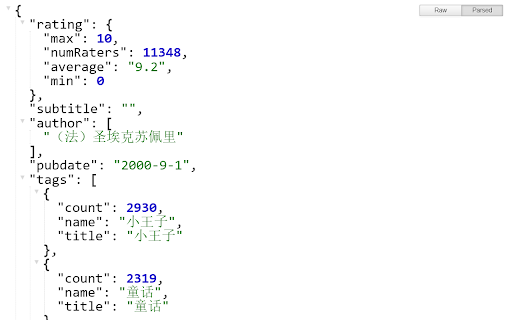
JSON Formatter screenshot

Links

Recommended Chrome extensions

Related listings from the same category, trending peers, and the same publisher portfolio.

Browse developer