Youtube Shorts AutoScroll icon

Youtube Shorts AutoScroll Chrome Extension Analysis

Automation & Workflow Efficiency

Chrome extension ID: cfalfdakejchchmgepmoloojdclhcmif

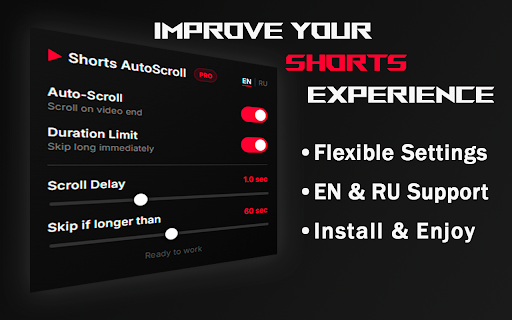
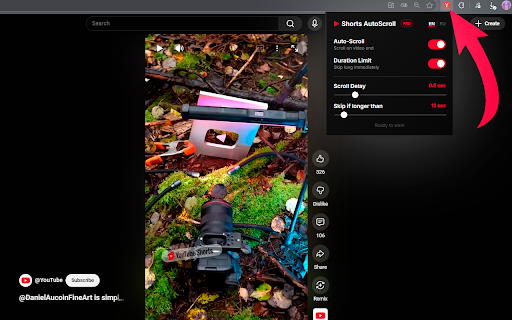
Youtube Shorts AutoScroll is a free browser extension that automates the playback of YouTube Shorts. It allows users to automatically scroll to the next video when the current one ends and to skip videos that exceed a specified maximum duration. The tool provides options for setting scroll delays and supports both English and Russian interfaces.

Developer:MDOR
Version:1.2.6
Size:1.51MiB
Last updated:

Overview

Installs

1K+

Rating

4.3

6 reviews

Languages

2 locales

Includes English, русский

Market analysis

Review-backed positioning, friction, and market signals for this Chrome extension.

Backed by review samples

Macro category

Automation & Workflow Efficiency

Pricing friction

Low review signal

Complaint intensity

Low review signal

Listing & review signals
Observed signals from store listing text and review samples.

Listing positioning

The Chrome extension positions itself as a 'completely free' auto-scroller for YouTube Shorts, designed to enhance the viewing experience. It emphasizes features like automatic scrolling upon video completion, skipping videos longer than a user-defined duration, and customizable delays. The listing also highlights its privacy-focused local operation.

Inferred product pattern

A utility extension designed to enhance the user experience on a specific content platform (YouTube Shorts) by automating repetitive actions and offering basic content filtering.

Review-backed pain points

Review-backed pain points are not available due to the limited number of reviews and their uniformly positive sentiment.

Observed feature gaps

Based on the listing and the very limited number of reviews, no specific feature gaps are explicitly observed or requested. All listed features appear to be functioning as described based on user ratings.

Tags
YouTube ShortsAuto ScrollVideo SkipperProductivity ToolContent Automation
Target users

- Frequent YouTube Shorts viewers

- Users seeking passive content consumption experiences

- Individuals aiming to manage or streamline their Shorts viewing

- Users who find manually scrolling repetitive

Primary use cases

- Automating navigation between YouTube Shorts videos

- Filtering out longer YouTube Shorts content

- Enhancing hands-free or background viewing of Shorts

Positive themes

- Improved focus and attention management (e.g., 'ADHD Manager')

- General satisfaction with the automation functionality

Negative themes

- Review-backed negative themes are not available due to the limited number of uniformly positive reviews.

Observed friction

- The listing explicitly states the extension is 'completely free' in its long description. While the short description mentions 'Premium Auto-Scroller,' this term does not seem to indicate a paid model, and no pricing friction is observed in reviews or other listing details.

Evidence boundary: Analyzed the Chrome Web Store listing, including the title, short and long descriptions, and two 5-star user reviews. Only two reviews were available, both 5-star, which severely limits insights into potential issues, feature requests, or a broader range of user sentiments. A minor contradiction between the short description's 'Premium' claim and the long description's 'completely free' statement was noted but resolved based on contextual evidence.
Complaint summaries
Review-backed complaint signals grouped by operational area.

Support

Support, account, or refund complaints are not available from the provided reviews.

Reliability

Reliability or performance complaints are not available from the provided reviews.

Privacy

Privacy or security complaints are not available. The listing explicitly states that the extension works locally and does not collect, store, or send user data.

Access & pricing

- Free usage observed

- No account requirement observed

- Free plan or free usage claimed

Store listing facts

Listing assets

- Screenshots: 2

- Videos: 0

- Languages: 2

Trust signals

- Privacy policy

- Developer contact

Store metadata

- Version: 1.2.6

- Size: 1.51MiB

- Last updated:

Listing SEO keywords

Search intent keywords
Keyword signals for evaluating how users may discover, compare, or search for this extension category.

Core discovery

youtube shorts auto scrollyoutube shorts skip videoyoutube shorts automationshorts viewing productivity

Comparison

youtube shorts enhanced playeryoutube shorts ad blocker for long videos

Problem

youtube shorts endless scrollingyoutube shorts too longyoutube shorts distraction management

Alternative

youtube shorts manual control alternativesshorts viewing tools

Similar extensions

Jump to related discovery paths:

Screenshots

Youtube Shorts AutoScroll screenshot

Links

Recommended Chrome extensions

Related listings from the same category, trending peers, and the same publisher portfolio.

Browse social