Text Saver icon

Text Saver Chrome Extension Analysis

Automation & Workflow Efficiency

Chrome extension ID: cildcemgcinmbcblfgnnhceclempmdle

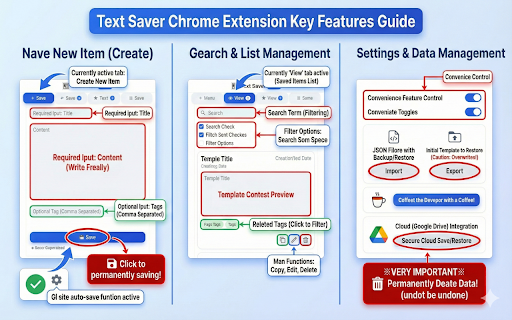
Text Saver is a browser extension that allows users to save, organize, and quickly insert text snippets into web input fields. It features a side panel for management, context menu integration for saving selected text, and keyboard shortcuts for rapid access.

Developer:ooak.studio.101
Version:3.0
Size:85.0KiB
Last updated:

Overview

Installs

19

Rating

5.0

4 reviews

Languages

2 locales

Includes English, 한국어

Market analysis

Review-backed positioning, friction, and market signals for this Chrome extension.

Backed by review samples

Macro category

Automation & Workflow Efficiency

Pricing friction

Low review signal

Complaint intensity

Low review signal

Listing & review signals
Observed signals from store listing text and review samples.

Listing positioning

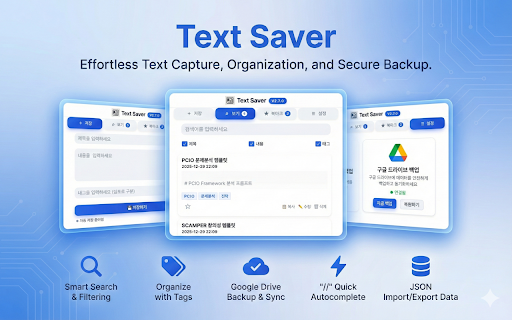
Text Saver positions itself as a productivity tool for storing and retrieving frequently used text snippets, templates, and prompts. It emphasizes a seamless workflow integration via a '//' trigger for quick search and insertion, alongside robust backup options like Google Drive.

Inferred product pattern

Local-first productivity utility with optional cloud-sync capabilities.

Review-backed pain points

Review-backed data is not available as all captured reviews are positive.

Observed feature gaps

None observed from provided data.

Tags
Clipboard ManagerProductivityText SnippetsKeyboard ShortcutAutomation
Target users

- Content Creators

- Customer Support Agents

- Developers

- Email Power Users

Primary use cases

- Inserting frequently used canned responses

- Managing AI prompt templates

- Saving code snippets

- Organizing checklists

Positive themes

- High utility for content reuse

- Strong appreciation for free access

- Positive reception of core functionality

Negative themes

No negative theme data.

Observed friction

- None. Users report the tool is free.

Evidence boundary: Data is based on store listing specifications and 4 user reviews, all of which are highly positive. The sample size is small, and there is a lack of negative feedback or reported issues, which may not represent all user experiences.
Complaint summaries
Review-backed complaint signals grouped by operational area.

Support

No support complaints identified.

Reliability

No reliability complaints identified.

Privacy

No privacy complaints identified; the extension emphasizes local storage with optional Google Drive backup.

Access & pricing

- Free usage observed

- No account requirement observed

- Free plan or free usage claimed

Store listing facts

Listing assets

- Screenshots: 2

- Videos: 0

- Languages: 2

Trust signals

- Privacy policy

- Developer contact

Store metadata

- Version: 3.0

- Size: 85.0KiB

- Last updated:

Listing SEO keywords

Search intent keywords
Keyword signals for evaluating how users may discover, compare, or search for this extension category.

Core discovery

text snippet managerchrome text expandersave text snippetsproductivity extensionclipboard manager

Comparison

Text Expander alternativessnippet tool vs clipboard manager

Problem

repetitive typingsave frequently used textslow typing workflow

Alternative

Alfred snippetsTextExpanderPhraseExpress

Similar extensions

Jump to related discovery paths:

Screenshots

Text Saver screenshot

Links

Recommended Chrome extensions

Related listings from the same category, trending peers, and the same publisher portfolio.

Browse tools