Audio Equalizer icon

Audio Equalizer Chrome Extension Analysis

Niche Lifestyle & Gaming Hacks

Chrome extension ID: cjadmgobonfhilogbdgkkhnoojpgenfg

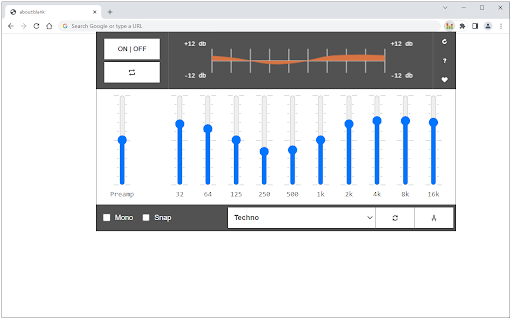
Audio Equalizer is a Chrome extension that allows users to manipulate audio output in the browser. It features a variety of presets, custom profile saving, a dark mode interface, and a Mono audio toggle for accessibility.

Developer:Muyor
Version:0.2.1
Size:34.54KiB
Last updated:

Overview

Installs

40K+

Rating

4.3

189 reviews

Languages

1 locales

Includes English

Market analysis

Review-backed positioning, friction, and market signals for this Chrome extension.

Backed by review samples

Macro category

Niche Lifestyle & Gaming Hacks

Pricing friction

Low review signal

Complaint intensity

Moderate review signal

Listing & review signals
Observed signals from store listing text and review samples.

Listing positioning

The product positions itself as a lite and stylish utility for adjusting audio frequency components directly from the browser toolbar. It emphasizes ease of use through presets and a specific accessibility feature for hearing impaired users.

Inferred product pattern

Browser-based audio DSP utility with built-in accessibility features.

Review-backed pain points

Users report high resource usage that impacts system performance, the extension occasionally stopping work and requiring a manual reload from the manager, and a lack of support for some audio sources.

Observed feature gaps

Lack of precise numerical dB controls for parameters and a desire for more aggressive bass/treble effects.

Tags
Audio EqualizerSound ControllerAudio PresetsAccessibility ToolBrowser Utility
Target users

- Audiophiles

- Podcast listeners

- Users with hearing impairments

- General web users seeking sound customization

Primary use cases

- Removing excess bass from podcasts for clearer dialogue

- Applying music-specific presets (pop, club, dance)

- Converting stereo audio to mono for one-ear hearing

- Saving custom sound profiles across tabs

Positive themes

- Ability to save custom audio profiles

- Consistency across different browser tabs

- Clean audio quality without pops or hisses

- Effective bass reduction for spoken word content

Negative themes

- High CPU and RAM consumption

- Instability requiring the extension to be re-enabled

- Compatibility issues with certain sites like Spotify

- Initial setup confusion

Observed friction

- Performance complaints detected

- No pricing friction observed; product appears to be free.

Evidence boundary: Extracted from the official store listing and a set of representative helpful reviews in English, Spanish, German, and Chinese. Analysis is based on a small sample of reviews relative to the total user base.
Complaint summaries
Review-backed complaint signals grouped by operational area.

Support

No direct support complaints observed; developer provides a bug report form on their website.

Reliability

Reports of the extension becoming inactive, causing video site bugs, or failing to affect audio on certain websites.

Privacy

No direct privacy complaints, though one user expressed suspicion regarding high resource usage.

Access & pricing

- Free usage observed

- No account requirement observed

- Free plan or free usage claimed

Store listing facts

Listing assets

- Screenshots: 1

- Videos: 1

- Languages: 1

Trust signals

- Developer contact

- Official website

Store metadata

- Version: 0.2.1

- Size: 34.54KiB

- Last updated:

Listing SEO keywords

Search intent keywords
Keyword signals for evaluating how users may discover, compare, or search for this extension category.

Core discovery

Chrome audio equalizerbrowser sound controllerweb audio presetsmono audio extension

Comparison

best chrome equalizeraudio equalizer vs sound booster

Problem

too much bass in podcastsbrowser audio qualityhearing impairment audio tool

Alternative

audio equalizer alternativechrome sound manager

Similar extensions

Jump to related discovery paths:

Screenshots

Audio Equalizer screenshot

Links

Website: mybrowseraddon.com

Videos: Watch

Recommended Chrome extensions

Related listings from the same category, trending peers, and the same publisher portfolio.

Browse tools