OmniDebugger icon

OmniDebugger Chrome Extension Analysis

Developer & Designer Tools

Chrome extension ID: dacnjmplfigjjgoildhjcpopebbcfmhp

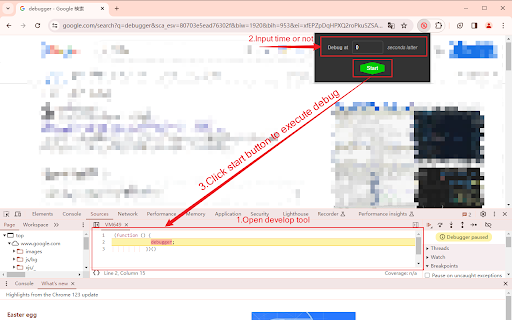
OmniDebugger is a Chrome extension that provides debugging capabilities for web pages. It allows users to pause JavaScript execution at specific points to facilitate troubleshooting and problem-solving, integrating with Chrome Developer Tools.

Developer:Seiri
Version:1.0.1
Size:36.91KiB
Last updated:

Overview

Installs

16

Rating

0 reviews

Languages

54 locales

Includes Deutsch, English, English (United Kingdom), English (United States)...

Market analysis

Review-backed positioning, friction, and market signals for this Chrome extension.

No review samples found

Macro category

Developer & Designer Tools

Pricing friction

Low review signal

Complaint intensity

Low review signal

Listing & review signals
Observed signals from store listing text and review samples.

Listing positioning

OmniDebugger is positioned as a powerful and simple-to-use Chrome extension designed for debugging any browser page, whether online or local. It emphasizes its core capability of delayed JavaScript execution to simplify problem location and resolution.

Inferred product pattern

A specialized Chrome extension augmenting the browser's built-in developer tools with specific debugging functionalities, primarily focused on JavaScript execution control.

Review-backed pain points

Review-backed data is not available.

Observed feature gaps

Review-backed data is not available. Based on the listing, a potential gap could be advanced network debugging, element inspection enhancements beyond basic JS debugging, or integration with specific IDEs.

Tags
Chrome DebuggerJavaScript DebuggingWeb Developer Tool
Target users

- Web Developers

- Software Developers

- Front-End Developers

- QAs / Testers

Primary use cases

- Debugging JavaScript on web pages

- Troubleshooting issues on online or local web pages

- Pausing JavaScript execution for detailed inspection

Positive themes

No positive theme data.

Negative themes

No negative theme data.

Observed friction

- Review-backed data is not available, and the listing does not mention pricing.

Evidence boundary: The analysis relies on the Chrome Web Store listing, including the title, short description, and long description. The product has a low user count (16 users) and no public reviews or comments, limiting insights into user experience, feature satisfaction, and pain points.
Complaint summaries
Review-backed complaint signals grouped by operational area.

Support

Review-backed data is not available.

Reliability

Review-backed data is not available.

Privacy

Review-backed data is not available.

Access & pricing

- No clear monetization signal

- No account requirement observed

- No clear pricing signal

Store listing facts

Listing assets

- Screenshots: 1

- Videos: 0

- Languages: 54

Trust signals

- Privacy policy

- Developer contact

- Official website

Store metadata

- Version: 1.0.1

- Size: 36.91KiB

- Last updated:

Listing SEO keywords

Search intent keywords
Keyword signals for evaluating how users may discover, compare, or search for this extension category.

Core discovery

chrome extension debuggerjavascript debugger chromeweb page debugging toolpause javascript execution chromelocal page debugger

Comparison

OmniDebugger vs Chrome DevToolsOmniDebugger vs JavaScript debuggersOmniDebugger alternative

Problem

how to debug javascript in chrometroubleshoot web page issuespause js execution chromedebug local html file

Alternative

chrome extension for javascript debuggingweb developer debugger toolsjs debugger alternative

Similar extensions

Jump to related discovery paths:

Screenshots

OmniDebugger screenshot

Links

Recommended Chrome extensions

Related listings from the same category, trending peers, and the same publisher portfolio.

Browse developer