Super Post Saver – Smart Bookmark Tool for LinkedIn™ Posts icon

Super Post Saver Chrome Extension Analysis

Social Media Growth & Marketing

Store listing title: Super Post Saver – Smart Bookmark Tool for LinkedIn™ Posts

Chrome extension ID: dcmjbhijkglccpmikedhjnjgaicbkpeo

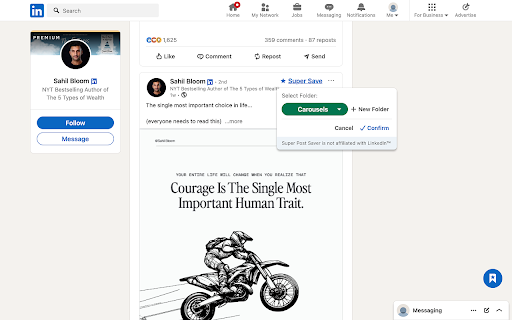
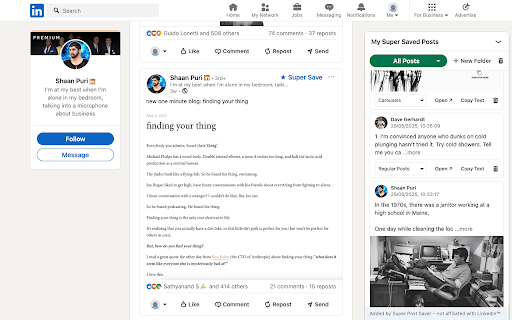
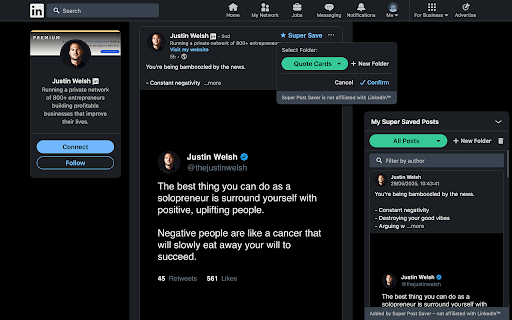
Super Post Saver is a Chrome extension that allows users to save LinkedIn posts into customized, searchable folders. It provides a clean UI for organizing content inspiration, such as carousels and quotes, directly within the browser.

Version:0.10.5
Size:36.58KiB
Last updated:

Overview

Installs

168

Rating

★ 4.2

13 reviews

Languages

1 locales

Includes English

Market analysis

Review-backed positioning, friction, and market signals for this Chrome extension.

Backed by review samples

Macro category

Social Media Growth & Marketing

Pricing friction

Low review signal

Complaint intensity

Moderate review signal

Listing & review signals
Observed signals from store listing text and review samples.

Listing positioning

The product positions itself as a structured alternative to LinkedIn's native 'Save' feature, specifically designed for creators rather than casual users. It emphasizes privacy-first, local-only storage to differentiate itself from tools that require logins or data scraping.

Inferred product pattern

A niche, privacy-centric productivity tool that solves the organizational limitations of LinkedIn's native bookmarking system for professional creators.

Review-backed pain points

Users report that the 'Super Save' button occasionally fails to appear, requiring page reloads, and some find the interface for creating/accessing custom folders non-intuitive.

Observed feature gaps

Users have requested the ability to sort saved posts by the specific creators or accounts they follow.

Tags
LinkedIn ToolContent CurationBookmark ManagerCreator Productivity
Target users

- Content Creators

- Social Media Marketers

- Personal Brand Builders

Primary use cases

- Building content swipe files

- Organizing LinkedIn post inspiration

- Tracking industry trends and formats

Positive themes

- Significant time savings compared to manual organization

- Effective replacement for Notion or Google Sheets for LinkedIn curation

- Ease of creating custom folders

Negative themes

- Inconsistent extension loading and button visibility

- UX confusion regarding folder management and access

Observed friction

- Performance complaints detected

- No pricing friction observed in the provided data.

Evidence boundary: Analysis based on the official Chrome Web Store description and 10 user reviews. The review sample size is small, which may not reflect the full distribution of technical issues or user sentiment.
Complaint summaries
Review-backed complaint signals grouped by operational area.

Support

No support complaints observed.

Reliability

Users reported intermittent issues where the extension fails to load or the 'Super Save' button does not appear without a page refresh.

Privacy

No privacy complaints observed; the listing emphasizes that all data is stored locally via chrome.storage.local.

Access & pricing

- No clear monetization signal

- No account requirement observed

- No clear pricing signal

Store listing facts

Listing assets

- Screenshots: 3

- Videos: 0

- Languages: 1

Trust signals

- Privacy policy

- Developer contact

Store metadata

- Version: 0.10.5

- Size: 36.58KiB

- Last updated:

Listing SEO keywords

Search intent keywords
Keyword signals for evaluating how users may discover, compare, or search for this extension category.

Core discovery

LinkedIn post saverLinkedIn bookmark managerorganize LinkedIn postsLinkedIn content curation

Comparison

LinkedIn save vs Super Post SaverLinkedIn organization tool vs Notion

Problem

disorganized LinkedIn postsLinkedIn bookmarking limitationscannot organize LinkedIn saves

Alternative

LinkedIn swipe file toolsocial media content organizerLinkedIn inspiration manager

Similar extensions

Jump to related discovery paths:

Screenshots

Super Post Saver – Smart Bookmark Tool for LinkedIn™ Posts screenshot

Links

Recommended Chrome extensions

Related listings from the same category, trending peers, and the same publisher portfolio.

Browse communication
ResumeMaker.Online Companion icon

ResumeMaker.Online Companion

Super Post Saver - Bookmark Tool

Save jobs and prefill application forms with a resume selected from ResumeMaker.Online.

Installs

6

Rating

★ —

WA-Sender icon

WA-Sender

what-sender.com

Optimize customer loyalty and capture new audience by sending personalized messages through WhatsApp.

Installs

100K+

Rating

★ 4.0

TWP - Translate Web Pages icon

TWP - Translate Web Pages

Filipe Dev

Translate your page in real time using Google or Yandex.

Installs

100K+

Rating

★ 4.8

MailTracker: Email tracker for Gmail icon

MailTracker: Email tracker for Gmail

MailTracker

Track if your emails are opened & how many times. Be notified when your emails are read with our advanced Email Tracking extension.

Installs

100K+

Rating

★ 4.7

Gmail™ Email Templates by cloudHQ icon

Gmail™ Email Templates by cloudHQ

cloudHQ

Beautiful email templates for Gmail. Design your templates or import templates from Mailchimp. With team sharing!

Installs

100K+

Rating

★ 4.2

InstaText icon

InstaText

InstaText

Write like a native speaker.

Installs

100K+

Rating

★ 4.5

Mailvelope - Secure your email with PGP icon

Mailvelope - Secure your email with PGP

Mailvelope GmbH

Protect your email conversations and attachments on Gmail, Nextcloud, Outlook & more with PGP and end-to-end encryption.

Installs

100K+

Rating

★ 4.4

Ddict: AI Translation & Writing Assistant icon

Ddict: AI Translation & Writing Assistant

Ddo

Translate text and enhance writing with AI for seamless language learning and communication in your browser.

Installs

100K+

Rating

★ 4.2

Outlook Classroom Email icon

Outlook Classroom Email

Clay

Redirect Google Classroom Emails to Outlook.

Installs

100K+

Rating

★ —

HyperWrite: AI Writing Assistant and Autocomplete App icon

HyperWrite: AI Writing Assistant and Autocomplete App

Otherside AI

Smart autocomplete for Gmail, Google Docs, ChatGPT, and more. An AI writing assistant that predicts words and sentences.

Installs

90K+

Rating

★ 4.3