testRigor’s Test Case Recorder icon

testRigor’s Test Case Recorder Chrome Extension Analysis

Developer & Designer Tools

Chrome extension ID: deoegoebpjdcbfmecfjfdihkoncjfmfd

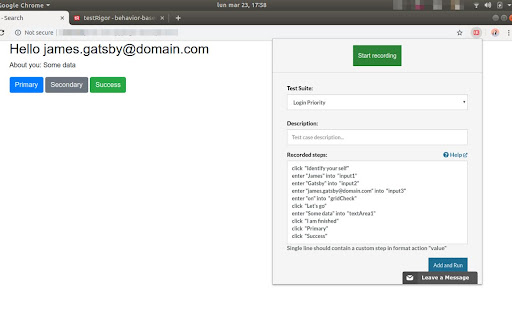
A Chrome extension designed to record web interactions and automatically generate human-readable test steps. It is intended to facilitate test automation without requiring technical coding expertise.

Developer:testRigor
Version:1.18
Size:82.58KiB
Last updated:

Overview

Installs

5K+

Rating

4.3

10 reviews

Languages

1 locales

Includes English

Market analysis

Review-backed positioning, friction, and market signals for this Chrome extension.

Backed by review samples

Macro category

Developer & Designer Tools

Pricing friction

Low review signal

Complaint intensity

Moderate review signal

Listing & review signals
Observed signals from store listing text and review samples.

Listing positioning

The product positions itself as a tool to capture test cases in plain English by recording browser interactions. It emphasizes ultra-stability by eliminating reliance on XPath and aims to simplify testing standards.

Inferred product pattern

A no-code utility that bridges browser interactions with a plain-English test automation platform.

Review-backed pain points

Users reported that the 'Start Recording' button fails to respond and the recording window does not appear, possibly due to Chrome version updates.

Observed feature gaps

No specific feature gaps identified from the provided data.

Tags
Test AutomationQA ToolNo-Code TestingTest Recorder
Target users

- QA Engineers

- Software Testers

- Developers

- Non-technical testers

Primary use cases

- Automated test case generation

- Converting browser activities into plain English steps

- Automating tests for complex web applications like Salesforce

Positive themes

- Intuitive and easy-to-use interface

- Stability of generated test cases

- Effective conversion of actions to human-friendly descriptions

Negative themes

- Functional failure of the recording mechanism

- UI responsiveness issues

Observed friction

- Performance complaints detected

- No pricing friction mentioned in the provided data.

Evidence boundary: Data extracted from the Chrome Web Store listing and a collection of user reviews covering positive usability and functional bugs. The review sample size is small, which may not reflect the full user sentiment or long-term reliability.
Complaint summaries
Review-backed complaint signals grouped by operational area.

Support

No support complaints observed.

Reliability

Users experienced issues where the extension failed to initiate recording or display the necessary recording window.

Privacy

No privacy complaints observed.

Access & pricing

- No clear monetization signal

- No clear access signal

- No clear pricing signal

Store listing facts

Listing assets

- Screenshots: 1

- Videos: 0

- Languages: 1

Trust signals

- Developer contact

Store metadata

- Version: 1.18

- Size: 82.58KiB

- Last updated:

Listing SEO keywords

Search intent keywords
Keyword signals for evaluating how users may discover, compare, or search for this extension category.

Core discovery

test case recorderautomated testing extensionno-code test automationplain English test cases

Comparison

XPath alternativeSelenium alternative

Problem

manual test creationcomplex test automationXPath maintenance

Alternative

browser automation toolsQA recording software

Similar extensions

Jump to related discovery paths:

Screenshots

testRigor’s Test Case Recorder screenshot