Markify — PDF to Markdown icon

Markify Chrome Extension Analysis

Developer & Designer Tools

Store listing title: Markify — PDF to Markdown

Chrome extension ID: didlfichodbfjihfcpkbmcieooboonin

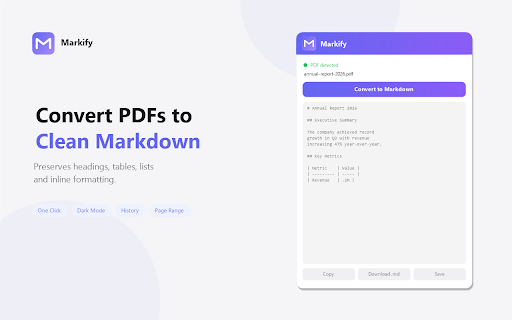
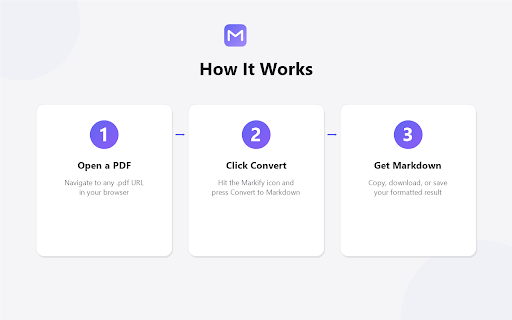
A browser extension that converts PDF files opened in Chrome, Edge, or Brave into clean Markdown text. The tool operates entirely client-side using the pdf.js library and provides features like page range selection and conversion history.

Developer:UnikDevelopment
Version:2.0.0
Size:401KiB
Last updated:

Overview

Installs

16

Rating

0 reviews

Languages

1 locales

Includes English

Market analysis

Review-backed positioning, friction, and market signals for this Chrome extension.

No review samples found

Macro category

Developer & Designer Tools

Pricing friction

Low review signal

Complaint intensity

Low review signal

Listing & review signals
Observed signals from store listing text and review samples.

Listing positioning

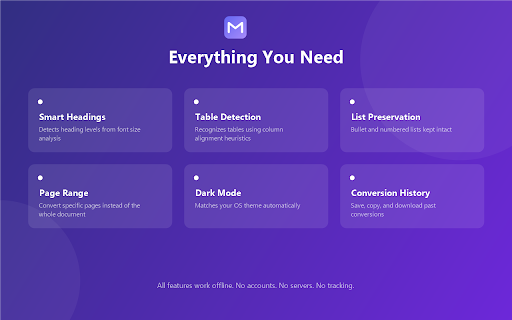
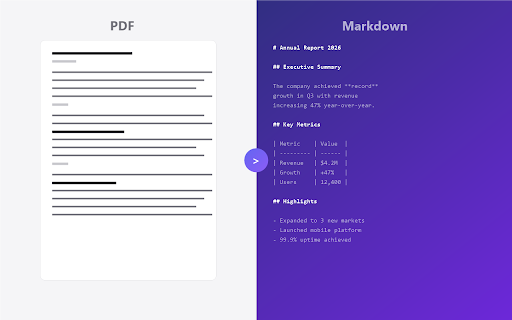
Markify positions itself as a privacy-first, local-only utility for converting PDFs to structured Markdown. It emphasizes the preservation of document formatting (headings, tables, lists) without the need for server uploads or user accounts.

Inferred product pattern

Local-first single-purpose utility tool for document format conversion.

Review-backed pain points

Review-backed data is not available.

Observed feature gaps

Review-backed data is not available.

Tags
PDF to MarkdownMarkdown ConverterLocal ProcessingProductivity Tool
Target users

- Developers

- Technical Writers

- Researchers

- Knowledge Management Users

Primary use cases

- Converting PDF research papers to Markdown for note-taking

- Extracting structured content from PDFs for documentation

- Converting PDFs to Markdown locally for privacy reasons

Positive themes

- Review-backed data is not available

Negative themes

- Review-backed data is not available

Observed friction

- No pricing friction observed; the product claims to require no accounts or servers.

Evidence boundary: Analysis based solely on the Chrome Web Store listing and product descriptions. No user reviews were available to validate feature performance or reliability claims.
Complaint summaries
Review-backed complaint signals grouped by operational area.

Support

Review-backed data is not available.

Reliability

Review-backed data is not available.

Privacy

Review-backed data is not available.

Access & pricing

- Free usage observed

- No account requirement observed

- Free plan or free usage claimed

Store listing facts

Listing assets

- Screenshots: 4

- Videos: 0

- Languages: 1

Trust signals

- Privacy policy

- Developer contact

Store metadata

- Version: 2.0.0

- Size: 401KiB

- Last updated:

Listing SEO keywords

Search intent keywords
Keyword signals for evaluating how users may discover, compare, or search for this extension category.

Core discovery

PDF to MarkdownConvert PDF to MDLocal PDF converterMarkdown formatter

Comparison

PDF to Markdown converter vs online toolsbest PDF to Markdown extension

Problem

how to convert PDF to Markdownextract tables from PDF to Markdownclean PDF to Markdown conversion

Alternative

Pandoc PDF to MarkdownOnline PDF to Markdown

Similar extensions

Jump to related discovery paths:

Screenshots

Markify — PDF to Markdown screenshot

Links

Recommended Chrome extensions

Related listings from the same category, trending peers, and the same publisher portfolio.

Browse tools
SnapCrop — Screenshot Crop & Annotate Tool icon

SnapCrop — Screenshot Crop & Annotate Tool

UnikDevelopment

Crop any area of any page, annotate with arrows, boxes & text, then copy to clipboard or download as PNG.

Installs

12

Rating

Microsoft Bing Search with Rewards icon

Microsoft Bing Search with Rewards

Microsoft Corporation

Use the Microsoft Rewards extension to find new ways to earn every day, easily track your points and set your default search to Bing

Installs

3.0M+

Rating

4.3

Google Scholar Button icon

Google Scholar Button

scholar-chrome-extensions

Lookup scholarly articles as you browse the web.

Installs

3.0M+

Rating

4.6

ЮБуст - VPN для YouTube. Обход блокировки Ютуб без ВПН. VPN для браузера icon

ЮБуст - VPN для YouTube. Обход блокировки Ютуб без ВПН. VPN для браузера

Uboost

Ускоритель Ютуб без ВПН, VPN для браузера Яндекс, Chrome, Opera, Edge. Обход замедления Ютуба.

Installs

2.0M+

Rating

4.2

Smallpdf—Edit, Convert, Compress, & AI Summarize PDF icon

Smallpdf—Edit, Convert, Compress, & AI Summarize PDF

Smallpdf AG

Get instant access to dozens of PDF tools directly in your browser – no downloads, no switching tabs.

Installs

2.0M+

Rating

4.6

Pie Adblock - A Powerful Free Ad Blocker icon

Pie Adblock - A Powerful Free Ad Blocker

Pie Extensions

Pie Adblock blocks ads & pop-ups, plus YouTube & Twitch video ads. You can customize your ad experience with Pie!

Installs

2.0M+

Rating

4.9

Google Dictionary (by Google) icon

Google Dictionary (by Google)

dictionary-extension-dev

View definitions easily as you browse the web.

Installs

2.0M+

Rating

4.4

AI Chat for Search icon

AI Chat for Search

AI Chat for Search Team

Display AI Chat response alongside search engine results

Installs

2.0M+

Rating

4.6

WPS浏览器助手:文档在线阅读编辑 icon

WPS浏览器助手:文档在线阅读编辑

金山PDF

PDF、Excel、Word、PPT等文档无需下载即可在线预览,还能对文档进行编辑、打印、转换等处理。

Installs

2.0M+

Rating

3.0

Planet Search icon

Planet Search

Free VPN Planet

Enchanced default search engine.

Installs

2.0M+

Rating

3.4