Export Chrome History icon

Export Chrome History Chrome Extension Analysis

Automation & Workflow Efficiency

Chrome extension ID: dihloblpkeiddiaojbagoecedbfpifdj

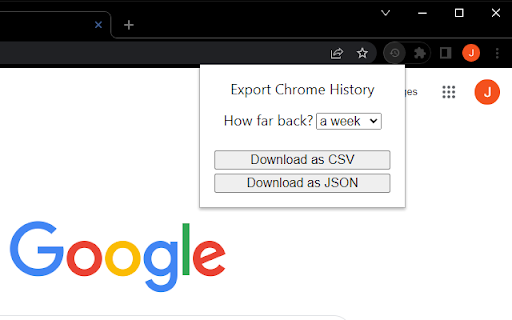
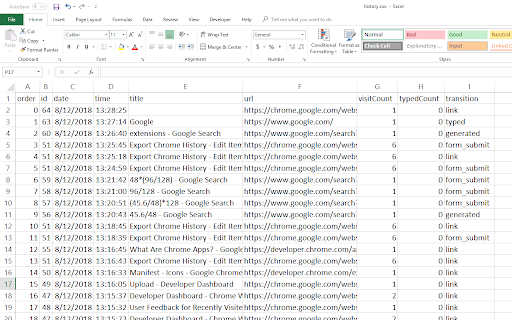
This tool allows users to extract their local Chrome browser history into machine-readable files. It operates as a local utility and does not provide access to synced Google account history beyond the local 90-day window maintained by the browser.

Developer:Jarett Lee
Version:1.0.2.0
Size:13.86KiB
Last updated:

Overview

Installs

100K+

Rating

4.5

57 reviews

Languages

1 locales

Includes English

Market analysis

Review-backed positioning, friction, and market signals for this Chrome extension.

Backed by review samples

Macro category

Automation & Workflow Efficiency

Pricing friction

Low review signal

Complaint intensity

Moderate review signal

Listing & review signals
Observed signals from store listing text and review samples.

Listing positioning

The extension is positioned as a simple utility for exporting Chrome browser history into CSV or JSON formats. It explicitly manages user expectations by noting that it is limited to Chrome's native 90-day local history storage.

Inferred product pattern

Utility-based local browser data extractor.

Review-backed pain points

Users often expect the tool to fetch their entire Google account history rather than just the local 90-day Chrome cache, leading to negative feedback regarding missing data.

Observed feature gaps

Lack of data filtering options, inability to fetch historical data beyond 90 days, and no functionality for importing history files back into Chrome.

Tags
Browser HistoryData ExportCSV ExportProductivity
Target users

- Data analysts

- Tab hoarders

- Privacy-focused users

- Researchers

Primary use cases

- Backing up local browsing history

- Analyzing browsing habits

- Recovering lost tab data

Positive themes

- Effective for quick data extraction

- Useful for managing large amounts of closed tabs

- Reliable for local-only privacy setups

Negative themes

- Frustration over the 90-day limitation

- Expectation gap regarding synced/cross-device history

- Accuracy issues with metadata

Observed friction

- None; the product is free.

Evidence boundary: Product listing documentation and user reviews confirm the tool is restricted to 90 days of local history and does not interact with synced Google data. Reviews are limited to 57 total comments, which may not capture the breadth of edge-case browser configurations.
Complaint summaries
Review-backed complaint signals grouped by operational area.

Support

No specific support complaints; negative reviews focus on feature limitations inherent to Chrome.

Reliability

Some users report missing or incorrect URL/title metadata in exports.

Privacy

No privacy complaints observed.

Access & pricing

- Free usage observed

- No account requirement observed

- Free plan or free usage claimed

Store listing facts

Listing assets

- Screenshots: 3

- Videos: 0

- Languages: 1

Trust signals

- Developer contact

Store metadata

- Version: 1.0.2.0

- Size: 13.86KiB

- Last updated:

Listing SEO keywords

Search intent keywords
Keyword signals for evaluating how users may discover, compare, or search for this extension category.

Core discovery

export chrome historychrome history to csvsave browser historychrome history backup

Comparison

chrome history alternativeexport history chrome extension

Problem

chrome history limitedcannot see full historydownload chrome activity

Alternative

google takeoutbrowser history downloader

Similar extensions

Jump to related discovery paths:

Screenshots

Export Chrome History screenshot

Recommended Chrome extensions

Related listings from the same category, trending peers, and the same publisher portfolio.

Browse workflow