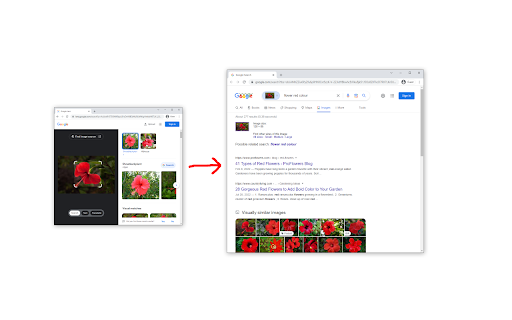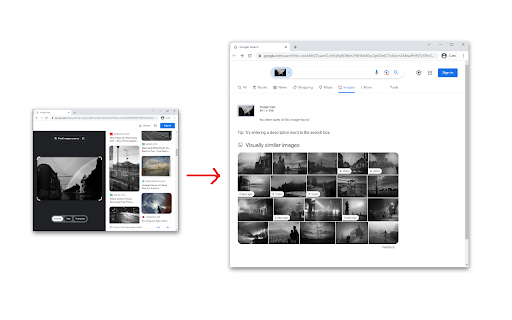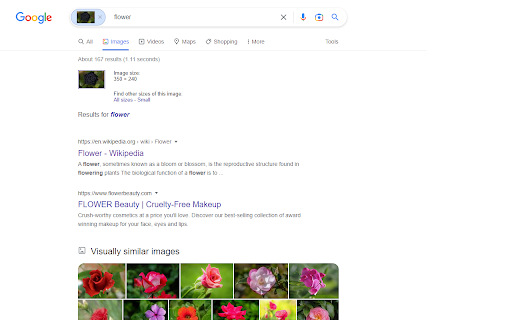
Disable Google Lens icon

Disable Google Lens Chrome Extension Analysis

Automation & Workflow Efficiency

Chrome extension ID: dkapjhgpncbeiebegegdbpgfoabdkilh

A Chrome extension that redirects Google Lens results back to the standard Google image search interface. It includes a custom right-click menu option to trigger the original image search functionality.

Developer:fanfare
Version:0.1.3
Size:28.26KiB
Last updated:

Overview

Installs

60K+

Rating

★ 3.9

170 reviews

Languages

1 locales

Includes English

Market analysis

Review-backed positioning, friction, and market signals for this Chrome extension.

Backed by review samples

Macro category

Automation & Workflow Efficiency

Pricing friction

Low review signal

Complaint intensity

High review signal

Listing & review signals
Observed signals from store listing text and review samples.

Listing positioning

The product positions itself as a tool to revert Google's image search experience to its legacy format. It claims to bypass Google Lens and provide a dedicated context menu item for traditional image searching.

Inferred product pattern

Single-purpose utility designed to undo a specific platform UI/UX change through redirection.

Review-backed pain points

Users report that the extension frequently stops working following browser updates, often leading to blank pages or a total return of the Google Lens interface.

Observed feature gaps

Lack of resilience against Chrome's internal updates and a lack of a fully automated setup that avoids manual GitHub instructions.

Tags
Search UtilityGoogle LensImage SearchBrowser Tweak
Target users

- Users who prefer legacy Google Image Search

- Users frustrated with Google Lens

- Browser power users

Primary use cases

- Bypassing Google Lens redirects

- Performing traditional reverse image searches

Positive themes

- Initial effectiveness in disabling Lens

Negative themes

- Breakage after Chrome updates

- Empty result pages

- Failure to find matching images

- Complexity of manual setup instructions

Observed friction

- Performance complaints detected

- No pricing friction observed as the tool is free.

Evidence boundary: Analyzed store listing and a sample of 10 reviews, predominantly low-rated. Review samples provided are heavily skewed toward negative feedback; positive sentiment data is limited.
Complaint summaries
Review-backed complaint signals grouped by operational area.

Support

No formal support complaints, though some users find the requirement to visit GitHub for instructions frustrating.

Reliability

High volume of complaints regarding the extension becoming obsolete or broken after Chrome version updates.

Privacy

No privacy complaints observed.

Access & pricing

- Free usage observed

- No account requirement observed

- Free plan or free usage claimed

Store listing facts

Listing assets

- Screenshots: 3

- Videos: 0

- Languages: 1

Trust signals

- Developer contact

- Official website

Store metadata

- Version: 0.1.3

- Size: 28.26KiB

- Last updated:

Listing SEO keywords

Search intent keywords
Keyword signals for evaluating how users may discover, compare, or search for this extension category.

Core discovery

disable google lensgoogle lens redirectclassic google image search

Comparison

google lens vs google image search

Problem

how to remove google lensgoogle lens not workingstop google lens

Alternative

google lens alternativeclassic image search extension

Similar extensions

Jump to related discovery paths:

Screenshots

Disable Google Lens screenshot

Links

Website: github.com

Recommended Chrome extensions

Related listings from the same category, trending peers, and the same publisher portfolio.

Browse workflow
AI Grammar Checker & Paraphraser – LanguageTool icon

AI Grammar Checker & Paraphraser – LanguageTool

lt-extension-publisher

Instantly Enhance Your Texts with LanguageTool’s Grammar Checker and Paraphrasing Tool

Installs

2.0M+

Rating

★ 4.7

Momentum icon

Momentum

Momentum

Transform your browser into a beautifully designed tab that helps you feel calm, keep focus, and stay energized.

Installs

2.0M+

Rating

★ 4.5

My Apps Secure Sign-in Extension icon

My Apps Secure Sign-in Extension

Microsoft

My Apps Secure Sign-in Extension

Installs

2.0M+

Rating

★ 2.2

Web Signer icon

Web Signer

Softplan Websigner Developers

Extensão para assinatura digital no browser

Installs

2.0M+

Rating

★ 3.0

Evernote Web Clipper icon

Evernote Web Clipper

Evernote

Use the Evernote extension to save things you see on the web into your Evernote account.

Installs

2.0M+

Rating

★ 4.7

Google Scholar PDF Reader icon

Google Scholar PDF Reader

scholar-chrome-extensions

Supercharge your paper reading: follow references, skim outline, jump to figures, cite and save.

Installs

2.0M+

Rating

★ 4.1

Keeper® Password Manager & Digital Vault icon

Keeper® Password Manager & Digital Vault

Keeper Security

Generate strong passwords, autofill and protect your confidential info with zero-knowledge encryption.

Installs

2.0M+

Rating

★ 4.8

Snow Web Application Metering icon

Snow Web Application Metering

snow_chrome_extensions

This extension tracks web application use for the purpose of license compliance and cost optimization. www.snowsoftware.com/browser

Installs

2.0M+

Rating

★ 1.3

Microsoft Defender Browser Protection icon

Microsoft Defender Browser Protection

Microsoft Corporation

Protect yourself against online threats, like phishing and malicious websites, with real-time protection from Microsoft.

Installs

2.0M+

Rating

★ 4.1

Визуальные закладки icon

Визуальные закладки

Yandex

Визуальные закладки – это страница, на которой собраны ваши любимые сайты

Installs

2.0M+

Rating

★ 3.4