Customized subtitles, works with Disney Plus icon

Customized subtitles, works with Disney Plus Chrome Extension Analysis

Niche Lifestyle & Gaming Hacks

Chrome extension ID: dmnpbfajdeblnfifkpkmhignhpnjking

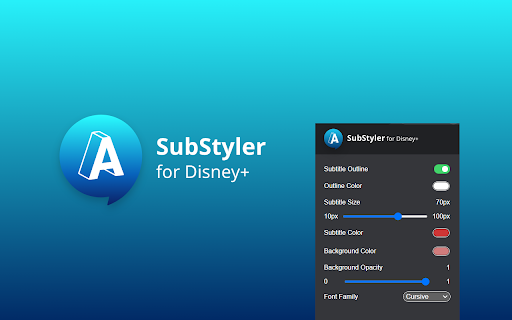
This browser extension provides users with granular control over the appearance of subtitles on the Disney+ streaming platform. It allows for adjustments to font style, text color, size, outlines, and background transparency to improve readability or aesthetic preference.

Version:1.0.15
Size:56.61KiB
Last updated:

Overview

Installs

2K+

Rating

4.3

10 reviews

Languages

55 locales

Includes Deutsch, English, English (Australia), English (United Kingdom)...

Market analysis

Review-backed positioning, friction, and market signals for this Chrome extension.

Backed by review samples

Macro category

Niche Lifestyle & Gaming Hacks

Pricing friction

Low review signal

Complaint intensity

Moderate review signal

Listing & review signals
Observed signals from store listing text and review samples.

Listing positioning

The extension positions itself as a creative tool for Disney+ users to personalize their viewing experience through custom subtitle styling. It emphasizes ease of use, allowing users to modify font, color, size, and background opacity via a control panel.

Inferred product pattern

Single-purpose utility extension for DOM manipulation of video streaming interfaces.

Review-backed pain points

Users occasionally report that the extension stops working or fails to trigger specific effects like outlines.

Observed feature gaps

Lack of control over outline size and desire for even larger font size options beyond the current maximum.

Tags
Subtitle CustomizationDisney PlusAccessibilityVideo Player Tools
Target users

- Disney+ subscribers

- Users requiring larger or more legible subtitles

- Accessibility-focused viewers

Primary use cases

- Increasing subtitle size for readability

- Changing subtitle text colors

- Adjusting subtitle background opacity

Positive themes

- Effective for enlarging subtitles for better visibility

- Works well for various languages including Japanese

- Simple and straightforward functionality

Negative themes

- Intermittent functional failure

- Missing specific customization options like outline sizing

- Technical issues where the tool stops working

Observed friction

- Performance complaints detected

- No pricing friction identified; the extension appears to be free.

Evidence boundary: Analysis based on 7 user reviews highlighting successful functionality balanced against intermittent technical failures. The small sample size of reviews may not represent the experience of the entire user base.
Complaint summaries
Review-backed complaint signals grouped by operational area.

Support

Some users expressed frustration regarding the extension failing to work without specific troubleshooting steps provided.

Reliability

Sporadic reports of the extension failing to load or function correctly on Disney+.

Privacy

No privacy complaints found.

Access & pricing

- Free usage observed

- No account requirement observed

- Free plan or free usage claimed

Store listing facts

Listing assets

- Screenshots: 1

- Videos: 1

- Languages: 55

Trust signals

- Privacy policy

- Developer contact

- Support link

Store metadata

- Version: 1.0.15

- Size: 56.61KiB

- Last updated:

Listing SEO keywords

Search intent keywords
Keyword signals for evaluating how users may discover, compare, or search for this extension category.

Core discovery

Disney Plus subtitle settingsCustom subtitle font extensionChange Disney Plus captionsBetter subtitles for Disney Plus

Comparison

Disney Plus caption customizersubtitle styling browser extension

Problem

Disney Plus subtitles too smallmake subtitles readable on Disney

Alternative

browser extension for video subtitles

Similar extensions

Jump to related discovery paths:

Screenshots

Customized subtitles, works with Disney Plus screenshot

Links

Recommended Chrome extensions

Related listings from the same category, trending peers, and the same publisher portfolio.

Browse fun
Shorts scroller, works with Youtube [QVI] icon

Shorts scroller, works with Youtube [QVI]

BestChromeExtensions

Independent software - not affiliated with YouTube. Auto-scroll Shorts, use custom keyboard shortcuts and quick access button.

Installs

20K+

Rating

4.0

Ad Skipper for Pluto TV [QVI] icon

Ad Skipper for Pluto TV [QVI]

BestChromeExtensions

Automatically skip and disable ads on Pluto TV.

Installs

9K+

Rating

3.3

Stylish - Custom themes for any website icon

Stylish - Custom themes for any website

userstyles.org

With hundreds of thousands of themes, skins & free backgrounds, you can customize any website with your own color scheme in a click.

Installs

2.0M+

Rating

4.3

РуТрекер - официальный плагин (доступ и пр.) icon

РуТрекер - официальный плагин (доступ и пр.)

RuTracker.org

Доступ к RuTracker.org, поиск и пр.

Installs

2.0M+

Rating

4.0

FrankerFaceZ icon

FrankerFaceZ

FrankerFaceZ

The Twitch enhancement suite. Get custom emotes and tons of new features you'll never want to go without.

Installs

1.0M+

Rating

4.2

My Doodle icon

My Doodle

Lovenish Goyal

Change Google Logo

Installs

1.0M+

Rating

4.1

Shimeji Browser Extension icon

Shimeji Browser Extension

Jarno Le Conté

Play with little shimejis while browsing the web.

Installs

1.0M+

Rating

4.0

Cute Cursors - Custom Cursor for Chrome™ icon

Cute Cursors - Custom Cursor for Chrome™

Cute Cursors

Funny custom cursors for Chrome™. Replace the default mouse cursor with a custom one from collections of cool and cute cursors.

Installs

800K+

Rating

4.6

Custom Cursor for Chrome icon

Custom Cursor for Chrome

Cursors

Enhance your Chrome experience with custom cursor. Give your mouse cursor a unique touch by replacing it with a custom cursor.

Installs

800K+

Rating

4.4

Google Meet Enhanced Experience icon

Google Meet Enhanced Experience

niritshlif

Virtual Green Screens, Blur, Pixelate, 3D Filters and More!

Installs

800K+

Rating

3.4