Miro Talktrack: Recordings that move work forward icon

Miro Talktrack Chrome Extension Analysis

Automation & Workflow Efficiency

Store listing title: Miro Talktrack: Recordings that move work forward

Chrome extension ID: dpdiefbbfngknhncipbjkehekbdomced

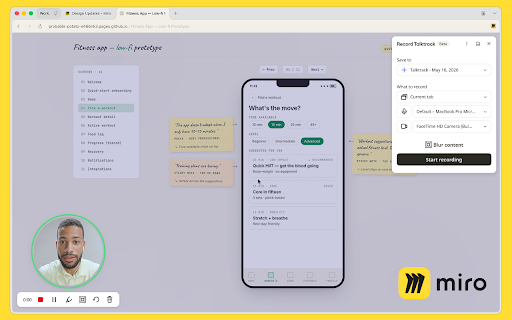
Miro Talktrack is a browser extension that allows users to quickly record their screen, webcam, and audio from any active tab. All recordings are automatically saved to the user's Miro account, allowing teams to pin videos next to relevant project boards, docs, and tasks. The integrated AI features automatically generate transcripts, summaries, and action items from the captured video content.

Developer:Miro
Version:0.3.34
Size:10.03MiB
Last updated:

Overview

Installs

1K+

Rating

5.0

5 reviews

Languages

7 locales

Includes Deutsch, English, español, français...

Market analysis

Review-backed positioning, friction, and market signals for this Chrome extension.

Backed by review samples

Macro category

Automation & Workflow Efficiency

Pricing friction

Low review signal

Complaint intensity

Low review signal

Listing & review signals
Observed signals from store listing text and review samples.

Listing positioning

The store listing positions Miro Talktrack as an asynchronous video tool that keeps screen recordings contextual by saving them directly onto Miro boards instead of letting them get lost in chat threads. It highlights the ability to record screen, camera, and voice from any browser tab without needing to open Miro first. The tool also features AI-generated transcripts, summaries, and non-destructive editing directly inside the Miro workspace.

Inferred product pattern

SaaS companion browser extension that captures rich media and pushes it directly into a centralized collaboration canvas.

Review-backed pain points

No review-backed pain points are available as all provided reviews are highly positive 5-star ratings with no complaints.

Observed feature gaps

No feature gaps were reported in the reviews. The listing mentions that Free plan users are limited to 5 Talktracks, which may act as a feature constraint for power users on free tiers.

Tags
Async VideoScreen RecorderMiro IntegrationTeam Collaboration
Target users

- Product Managers

- UX/UI Designers

- Engineering Leads

- Sales Engineers

- Remote Teams

Primary use cases

- Recording asynchronous design walkthroughs and feedback on Figma

- Creating team strategy updates and weekly progress updates

- Recording technical incident retrospectives

- Leaving personalized demo recordings on shared prospect boards

Positive themes

- Successfully replacing synchronous status meetings with asynchronous video walkthroughs

- Convenience of recording from any tab in the browser outside of Miro

- Seamless integration that drops videos directly onto the Miro canvas for consolidated collaboration

Negative themes

- No negative review themes observed in the current sample

Observed friction

- Free plan users are capped at 5 Talktracks, while paid Miro plans (Starter, Business, Enterprise) include unlimited recordings. No pricing friction complaints were observed in the review sample.

Evidence boundary: Based on the official Chrome Web Store listing details, pricing structure specifications from miro.com, and 4 highly positive 5-star user reviews. The sample size of analyzed reviews is small (4 helpful 5-star reviews), which limits visibility into potential negative edge cases, bugs, or enterprise deployment challenges.
Complaint summaries
Review-backed complaint signals grouped by operational area.

Support

No support, account blocking, or refund complaints were found in the current review data.

Reliability

No reliability, lag, or recording performance complaints were reported in the analyzed reviews.

Privacy

No privacy, security, or data tracking complaints were reported in the analyzed reviews.

Access & pricing

- Free entry with paid features

- Account required for core usage

- Limited free usage observed

Store listing facts

Listing assets

- Screenshots: 1

- Videos: 0

- Languages: 7

Trust signals

- Privacy policy

- Developer contact

- Official website

- Support link

Store metadata

- Version: 0.3.34

- Size: 10.03MiB

- Last updated:

Listing SEO keywords

Search intent keywords
Keyword signals for evaluating how users may discover, compare, or search for this extension category.

Core discovery

async video recorder chrome extensionmiro screen recording toolrecord figma design walkthroughcollaborative video notes

Comparison

miro talktrack vs loomtalktrack vs screenitymiro video recording vs slack clips

Problem

how to record screen directly to miroreplace status meetings with async videohow to share figma feedback with video

Alternative

LoomVidyardScreencastifyZoom Clips

Similar extensions

Jump to related discovery paths:

Screenshots

Miro Talktrack: Recordings that move work forward screenshot

Links

Recommended Chrome extensions

Related listings from the same category, trending peers, and the same publisher portfolio.

Browse communication
ScreenPal - Screen Recorder & Video Editor icon

ScreenPal - Screen Recorder & Video Editor

ScreenPal (formerly Screencast-O-Matic)

Record your screen & webcam, take screenshots, edit videos & images - easy & free!

Installs

100K+

Rating

4.3

WEB.DE MailCheck icon

WEB.DE MailCheck

1&1 Mail & Media GmbH

Der sichere Klick in Dein Postfach.

Installs

90K+

Rating

3.4

HyperWrite: AI Writing Assistant and Autocomplete App icon

HyperWrite: AI Writing Assistant and Autocomplete App

Otherside AI

Smart autocomplete for Gmail, Google Docs, ChatGPT, and more. An AI writing assistant that predicts words and sentences.

Installs

80K+

Rating

4.2

Zight Screen Recorder, Screenshot App icon

Zight Screen Recorder, Screenshot App

Zight

The best screen recorder for Chrome. Capture your screen, webcam, and instantly share videos and screenshots in seconds.

Installs

80K+

Rating

4.5

Voila – AI Assistant, Copilot and AI Writer icon

Voila – AI Assistant, Copilot and AI Writer

Initial condition

Seamless personal AI assistant powered by GPT-5 to help you create, write, summarize, brainstorm, and research on any website.

Installs

80K+

Rating

4.7

Multi Email Forward by cloudHQ icon

Multi Email Forward by cloudHQ

cloudHQ

Forward multiple Gmail™ emails with one click. Transfer or migrate your Gmail™ emails.

Installs

80K+

Rating

4.1

FlowCrypt: Encrypt Gmail with PGP icon

FlowCrypt: Encrypt Gmail with PGP

flowcrypt-release

Simple end-to-end encryption to secure email and attachments on Google.

Installs

70K+

Rating

4.7

Grammar Checker and AI tool - Correcto icon

Grammar Checker and AI tool - Correcto

product-development-correcto

Improve your writing with the AI-powered online grammar and spelling checker in Spanish and our paraphrasing tool.

Installs

70K+

Rating

4.6

Share link via email icon

Share link via email

Cobote

Adds a button and context menu item to send the page URL or a link URL via email

Installs

70K+

Rating

3.9

MerciApp - AI Writing Assistant icon

MerciApp - AI Writing Assistant

MerciApp

Write better, faster, wherever you work.

Installs

60K+

Rating

4.5