Venice AI to PDF: Export Venice AI Chats to PDF, Markdown, JSON icon

Venice AI to PDF Chrome Extension Analysis

AI & Writing Assistants

Store listing title: Venice AI to PDF: Export Venice AI Chats to PDF, Markdown, JSON

Chrome extension ID: dpeabmlbmhjbokfijjcpcebgkgkjknkm

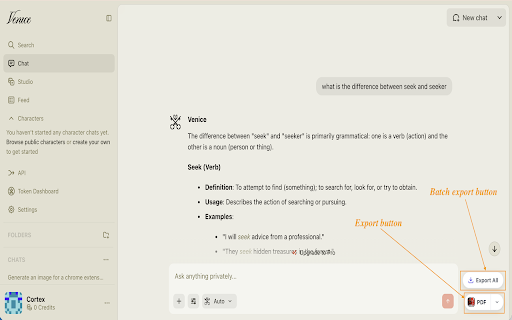
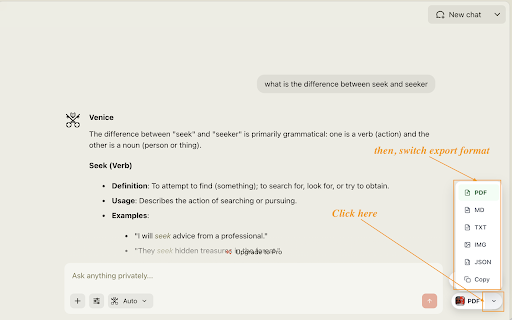
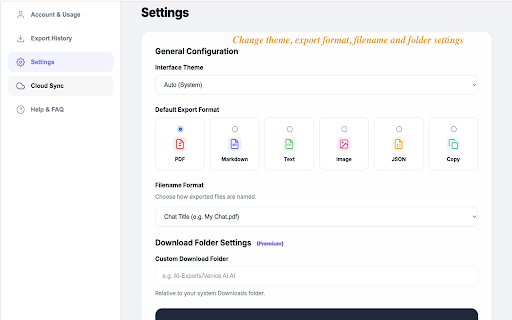
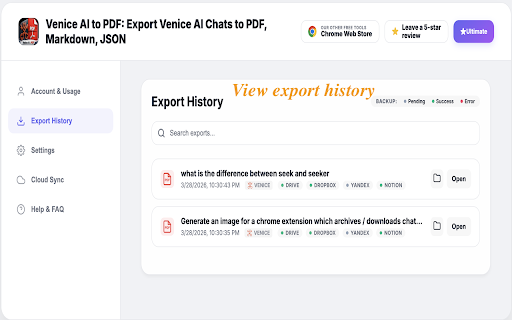
This Chrome extension enables users to download and archive Venice AI chat logs into structured formats such as PDF, Markdown, JSON, and plain text. It captures visual components exactly as seen on screen, preserving LaTeX math equations, code syntax highlighting, and inline tables. It operates directly inside the browser locally, offering optional backup integrations with platforms like Google Drive and Notion.

Developer:Neo Cortex
Version:1.0.9
Size:3.91MiB
Last updated:

Overview

Installs

168

Rating

5.0

9 reviews

Languages

62 locales

Includes Deutsch, English, English (United Kingdom), Filipino...

Market analysis

Review-backed positioning, friction, and market signals for this Chrome extension.

No review samples found

Macro category

AI & Writing Assistants

Pricing friction

Low review signal

Complaint intensity

Low review signal

Listing & review signals
Observed signals from store listing text and review samples.

Listing positioning

Venice AI to PDF is positioned as an instant, one-click export utility that allows users to save Venice AI chat histories without losing layout or formatting. The listing emphasizes that code, tables, and mathematical formulas are accurately preserved in the exported files. It highlights a privacy-first, local processing model with an optional Pro tier for automated cloud synchronization.

Inferred product pattern

A single-purpose browser utility offering local chat-to-document conversion with a premium cloud-sync upsell.

Review-backed pain points

Review-backed data is not available as no user reviews were found for this extension.

Observed feature gaps

No feature gaps could be identified from user reviews due to the lack of feedback. However, the automated cloud-sync capability is locked behind a premium (Pro) tier, which could be a limitation for users seeking a fully free backup solution.

Tags
AI Chat ExportVenice AIPDF ExportMarkdown ConverterBackup Tool
Target users

- Developers

- Students

- Writers & Creators

- Professionals

- Researchers

- Venice AI Users

Primary use cases

- Exporting Venice AI chats to PDF, Markdown, or JSON

- Archiving coding and debugging sessions from Venice AI

- Saving study material, research notes, and planning documents

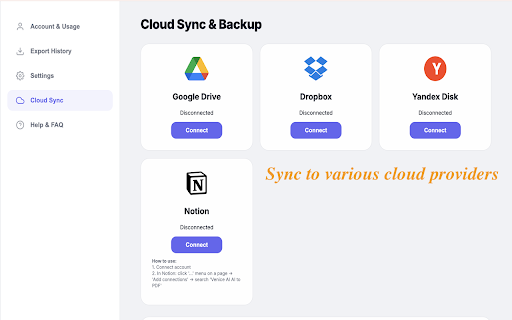
- Backing up AI conversations automatically to Google Drive, Dropbox, or Notion

Positive themes

- No reviews available to extract positive themes

Negative themes

- No reviews available to extract negative themes

Observed friction

- No pricing friction is reported in public reviews. The listing mentions an optional Cloud Sync (Pro) tier, but standard local exporting is promoted as free and registration-free.

Evidence boundary: The analysis is built on the official store listing description detailing features, privacy claims, target audiences, and the Pro upgrade model. No public user reviews were available at the time of evaluation. The evaluation lacks user-driven insights, complaints, or feature validation because the extension has no public reviews listed on the Chrome Web Store.
Complaint summaries
Review-backed complaint signals grouped by operational area.

Support

No support or account complaints have been documented due to a lack of public review data.

Reliability

No reliability or performance issues have been reported in public reviews.

Privacy

No privacy complaints have been raised. The developer asserts a local-first architecture with no tracking, analytics, or external server data uploads.

Access & pricing

- Free entry with paid features

- No account requirement observed

- Free plan or free usage claimed

Store listing facts

Listing assets

- Screenshots: 5

- Videos: 0

- Languages: 62

Trust signals

- Privacy policy

- Developer contact

- Official website

- Support link

Store metadata

- Version: 1.0.9

- Size: 3.91MiB

- Last updated:

Listing SEO keywords

Search intent keywords
Keyword signals for evaluating how users may discover, compare, or search for this extension category.

Core discovery

Venice AI chat exporterexport Venice AI to PDFVenice AI Markdown downloadsave Venice AI conversations

Comparison

Venice AI export vs copy pasteVenice AI print to PDF vs extension

Problem

how to save Venice AI chatVenice AI export formatting brokendownload Venice AI chat logs

Alternative

Venice AI exporter alternativeAI chat backup extension

Similar extensions

Jump to related discovery paths:

Screenshots

Venice AI to PDF: Export Venice AI Chats to PDF, Markdown, JSON screenshot

Links

Recommended Chrome extensions

Related listings from the same category, trending peers, and the same publisher portfolio.

Browse workflow
X (Twitter) Video Saver - One Click X / Twitter Video Downloader icon

X (Twitter) Video Saver - One Click X / Twitter Video Downloader

Neo Cortex

Twitter video downloader for X. Download and save Twitter videos as MP4 with one click, fast and private.

Installs

8K+

Rating

4.2

AI Chat Exporter - ChatGPT, Claude, Gemini & DeepSeek to PDF icon

AI Chat Exporter - ChatGPT, Claude, Gemini & DeepSeek to PDF

Neo Cortex

Export ChatGPT, Claude, Gemini, DeepSeek, Grok to PDF. Batch save chats with code, math & images. Export your AI history.

Installs

2K+

Rating

4.4

Avira Password Manager icon

Avira Password Manager

Avira

Avira Password Manager saves, manages, and syncs all your passwords across all your devices.

Installs

7.0M+

Rating

3.7

Google Keep Chrome Extension icon

Google Keep Chrome Extension

google.com

Save to Google Keep in a single click!

Installs

6.0M+

Rating

4.0

1Password – Password Manager icon

1Password – Password Manager

1Password

The best way to experience 1Password in your browser. Easily sign in to sites, generate passwords, and store secure information.

Installs

6.0M+

Rating

2.9

ClassLink OneClick Extension icon

ClassLink OneClick Extension

ClassLink

ClassLink OneClick Extension

Installs

6.0M+

Rating

1.7

iCloud Passwords icon

iCloud Passwords

Apple Inc.

iCloud Passwords lets you fill passwords from iCloud Keychain when signing in to websites using Chrome.

Installs

6.0M+

Rating

2.3

iCloud Bookmarks icon

iCloud Bookmarks

Apple Inc.

Keep your Chrome bookmarks on Windows up to date with the Safari bookmarks on your iPhone, iPad, and Mac.

Installs

6.0M+

Rating

3.4

Screencastify - Screen Video Recorder icon

Screencastify - Screen Video Recorder

castify-ext-dev

Used by 15M+ people. An easy-to-use screen recorder for your browser. Capture, edit and share videos in seconds.

Installs

5.0M+

Rating

3.9

Save to Pinterest icon

Save to Pinterest

Pinterest, Inc.

Save ideas to Pinterest.

Installs

5.0M+

Rating

3.5