Kami for Google Chrome™ icon

Kami for Google Chrome™ Chrome Extension Analysis

Automation & Workflow Efficiency

Chrome extension ID: ecnphlgnajanjnkcmbpancdjoidceilk

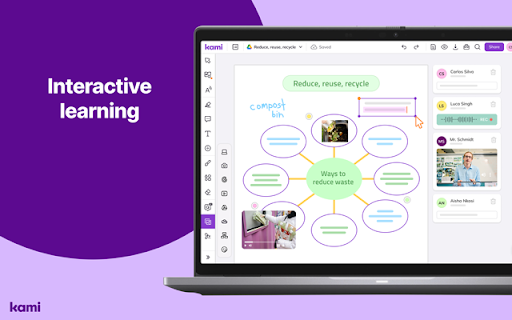
Kami is an interactive document annotation tool and learning platform designed for the education sector. It integrates with major LMS providers like Google Classroom and Canvas to facilitate digital feedback and instruction.

Developer:Kami
Version:2.0.24891
Size:7.74MiB
Last updated:

Overview

Installs

6.0M+

Rating

4.6

8,401 reviews

Languages

7 locales

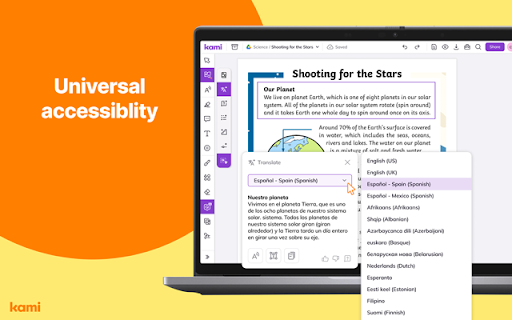
Includes Deutsch, English, Nederlands, español...

Market analysis

Review-backed positioning, friction, and market signals for this Chrome extension.

Backed by review samples

Macro category

Automation & Workflow Efficiency

Pricing friction

High review signal

Complaint intensity

High review signal

Listing & review signals
Observed signals from store listing text and review samples.

Listing positioning

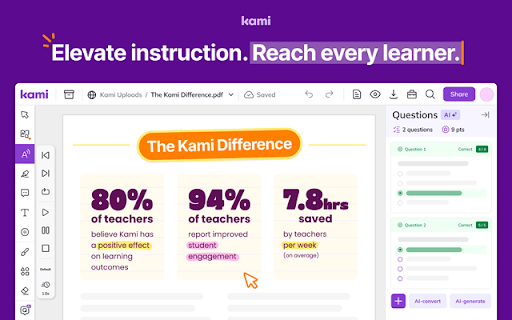
Kami positions itself as a game-changing interactive learning platform that turns any resource into an accessible experience. It focuses on empowering students and saving teachers significant time on grading and lesson planning.

Inferred product pattern

A large-scale EdTech platform providing document interaction and LMS integration, utilizing a freemium model that transitions to paid subscriptions for educators.

Review-backed pain points

Users report significant frustration with application stability, specifically regarding crashes that lead to lost work. There are also complaints about difficulty saving annotations directly back to Google Drive and unexpected subscription costs for educators.

Observed feature gaps

Users noted issues with the ability to save annotations back to the original Google Drive files and inconsistencies in text selection/highlighting tools.

Tags
PDF AnnotationInteractive LearningEducation ToolDigital Classroom
Target users

- Students

- Teachers

- School Leaders

- Educators

Primary use cases

- Annotating PDF documents

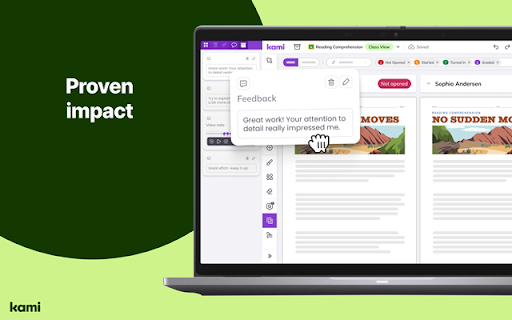
- Digital assignment feedback

- Interactive lesson planning

- Remote learning assessment

Positive themes

- Incredibly helpful when functioning correctly

- Powerful annotation capabilities

Negative themes

- Frequent application crashes

- Loss of work due to connectivity or saving issues

- High system resource consumption

- Lack of pricing transparency

- Poor customer support responsiveness

Observed friction

- Payment required for meaningful usage

- Free-tier complaints detected

- Account blocking complaints detected

- Performance complaints detected

- Privacy complaints detected

- Users expressed frustration over a lack of upfront transparency regarding annual subscription fees for teachers.

Evidence boundary: Analysis based on store listing claims and a sample of user reviews highlighting technical stability and pricing issues. Review data provided is heavily weighted toward low-rating samples, which may disproportionately reflect technical failures and user frustration.
Complaint summaries
Review-backed complaint signals grouped by operational area.

Support

Complaints highlight slow or non-existent responses from customer service and difficulty locating contact information for support.

Reliability

Significant reliability issues reported, including application crashes, inability to save work, and high CPU/RAM consumption.

Privacy

Users have expressed concerns regarding the clarity of the privacy policy and the necessity of granting broad Google account access.

Access & pricing

- Subscription model observed

- Login needed for core features

- Trial or limited free usage before paid plan

Store listing facts

Listing assets

- Screenshots: 5

- Videos: 0

- Languages: 7

Trust signals

- Privacy policy

- Developer contact

- Official website

- Support link

Store metadata

- Version: 2.0.24891

- Size: 7.74MiB

- Last updated:

Listing SEO keywords

Search intent keywords
Keyword signals for evaluating how users may discover, compare, or search for this extension category.

Core discovery

PDF annotationinteractive learningdigital classroom toolsGoogle Classroom extensioneducational annotation

Comparison

Kami vs Adobe AcrobatKami vs FoxitKami vs Google Drive

Problem

PDF editor crasheslosing annotationscannot save to Google Drive

Alternative

digital learning platformstudent annotation tool

Similar extensions

Jump to related discovery paths:

Screenshots

Kami for Google Chrome™ screenshot

Links

Recommended Chrome extensions

Related listings from the same category, trending peers, and the same publisher portfolio.

Browse education
Pix Companion icon

Pix Companion

web-extensions

Browser extension for Pix

Installs

100K+

Rating

1.4

Rememberry - Translate and Memorize with Flashcards icon

Rememberry - Translate and Memorize with Flashcards

rememberry

Translate words while browsing and turn them into spaced repetition flashcards to build foreign language vocabulary.

Installs

100K+

Rating

4.6

Talk & Comment - Voice notes anywhere icon

Talk & Comment - Voice notes anywhere

TalkandComment.com

Voice notes for classrooms and teams. Give feedback students actually hear.

Installs

100K+

Rating

4.1

Translator, dictionary - accurate translate icon

Translator, dictionary - accurate translate

Translate App

Translate text on any webpage instantly using Google Translate. Online Translator, accurate Translation.

Installs

100K+

Rating

4.4

QuestionAI Homework Powered AI Assistant icon

QuestionAI Homework Powered AI Assistant

D3 Dimension Technology

AI Copilot can answer screenshot queries and assist with writing, summarizing, translating, and grammar checking.

Installs

100K+

Rating

4.8

Scrible Extension icon

Scrible Extension

Scrible, Inc.

Smarter Web reading & research. Annotate, bookmark, save, cite, manage & share online articles. Use with your Scrible.com account.

Installs

100K+

Rating

3.5

Highlight This: finds and marks words icon

Highlight This: finds and marks words

Wim Deboel

Automatically finds and highlights words and phrases on the web page according to your list

Installs

100K+

Rating

3.8

NeoExamShield icon

NeoExamShield

techadmin

Prevents malpractice by blocking unauthorized extensions and websites during tests on the Iamneo portal.

Installs

100K+

Rating

1.1

オクリンクプラス Webページスクリーンショット機能 icon

オクリンクプラス Webページスクリーンショット機能

ベネッセコーポレーション

オクリンクプラスのカードにWebページのスクリーンショットを挿入し、リンクを埋め込むことができます!

Installs

100K+

Rating

3.0

Lingualeo Language Translator icon

Lingualeo Language Translator

browser-extension

Translate words & phrases from websites quickly. Add to your personal dictionary on Lingualeo.com and learn foreign languges easily!

Installs

100K+

Rating

3.8