Séneca Fácil icon

Séneca Fácil Chrome Extension Analysis

Automation & Workflow Efficiency

Chrome extension ID: edgcbhmjccjhjalfhpjihlliddflclbl

Séneca Fácil is a Chrome extension designed for teachers using the Séneca educational management system. It aims to reduce manual data entry by automating the process of entering grades and managing educational notebooks.

Developer:gregmarbella1
Version:0.0.7.0
Size:38.15KiB
Last updated:

Overview

Installs

3K+

Rating

3.6

19 reviews

Languages

1 locales

Includes español

Market analysis

Review-backed positioning, friction, and market signals for this Chrome extension.

Backed by review samples

Macro category

Automation & Workflow Efficiency

Pricing friction

Low review signal

Complaint intensity

Moderate review signal

Listing & review signals
Observed signals from store listing text and review samples.

Listing positioning

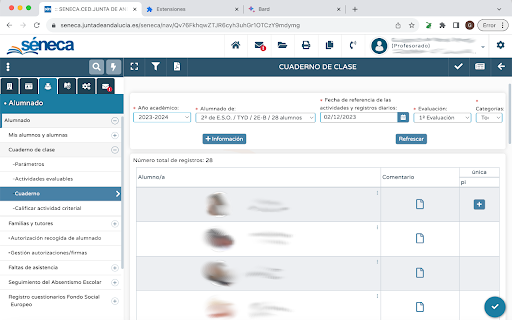
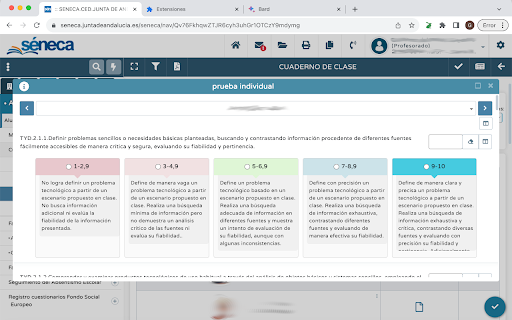
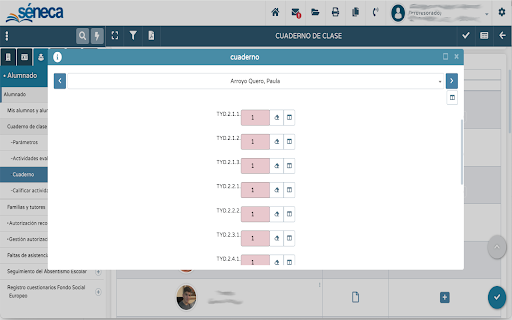
The product is positioned as a productivity utility for the Séneca Notebook and PRA systems. It specifically highlights the ability to paste data directly from spreadsheets into the platform.

Inferred product pattern

Niche institutional workflow automation tool designed to wrap around a specific government/educational portal.

Review-backed pain points

Users report that the core 'cloning' feature, which copies a grade across multiple criteria, now only works for the first student and then fails, forcing teachers back to manual entry.

Observed feature gaps

Lack of stability in automation scripts and inconsistent behavior across different browsers (Chrome vs Edge/Firefox).

Tags
Education ToolGrade AutomationSéneca AssistantSchool Productivity
Target users

- Teachers using the Séneca platform

- Educational administrators in Spain

Primary use cases

- Automating grade entry across multiple criteria

- Importing spreadsheet data into Séneca

- Streamlining the filling of educational notebooks (PRA)

Positive themes

- High utility when functional

- Significant time-saver for grading

Negative themes

- Broken grade cloning functionality

- Performance degradation over time

- Browser compatibility issues

Observed friction

- Performance complaints detected

- No pricing information provided in listing or reviews.

Evidence boundary: Extracted from a brief store listing and 10 detailed user reviews focusing on functional regressions. The store description is extremely minimal, providing little insight into the full feature set beyond spreadsheet pasting.
Complaint summaries
Review-backed complaint signals grouped by operational area.

Support

Users are expressing frustration in reviews regarding unresolved bugs, suggesting a lack of active technical support.

Reliability

Severe reliability issues where the extension stops autocompleting after a few entries or fails to apply grades to all criteria.

Privacy

No privacy or security complaints observed.

Access & pricing

- No clear monetization signal

- No account requirement observed

- No clear pricing signal

Store listing facts

Listing assets

- Screenshots: 3

- Videos: 0

- Languages: 1

Trust signals

- Developer contact

- Official website

Store metadata

- Version: 0.0.7.0

- Size: 38.15KiB

- Last updated:

Listing SEO keywords

Search intent keywords
Keyword signals for evaluating how users may discover, compare, or search for this extension category.

Core discovery

Séneca FácilCuaderno de Séneca extensionautomatizar notas Séneca

Comparison

Séneca Fácil vs manual entrybest Séneca notebook extension

Problem

Séneca grade cloning not workingpaste spreadsheet to Séneca

Alternative

Séneca Fácil alternativesSéneca productivity tools

Similar extensions

Jump to related discovery paths:

Screenshots

Séneca Fácil screenshot

Links

Recommended Chrome extensions

Related listings from the same category, trending peers, and the same publisher portfolio.

Browse education
QuestionAI Homework Powered AI Assistant icon

QuestionAI Homework Powered AI Assistant

D3 Dimension Technology

AI Copilot can answer screenshot queries and assist with writing, summarizing, translating, and grammar checking.

Installs

100K+

Rating

4.8

Scrible Extension icon

Scrible Extension

Scrible, Inc.

Smarter Web reading & research. Annotate, bookmark, save, cite, manage & share online articles. Use with your Scrible.com account.

Installs

100K+

Rating

3.5

Highlight This: finds and marks words icon

Highlight This: finds and marks words

Wim Deboel

Automatically finds and highlights words and phrases on the web page according to your list

Installs

100K+

Rating

3.8

NeoExamShield icon

NeoExamShield

techadmin

Prevents malpractice by blocking unauthorized extensions and websites during tests on the Iamneo portal.

Installs

100K+

Rating

1.1

オクリンクプラス Webページスクリーンショット機能 icon

オクリンクプラス Webページスクリーンショット機能

ベネッセコーポレーション

オクリンクプラスのカードにWebページのスクリーンショットを挿入し、リンクを埋め込むことができます!

Installs

100K+

Rating

3.0

Lingualeo Language Translator icon

Lingualeo Language Translator

browser-extension

Translate words & phrases from websites quickly. Add to your personal dictionary on Lingualeo.com and learn foreign languges easily!

Installs

100K+

Rating

3.8

Zhongwen: Chinese-English Dictionary icon

Zhongwen: Chinese-English Dictionary

Christian Schiller

Great tool for learning Chinese. Includes links to Chinese Grammar Wiki. Supports adding words to Skritter.

Installs

100K+

Rating

4.6

Translate Selected Text icon

Translate Selected Text

Adrià Vilanova Martínez (avm99963)

Translate selected text with Google Translate

Installs

100K+

Rating

3.8

TransOver icon

TransOver

artemave

Hover, click or select to translate (with text-to-speech). Translator.

Installs

100K+

Rating

4.5

Weblioポップアップ英和辞典 icon

Weblioポップアップ英和辞典

GRASグループ株式会社

Webページの英語にマウスオーバーさせることで「英和辞典」での意味を表示させるポップアップ辞書機能や、文章を選択することで翻訳結果へスムーズに移動することができる機能を備えた、Weblio公式のエクステンションです。

Installs

100K+

Rating

4.1