Edit with Sublime Text™ icon

Edit with Sublime Text™ Chrome Extension Analysis

Developer & Designer Tools

Chrome extension ID: eiejadjdcchfommckmikpcdnihljbpai

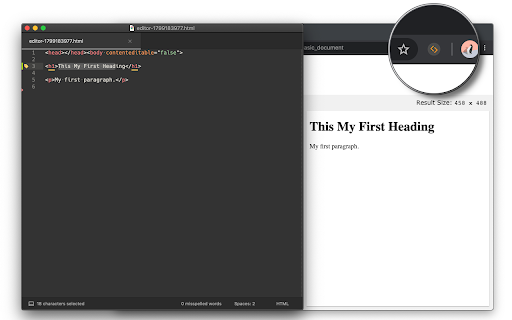
This tool enables users to edit browser-based HTML nodes and input fields using Sublime Text. Once configured, changes saved in the external editor are pushed back into the live web page, facilitating a more professional workflow for front-end tasks.

Developer:rynu.smith
Version:0.2.4
Size:190KiB
Last updated:

Overview

Installs

8K+

Rating

3.7

39 reviews

Languages

1 locales

Includes English

Market analysis

Review-backed positioning, friction, and market signals for this Chrome extension.

Backed by review samples

Macro category

Developer & Designer Tools

Pricing friction

Low review signal

Complaint intensity

Moderate review signal

Listing & review signals
Observed signals from store listing text and review samples.

Listing positioning

The extension positions itself as a productivity bridge between the browser and the Sublime Text editor. It allows developers to offload HTML, CSS, and input field editing to their preferred desktop editor for real-time synchronization.

Inferred product pattern

Bridge-style utility that connects local OS file handling with browser-based DOM elements.

Review-backed pain points

Users struggle with core functionality initialization and a lack of customizability regarding executable paths, specifically for portable installations.

Observed feature gaps

The extension lacks robust documentation or native support for local file editing and non-standard editor path configurations.

Tags
Sublime TextCode EditorWeb DevelopmentHTML Editor
Target users

- Web Developers

- Front-end Engineers

- Technical Support Staff

Primary use cases

- Editing HTML elements in Sublime Text

- Live testing of CSS/JS changes

- Modifying large input areas via external text editor

Positive themes

- Simplifies workflow for HTML modification

- Ease of installation

- Effective for quick tweaks on web pages

Negative themes

- Failure to initialize or connect

- Lack of support for portable Sublime Text versions

- Incompatibility with local HTML files

Observed friction

- Performance complaints detected

- None identified; the extension appears to be provided for free.

Evidence boundary: Evidence is derived from 39 reviews spanning several years, showing a mix of high satisfaction for successful users and significant frustration from users experiencing connection failures. The reviews span from 2018 to 2023, meaning some feedback may refer to older versions of the browser or the extension.
Complaint summaries
Review-backed complaint signals grouped by operational area.

Support

Users report non-functional states without clear troubleshooting paths.

Reliability

Several reports of the extension failing to trigger or connect to the editor, with some users stating it does not work at all.

Privacy

No privacy-related complaints observed.

Access & pricing

- Free usage observed

- No account requirement observed

- Free plan or free usage claimed

Store listing facts

Listing assets

- Screenshots: 1

- Videos: 1

- Languages: 1

Trust signals

- Privacy policy

- Developer contact

- Official website

Store metadata

- Version: 0.2.4

- Size: 190KiB

- Last updated:

Listing SEO keywords

Search intent keywords
Keyword signals for evaluating how users may discover, compare, or search for this extension category.

Core discovery

edit browser code in sublime textchrome extension external editorlive html editor chrome

Comparison

sublime text chrome integrationedit input field in external editor

Problem

extension not workingcannot open filesublime text path error

Alternative

vscode chrome extensionatom editor web integration

Similar extensions

Jump to related discovery paths:

Screenshots

Edit with Sublime Text™ screenshot

Links

Recommended Chrome extensions

Related listings from the same category, trending peers, and the same publisher portfolio.

Browse developer
User-Agent Switcher and Manager icon

User-Agent Switcher and Manager

rynu.smith

Spoof websites trying to gather information about your web navigation to deliver distinct content you may not want

Installs

300K+

Rating

4.3

Open in PDF Reader icon

Open in PDF Reader

rynu.smith

Send PDF links directly to your favorite PDF viewer like Adobe Acrobat Reader

Installs

90K+

Rating

3.5

CRXLauncher icon

CRXLauncher

CRXLauncher

Effortlessly Launch Chrome Extensions with CRXLauncher

Installs

1.0M+

Rating

4.6

Stylus icon

Stylus

stylus.openstyles

Redesign the web with Stylus, a user styles manager. Stylus allows you to easily install themes and skins for many popular sites.

Installs

1.0M+

Rating

4.5

SEOquake: On-Page SEO Checker icon

SEOquake: On-Page SEO Checker

SEOquake

Run page-level SEO audits, check technical issues, analyze links and keyword density, and view Semrush metrics.

Installs

1.0M+

Rating

4.5

Similarweb - Website Traffic, AI Traffic & SEO Checker icon

Similarweb - Website Traffic, AI Traffic & SEO Checker

Similarweb

Instant website analysis, AI traffic insights, and SEO metrics at your fingertips.

Installs

1.0M+

Rating

4.6

Eye Dropper icon

Eye Dropper

Eye Dropper

Pick colors from any website.

Installs

1.0M+

Rating

4.3

Lighthouse icon

Lighthouse

lighthouse-extension-owners

Lighthouse is an open-source, automated tool for improving the performance, quality, and correctness of your web apps.

Installs

1.0M+

Rating

4.4

Topaz SigPlusExtLite Extension icon

Topaz SigPlusExtLite Extension

Topaz Systems Inc

The Topaz SigPlusExtLite Chrome Extension enables users to capture signatures on a wide variety of Topaz signature pads.

Installs

1.0M+

Rating

4.0

Контур.Плагин icon

Контур.Плагин

kontur.extension

Расширение браузера, выполняющее криптографические операции в сервисах СКБ Контур

Installs

1.0M+

Rating

3.3