View Rendered Source icon

View Rendered Source Chrome Extension Analysis

Developer & Designer Tools

Chrome extension ID: ejgngohbdedoabanmclafpkoogegdpob

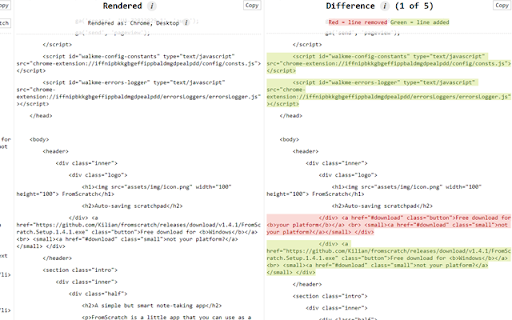
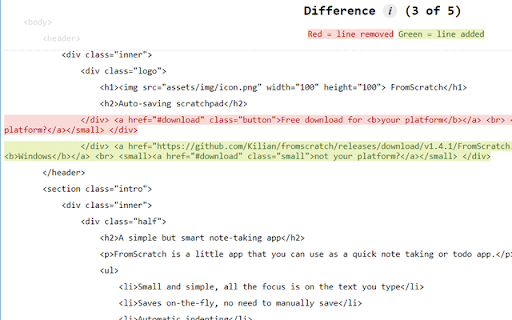
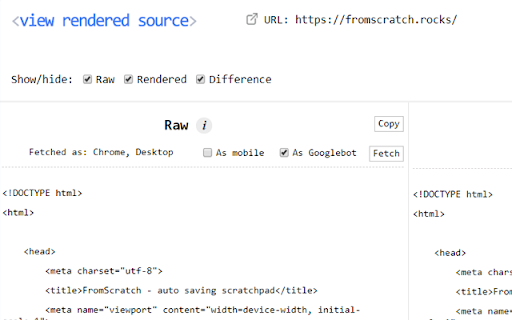
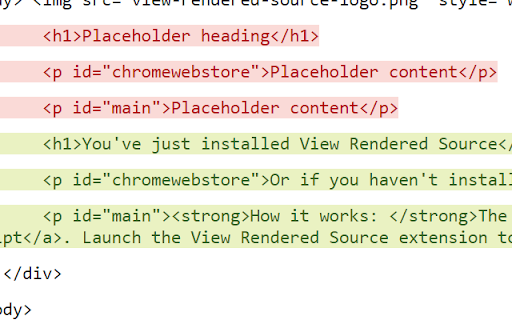
A lightweight utility that compares the raw HTML sent by a server with the final DOM constructed by the browser. It highlights line-by-line differences caused by JavaScript and allows for mobile and Googlebot user-agent emulation.

Developer:Jon
Version:4.0
Size:73.68KiB
Last updated:

Overview

Installs

30K+

Rating

4.4

41 reviews

Languages

1 locales

Includes English

Market analysis

Review-backed positioning, friction, and market signals for this Chrome extension.

Backed by review samples

Macro category

Developer & Designer Tools

Pricing friction

Low review signal

Complaint intensity

Moderate review signal

Listing & review signals
Observed signals from store listing text and review samples.

Listing positioning

The product is positioned as a modern replacement for the traditional 'View Source' function. It emphasizes the ability to see the final rendered DOM after JavaScript execution, targeting developers using frameworks like React and Vue, as well as SEO professionals.

Inferred product pattern

Specialized developer utility providing DOM state diffing for SEO and JS debugging.

Review-backed pain points

Users report the extension failing to trigger on certain sites, conflicts with keyboard shortcuts for non-English characters (Umlauts), and the loss of $_POST data during use.

Observed feature gaps

Lack of dark mode, absence of a filtered checklist for specific meta tags (e.g., canonical, robots), and inability to compare two different DOM snapshots.

Tags
DOM InspectorSEO ToolWeb DevelopmentHTML RenderJavaScript Debugger
Target users

- Web Developers

- SEO Specialists

- Frontend Engineers

Primary use cases

- Debugging JavaScript-heavy pages

- Verifying dynamic rendering for SEO

- Comparing raw vs rendered source code

- Testing mobile user-agent rendering

Positive themes

- Faster than competing utilities

- Effective diffing capabilities

- General utility for DOM inspection

Negative themes

- Intermittent failures on certain websites

- Keyboard shortcut conflicts

- Inaccuracy in mobile rendering emulation

Observed friction

- Performance complaints detected

- Privacy complaints detected

- No pricing friction observed; product appears to be free.

Evidence boundary: Extracted from Chrome Web Store listing and 10 sampled reviews. Sample size of reviews is small relative to total count; some review timestamps appear anomalous.
Complaint summaries
Review-backed complaint signals grouped by operational area.

Support

No specific support complaints, though developer contact is limited to Twitter DMs.

Reliability

Reports of the extension failing to launch or 'doing nothing' on various sites, and errors when using specific Chrome site access permissions.

Privacy

One user expressed concern that the extension's official website may have been compromised or captured by squatters.

Access & pricing

- Free usage observed

- No account requirement observed

- Free plan or free usage claimed

Store listing facts

Listing assets

- Screenshots: 4

- Videos: 0

- Languages: 1

Trust signals

- Developer contact

- Official website

Store metadata

- Version: 4.0

- Size: 73.68KiB

- Last updated:

Listing SEO keywords

Search intent keywords
Keyword signals for evaluating how users may discover, compare, or search for this extension category.

Core discovery

rendered sourcedom inspectorjavascript renderinggooglebot viewraw vs rendered html

Comparison

View Rendered Source vs View Sourcerendered source vs raw html

Problem

javascript not rendering in view sourcehow to see rendered domseo dynamic rendering check

Alternative

view rendered source alternativedom diff tool chrome extension

Similar extensions

Jump to related discovery paths:

Screenshots

View Rendered Source screenshot

Links

Recommended Chrome extensions

Related listings from the same category, trending peers, and the same publisher portfolio.

Browse developer