Patreon Video Quality & Download icon

Patreon Video Quality & Download Chrome Extension Analysis

Video & Image Downloaders

Chrome extension ID: elfelkhhdgnejjngjacacallbedlaalg

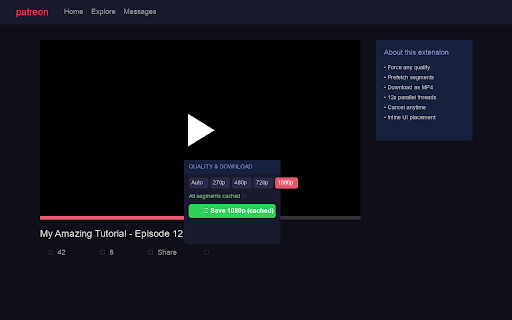
This extension enables Patreon users to force specific video playback resolutions, ranging from 270p to 1080p, without needing a page reload. It also allows users to download subscribed Patreon videos directly as MP4 files. By utilizing client-side TS-to-MP4 conversion and parallel download threads, it speeds up the saving process entirely within the browser.

Version:2.4.0
Size:194KiB
Last updated:

Overview

Installs

584

Rating

★ 3.7

6 reviews

Languages

1 locales

Includes English

Market analysis

Review-backed positioning, friction, and market signals for this Chrome extension.

No review samples found

Macro category

Video & Image Downloaders

Pricing friction

Low review signal

Complaint intensity

Low review signal

Listing & review signals
Observed signals from store listing text and review samples.

Listing positioning

The store listing positions this extension as a dedicated utility tool for Patreon subscribers to take full control of their video playback and download experiences. It highlights features like forced resolution selection and one-click MP4 downloads directly within the Patreon post interface. Additionally, the listing emphasizes technical advantages like fast parallel downloading and entirely local browser-based processing.

Inferred product pattern

Client-side media scraper and file converter designed specifically for host-specific video player APIs.

Review-backed pain points

Review-backed pain points are not available as there are currently no reviews for this extension.

Observed feature gaps

No observed feature gaps could be identified due to the lack of user review data.

Tags
Patreon DownloaderVideo Quality ControlMP4 Converter
Target users

- Patreon subscribers

- Offline video viewers

- Users with unstable internet connections

Primary use cases

- Downloading Patreon creator videos for offline playback

- Forcing high video quality on slow internet connections to prevent buffering

Positive themes

- Review-backed data is not available.

Negative themes

- Review-backed data is not available.

Observed friction

- No pricing friction is reported. The extension is listed as free to use, though review-backed confirmation is unavailable.

Evidence boundary: The analysis is based entirely on the developer's official Chrome Web Store listing, feature documentation, and technical breakdown. The analysis is limited by the complete absence of user reviews, public rating data, or active discussion threads.
Complaint summaries
Review-backed complaint signals grouped by operational area.

Support

No support or customer service complaints have been reported.

Reliability

No performance or reliability complaints have been reported yet.

Privacy

No privacy complaints have been reported. The developer claims all video processing and caching happen locally inside the user's browser.

Access & pricing

- Free usage observed

- No account requirement observed

- Free plan or free usage claimed

Store listing facts

Listing assets

- Screenshots: 1

- Videos: 0

- Languages: 1

Trust signals

- Privacy policy

- Developer contact

- Official website

Store metadata

- Version: 2.4.0

- Size: 194KiB

- Last updated:

Listing SEO keywords

Search intent keywords
Keyword signals for evaluating how users may discover, compare, or search for this extension category.

Core discovery

how to download patreon videospatreon video downloaderforce video quality patreonpatreon mp4 downloader

Comparison

patreon downloader vs yt-dlpbest patreon video downloader chrome

Problem

patreon video plays in low qualitycannot download patreon videopatreon video player buffering

Alternative

patreon download toolpatreon quality changer

Similar extensions

Jump to related discovery paths:

Screenshots

Patreon Video Quality & Download screenshot

Links

Recommended Chrome extensions

Related listings from the same category, trending peers, and the same publisher portfolio.

Browse entertainment