Video Controls for TikTok icon

Video Controls for TikTok Chrome Extension Analysis

Niche Lifestyle & Gaming Hacks

Chrome extension ID: epmobcfgbmjijkhpimkmjhelcjkdfcoj

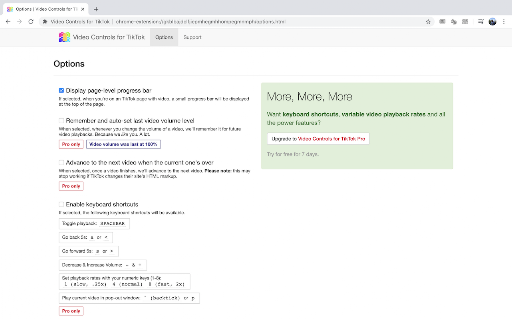
This extension provides enhanced playback controls for TikTok videos on desktop browsers. Key features include keyboard shortcuts for volume and playback rate, volume memory, and auto-advance functionality.

Developer:GeorgeMike.com
Version:1.0.6
Size:306KiB
Last updated:

Overview

Installs

1K+

Rating

★ 3.9

22 reviews

Languages

1 locales

Includes English

Market analysis

Review-backed positioning, friction, and market signals for this Chrome extension.

Backed by review samples

Macro category

Niche Lifestyle & Gaming Hacks

Pricing friction

Moderate review signal

Complaint intensity

Moderate review signal

Listing & review signals
Observed signals from store listing text and review samples.

Listing positioning

The product is positioned as a utility to enhance the TikTok desktop experience by adding advanced playback controls and video downloading capabilities. It emphasizes keyboard shortcuts, pop-out windows, and automated volume settings.

Inferred product pattern

A niche utility extension for TikTok desktop users that adds missing player functionality, currently facing maintenance and monetization criticisms.

Review-backed pain points

Users report bugs where certain keys do not work, features like auto-advance breaking, and frustration over features like volume memory being behind a paywall.

Observed feature gaps

Requests for video quality selection (e.g., 360p/720p), a mute key (M), and playback speed memory.

Tags
TikTok ControlsVideo PlayerKeyboard ShortcutsVideo Downloader
Target users

- TikTok desktop users

- Heavy video consumers

- Users seeking enhanced playback control

Primary use cases

- Controlling TikTok video playback with keyboard shortcuts

- Watching TikTok videos in pop-out windows

- Automating video progression

Positive themes

- Useful pop-out and fullscreen modes

- Convenient auto-advance feature

- Improved playback control via keyboard

Negative themes

- Bugs in keyboard shortcut functionality

- Unreliability in recent updates

- Features requiring payment

Observed friction

- Free-tier complaints detected

- Performance complaints detected

- Users expressed frustration that basic features, specifically remembering volume levels, require payment.

Evidence boundary: Analysis of store listing features and user reviews highlighting bugs, feature requests, and monetization feedback. Limited number of reviews and a developer note indicating the product is no longer actively maintained.
Complaint summaries
Review-backed complaint signals grouped by operational area.

Support

No direct support complaints, but users are asking for updates/maintenance due to a lack of active maintenance from the developer.

Reliability

Users reported bugs with keyboard shortcuts, issues with volume muting, and the auto-advance feature breaking.

Privacy

No privacy complaints observed.

Access & pricing

- Free entry with paid features

- No account requirement observed

- Limited free usage observed

Store listing facts

Listing assets

- Screenshots: 1

- Videos: 0

- Languages: 1

Trust signals

- Privacy policy

- Developer contact

- Official website

Store metadata

- Version: 1.0.6

- Size: 306KiB

- Last updated:

Listing SEO keywords

Search intent keywords
Keyword signals for evaluating how users may discover, compare, or search for this extension category.

Core discovery

TikTok video controlsTikTok keyboard shortcutsTikTok player enhancementTikTok video downloader

Comparison

TikTok playerTikTok desktop controls

Problem

TikTok volume controlTikTok playback speedTikTok skip video

Alternative

TikTok video enhancerTikTok desktop player

Similar extensions

Jump to related discovery paths:

Screenshots

Video Controls for TikTok screenshot

Links

Recommended Chrome extensions

Related listings from the same category, trending peers, and the same publisher portfolio.

Browse social