Marble: Automatically Organized Tab Groups icon

Marble Chrome Extension Analysis

Tab & Bookmark Productivity

Store listing title: Marble: Automatically Organized Tab Groups

Chrome extension ID: faadmipaelbkbdfjkfpiiomoplihjhdm

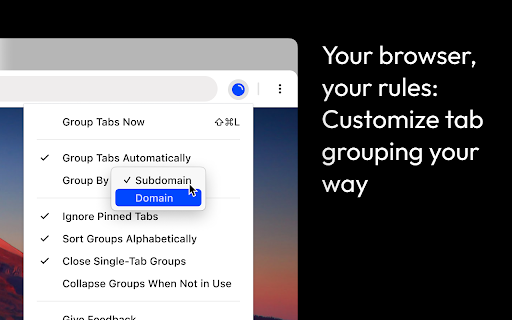
Marble is a Chrome extension designed to automate tab management. It organizes open tabs into color-coded, domain-specific clusters to help users navigate multiple open websites more efficiently.

Developer:Mr Violets
Version:1.2.2
Size:36.55KiB
Last updated:

Overview

Installs

2K+

Rating

★ 4.5

26 reviews

Languages

1 locales

Includes English

Market analysis

Review-backed positioning, friction, and market signals for this Chrome extension.

Backed by review samples

Macro category

Tab & Bookmark Productivity

Pricing friction

Low review signal

Complaint intensity

Moderate review signal

Listing & review signals
Observed signals from store listing text and review samples.

Listing positioning

Marble positions itself as a solution for browser clutter by automatically grouping tabs based on their domain or subdomain. It emphasizes a clean, structured, and easily navigable workspace through intelligent sorting and visual grouping.

Inferred product pattern

A utility-based automation tool that leverages Chrome's native Tab Grouping API to enhance browser organization.

Review-backed pain points

Users reported that the extension can overwrite existing manual tab groups and inadvertently ungroup pinned tabs. There are also reports of conflicts when using other window-merging or tab-management extensions.

Observed feature gaps

Users have requested manual group naming, custom URL/regex rulesets, alphabetical sorting, vertical tab views, and the ability to hide group labels.

Tags
Tab OrganizerBrowser ProductivityAutomatic Tab GroupingWorkflow Automation
Target users

- Heavy browser users

- Researchers

- Multi-taskers

- Professionals with high tab counts

Primary use cases

- Automated domain-based tab organization

- Visual tab management

- Reducing browser tab clutter

Positive themes

- Effective automatic grouping

- Simplicity of use

- Visual organization via color-coded groups

Negative themes

- Destructive grouping behavior

- Interference with pinned tabs

- Extension interoperability issues

Observed friction

- No pricing information or friction observed in the provided data.

Evidence boundary: Data extracted from the Chrome Web Store listing description and a collection of user reviews highlighting both functionality and technical conflicts. The review sample size is small (24 reviews), and monetization/pricing details are not explicitly stated in the provided data.
Complaint summaries
Review-backed complaint signals grouped by operational area.

Support

No support or account-related complaints observed.

Reliability

Reliability issues identified regarding the extension overriding pinned tabs and conflicting with other browser extensions.

Privacy

No privacy or security complaints observed.

Access & pricing

- No clear monetization signal

- No account requirement observed

- No clear pricing signal

Store listing facts

Listing assets

- Screenshots: 4

- Videos: 0

- Languages: 1

Trust signals

- Developer contact

Store metadata

- Version: 1.2.2

- Size: 36.55KiB

- Last updated:

Listing SEO keywords

Search intent keywords
Keyword signals for evaluating how users may discover, compare, or search for this extension category.

Core discovery

automatic tab groupingorganize tabs by domainbrowser tab managertab organizer extension

Comparison

Google Labs tab groupingtab management extensions

Problem

cluttered browsermessy tabstoo many tabs

Alternative

Tab ManagerWorkonaToby

Similar extensions

Jump to related discovery paths:

Screenshots

Marble: Automatically Organized Tab Groups screenshot

Recommended Chrome extensions

Related listings from the same category, trending peers, and the same publisher portfolio.

Browse workflow