QuickType icon

QuickType Chrome Extension Analysis

Automation & Workflow Efficiency

Chrome extension ID: fcbahajcdinlpiagpafpkhofpeadocbh

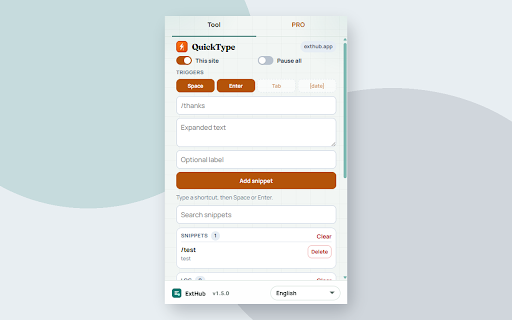
QuickType is a browser-based utility that allows users to create custom shortcuts for frequently used text. When a defined shortcut is typed into a browser field followed by a trigger key, the extension automatically replaces it with the pre-saved long-form text.

Developer:mayzervan9
Version:1.5.0
Size:199KiB
Last updated:

Overview

Installs

0

Rating

0 reviews

Languages

1 locales

Includes English

Market analysis

Review-backed positioning, friction, and market signals for this Chrome extension.

No review samples found

Macro category

Automation & Workflow Efficiency

Pricing friction

Low review signal

Complaint intensity

Low review signal

Listing & review signals
Observed signals from store listing text and review samples.

Listing positioning

QuickType positions itself as a privacy-focused text expansion tool for Chrome and Edge. It emphasizes local-only storage and a simplified user experience that requires no accounts or remote servers.

Inferred product pattern

Local-only text expansion utility.

Review-backed pain points

Review-backed data is not available.

Observed feature gaps

No feature gaps identified; the extension is positioned as a minimal, focused utility.

Tags
Text ExpanderProductivity ToolShortcut Utility
Target users

- Content creators

- Customer support agents

- Power users

- General web users

Primary use cases

- Email templates

- Frequently used phrases

- Professional signatures

- Common data entry

Positive themes

No positive theme data.

Negative themes

No negative theme data.

Observed friction

- None; the extension is marketed as free and fully local.

Evidence boundary: Analysis is based on the store listing description, developer claims regarding local storage, and the absence of user reviews. Evidence is derived solely from the provided store listing text, as there are no user reviews to substantiate real-world performance.
Complaint summaries
Review-backed complaint signals grouped by operational area.

Support

No support complaints available.

Reliability

No reliability complaints available.

Privacy

No privacy complaints available.

Access & pricing

- Free usage observed

- No account requirement observed

- Free plan or free usage claimed

Store listing facts

Listing assets

- Screenshots: 1

- Videos: 0

- Languages: 1

Trust signals

- Privacy policy

- Developer contact

- Official website

- Support link

Store metadata

- Version: 1.5.0

- Size: 199KiB

- Last updated:

Listing SEO keywords

Search intent keywords
Keyword signals for evaluating how users may discover, compare, or search for this extension category.

Core discovery

text expander chrome extensionshortcut text replacerbrowser text shortcuts

Comparison

text expander alternativesfree text expander

Problem

typing efficiencyrepetitive typing

Alternative

text snippet toolautomation tools for chrome

Similar extensions

Jump to related discovery paths:

Screenshots

QuickType screenshot

Links

Recommended Chrome extensions

Related listings from the same category, trending peers, and the same publisher portfolio.

Browse tools