Anti-CORS, anti-CSP icon

Anti-CORS, anti-CSP Chrome Extension Analysis

Developer & Designer Tools

Chrome extension ID: fcbmpcbjjphnaohicmhefjihollidgkp

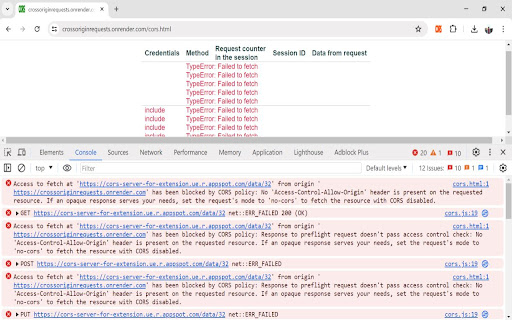
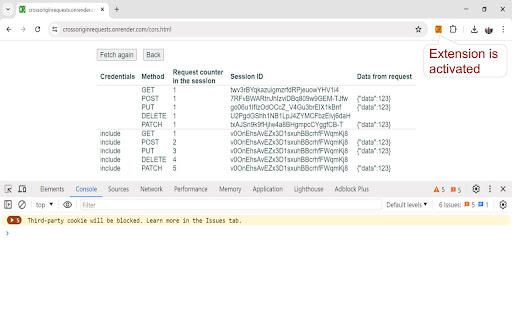
This browser extension allows developers to disable CORS and CSP policies on a per-site basis to facilitate cross-origin requests. It requires no configuration, operates without a complex UI, and is designed to simplify testing of web applications against backend services with differing hostnames.

Version:0.0.9
Size:42.2KiB
Last updated:

Overview

Installs

5K+

Rating

4.1

15 reviews

Languages

1 locales

Includes English

Market analysis

Review-backed positioning, friction, and market signals for this Chrome extension.

Backed by review samples

Macro category

Developer & Designer Tools

Pricing friction

Low review signal

Complaint intensity

Moderate review signal

Listing & review signals
Observed signals from store listing text and review samples.

Listing positioning

The extension positions itself as an effortless, domain-specific solution for developers needing to bypass CORS and CSP restrictions during local development. It emphasizes security by limiting overrides to selected hostnames rather than applying changes globally.

Inferred product pattern

Single-purpose developer utility targeting a specific pain point in web development workflows.

Review-backed pain points

Some users report that the extension does not solve specific security errors related to cross-origin iframe access, suggesting it may not handle all browser security contexts.

Observed feature gaps

The extension lacks a user interface and granular configuration, which some power users might require for complex edge cases.

Tags
CORSCSPWeb DevelopmentDebuggerBrowser Security
Target users

- Web Developers

- API Developers

- Frontend Engineers

Primary use cases

- Bypassing CORS errors in development environments

- Disabling Content Security Policy for debugging

- Testing REST services on different hostnames

Positive themes

- Ease of use

- Effective out-of-the-box functionality

- Simple, no-nonsense design

Negative themes

- Failure to bypass specific cross-origin iframe security errors

- General 'does not work' reports

Observed friction

- None; the extension is free and open-source.

Evidence boundary: Evidence is derived from the extension's functional claims, open-source repository documentation, and a mix of positive and critical user reviews. The sample size is small and reflects a binary 'works/does not work' sentiment without deep technical context on the failures.
Complaint summaries
Review-backed complaint signals grouped by operational area.

Support

No specific support complaints; negative feedback is limited to functional effectiveness.

Reliability

Minor reports of the extension failing to solve specific iframe-related cross-origin errors.

Privacy

None observed.

Access & pricing

- Free usage observed

- No account requirement observed

- Free plan or free usage claimed

Store listing facts

Listing assets

- Screenshots: 2

- Videos: 0

- Languages: 1

Trust signals

- Developer contact

- Official website

Store metadata

- Version: 0.0.9

- Size: 42.2KiB

- Last updated:

Listing SEO keywords

Search intent keywords
Keyword signals for evaluating how users may discover, compare, or search for this extension category.

Core discovery

CORS bypass extensiondisable CSP chromeCORS policy solvercross origin developmentbrowser dev tools

Comparison

CORS unblockerallow-control-allow-origin chrome

Problem

CORS errorblocked by CORS policyCSP violation

Alternative

CORS proxycustom headers extension

Similar extensions

Jump to related discovery paths:

Screenshots

Anti-CORS, anti-CSP screenshot

Links

Recommended Chrome extensions

Related listings from the same category, trending peers, and the same publisher portfolio.

Browse developer
Keep scrolling down to load contents of a web page icon

Keep scrolling down to load contents of a web page

marian.caikovski

Automatically scroll a web page down to reach its bottom, preload all its contents and use Ctrl+F search in the entire page

Installs

5K+

Rating

4.9

Cookie-Editor icon

Cookie-Editor

cgagnier

Simple yet powerful Cookie Editor that allow you to quickly create, edit and delete cookies without leaving your tab.

Installs

2.0M+

Rating

4.4

Chromebook Recovery Utility icon

Chromebook Recovery Utility

google.com

Create recovery media for your Chromebook.

Installs

2.0M+

Rating

2.6

CRXLauncher icon

CRXLauncher

CRXLauncher

Effortlessly Launch Chrome Extensions with CRXLauncher

Installs

1.0M+

Rating

4.6

Stylus icon

Stylus

stylus.openstyles

Redesign the web with Stylus, a user styles manager. Stylus allows you to easily install themes and skins for many popular sites.

Installs

1.0M+

Rating

4.5

SEOquake: On-Page SEO Checker icon

SEOquake: On-Page SEO Checker

SEOquake

Run page-level SEO audits, check technical issues, analyze links and keyword density, and view Semrush metrics.

Installs

1.0M+

Rating

4.5

Similarweb - Website Traffic, AI Traffic & SEO Checker icon

Similarweb - Website Traffic, AI Traffic & SEO Checker

Similarweb

Instant website analysis, AI traffic insights, and SEO metrics at your fingertips.

Installs

1.0M+

Rating

4.6

Eye Dropper icon

Eye Dropper

Eye Dropper

Pick colors from any website.

Installs

1.0M+

Rating

4.3

Lighthouse icon

Lighthouse

lighthouse-extension-owners

Lighthouse is an open-source, automated tool for improving the performance, quality, and correctness of your web apps.

Installs

1.0M+

Rating

4.4

Topaz SigPlusExtLite Extension icon

Topaz SigPlusExtLite Extension

Topaz Systems Inc

The Topaz SigPlusExtLite Chrome Extension enables users to capture signatures on a wide variety of Topaz signature pads.

Installs

1.0M+

Rating

4.0