utf-8 and unicode characters icon

utf-8 and unicode characters Chrome Extension Analysis

Niche Lifestyle & Gaming Hacks

Chrome extension ID: fcemphgmjnjpmmdhcedhjiegickfbiia

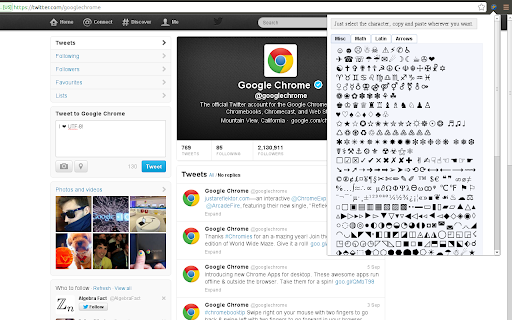
This extension is a lightweight Unicode character palette that allows users to access a wide array of symbols directly in their browser. It enables quick copying of glyphs to be used in tweets, blog posts, or messages. The rendering of these symbols relies on the fonts installed locally on the user's operating system.

Developer:codexico
Version:3.1
Size:79.91KiB
Last updated:

Overview

Installs

9K+

Rating

3.8

50 reviews

Languages

1 locales

Includes English

Market analysis

Review-backed positioning, friction, and market signals for this Chrome extension.

Backed by review samples

Macro category

Niche Lifestyle & Gaming Hacks

Pricing friction

Low review signal

Complaint intensity

Moderate review signal

Listing & review signals
Observed signals from store listing text and review samples.

Listing positioning

The store listing positions the extension as a simple, open-source repository of cool UTF-8 characters and emoticons to copy and paste. It highlights compatibility for modern operating systems and suggests specific third-party fonts to install for optimal rendering. Links to its GitHub repository and Firefox counterpart are provided to establish transparency.

Inferred product pattern

Unmonetized open-source glyph container relying on host-system font packages.

Review-backed pain points

The most significant user pain point is the unintuitive activation trigger, with users reporting they must hold down the mouse button on the extension icon to load it. The lack of a character search bar creates friction, forcing users to manually scan cluttered sections to locate desired symbols. Additionally, rendering dependency on system fonts leads to broken characters for many Windows users.

Observed feature gaps

A search bar to lookup glyphs by Unicode name is highly requested by users as a faster alternative to visual searching. Additionally, users noted a lack of filtering options to collapse categories, as well as an omission of standard international accents and umlauts in favor of decorative emoticons.

Tags
Unicode CharactersEmoji Copy PasteCool SymbolsText Decorator
Target users

- Social media content creators

- Casual web users seeking custom emoticons

- Bloggers using platforms like Twitter and WordPress

Primary use cases

- Copying decorative emoticons and stars for social media messages

- Finding unusual Unicode glyphs to paste into web editors

Positive themes

- Wide selection of cute emoticons and unique text symbols

- Helpful developer transparency regarding rendering limitations and font installation

Negative themes

- Clunky interface requiring a prolonged mouse click to register and load

- Absence of a text-search function to find symbols by keyword

- Rendering failures showing empty squares or unrecognized symbols on older operating systems

- Failure of the extension interface to launch on specific platforms like Chromebooks

Observed friction

- Performance complaints detected

- No pricing friction was identified, as the extension is entirely free, open-source, and does not promote any paid tiers or features.

Evidence boundary: The analysis is drawn from the public store description, developer notes about system font requirements, and 10 user reviews highlighting usability bugs, rendering limitations, and the lack of a search feature. The sample reviews are historical (ranging from 2014 to 2022) and may reflect issues with older versions of Google Chrome or legacy operating systems.
Complaint summaries
Review-backed complaint signals grouped by operational area.

Support

There are no complaints regarding account creation, billing, or refunds, as the product operates entirely client-side without registration.

Reliability

Users experienced issues where the extension interface would not load at all on Chrome or Chromebook setups, or would fail to display correctly on Chromium-based forks like Vivaldi. Font fallback errors frequently cause characters to render as unrecognized boxes on Windows 7.

Privacy

No privacy or data-harvesting concerns were reported by users.

Access & pricing

- Free usage observed

- No account requirement observed

- Free plan or free usage claimed

Store listing facts

Listing assets

- Screenshots: 1

- Videos: 0

- Languages: 1

Trust signals

- Developer contact

- Official website

Store metadata

- Version: 3.1

- Size: 79.91KiB

- Last updated:

Listing SEO keywords

Search intent keywords
Keyword signals for evaluating how users may discover, compare, or search for this extension category.

Core discovery

unicode copy paste extensionutf8 characters list chromecool symbols to copy

Comparison

unicode extension vs emoji keyboard

Problem

unrecognized unicode characters windows 7how to copy paste emojis on laptop

Alternative

cool text generatorglyphy copy pasteunicode symbol map

Similar extensions

Jump to related discovery paths:

Screenshots

utf-8 and unicode characters screenshot

Links

Recommended Chrome extensions

Related listings from the same category, trending peers, and the same publisher portfolio.

Browse social