CookyStream icon

CookyStream Chrome Extension Analysis

Automation & Workflow Efficiency

Chrome extension ID: ffgaiddifghkcdkhjmgmmlgmdplnemfo

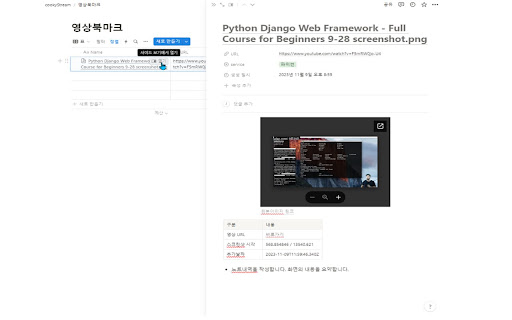
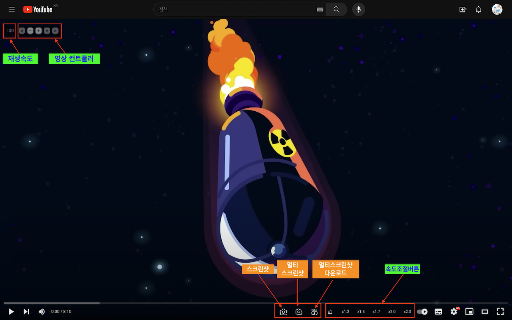
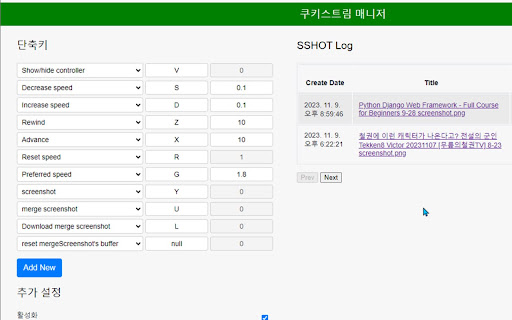
A browser extension designed to enhance video consumption through playback control and visual documentation. Users can adjust video speeds, capture screenshots, and sync bookmarks and images to external productivity apps.

Developer:cookyman
Version:0.6.8
Size:528KiB
Last updated:

Overview

Installs

357

Rating

5.0

9 reviews

Languages

1 locales

Includes 한국어

Market analysis

Review-backed positioning, friction, and market signals for this Chrome extension.

Backed by review samples

Macro category

Automation & Workflow Efficiency

Pricing friction

Low review signal

Complaint intensity

Low review signal

Listing & review signals
Observed signals from store listing text and review samples.

Listing positioning

CookyStream positions itself as a comprehensive tool for personalizing and managing HTML5 video content. It emphasizes productivity by offering speed control, screenshot capture, and direct integration with Notion and Google Drive for efficient record-keeping.

Inferred product pattern

A productivity-centric video utility that bridges video consumption with organized note-taking ecosystems.

Review-backed pain points

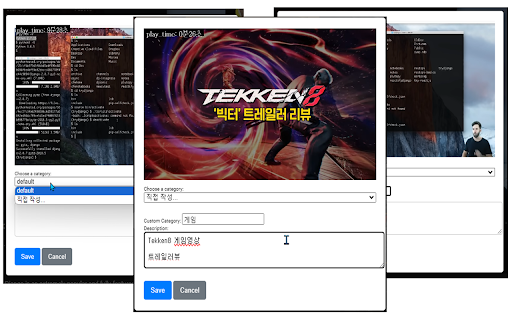
Users noted a cumbersome workflow where they must manually save a screenshot after capturing it, rather than an automatic save-on-capture feature.

Observed feature gaps

Reviewers suggested adding a dedicated function to clear or reset saved screenshot logs and requested more automation in the capture-to-save process.

Tags
Video Speed ControllerScreenshot ToolNotion IntegrationVideo Bookmarking
Target users

- Students

- Researchers

- Content Organizers

- Notion Users

Primary use cases

- Taking notes during video lectures

- Capturing visual references from streaming services

- Organizing video watch history and bookmarks

Positive themes

- Seamless Notion database integration

- Useful screenshot merging capabilities

- Customizable video rewind/fast-forward settings

Negative themes

- Manual save workflow friction

- Missing data management functions

Observed friction

- No pricing information or friction observed in the provided data.

Evidence boundary: Analysis based on the official product description and 7 high-rating user reviews. The total number of reviews is low, which may not reflect the full user sentiment distribution.
Complaint summaries
Review-backed complaint signals grouped by operational area.

Support

No support or account-related complaints observed.

Reliability

No reliability or performance complaints observed.

Privacy

No privacy or security complaints observed.

Access & pricing

- No clear monetization signal

- Login needed for core features

- No clear pricing signal

Store listing facts

Listing assets

- Screenshots: 5

- Videos: 1

- Languages: 1

Trust signals

- Developer contact

- Official website

Store metadata

- Version: 0.6.8

- Size: 528KiB

- Last updated:

Listing SEO keywords

Search intent keywords
Keyword signals for evaluating how users may discover, compare, or search for this extension category.

Core discovery

video speed controllervideo screenshot extensionNotion video bookmarkingHTML5 video controller

Comparison

Video Speed ControllerScreenshot Capture Tool

Problem

organize video notescapture video screenshotsvideo bookmarking tool

Alternative

Video note takerVideo management extension

Similar extensions

Jump to related discovery paths:

Screenshots

CookyStream screenshot

Links

Website: github.com

Videos: Watch

Recommended Chrome extensions

Related listings from the same category, trending peers, and the same publisher portfolio.

Browse entertainment