Simple Autoscroll icon

Simple Autoscroll Chrome Extension Analysis

Automation & Workflow Efficiency

Chrome extension ID: fgecljolecpahpphjjhfhgiimljpkodo

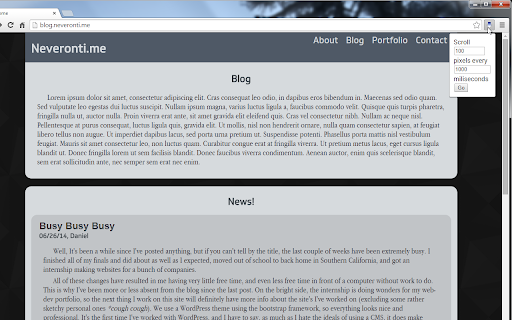
Simple Autoscroll is a Chrome extension that automates the scrolling process on web pages. Users can customize the scrolling speed using pixel and millisecond intervals and can even scroll upwards or loop the page for continuous reading.

Developer:danman113
Version:2.3
Size:71.42KiB
Last updated:

Overview

Installs

100K+

Rating

3.9

176 reviews

Languages

1 locales

Includes English

Market analysis

Review-backed positioning, friction, and market signals for this Chrome extension.

Backed by review samples

Macro category

Automation & Workflow Efficiency

Pricing friction

Low review signal

Complaint intensity

High review signal

Listing & review signals
Observed signals from store listing text and review samples.

Listing positioning

The product is positioned as a simple utility to enable hands-free reading of long articles by automating page scrolling. It emphasizes user control over speed, direction, and looping, while highlighting its open-source nature and privacy-conscious design.

Inferred product pattern

A lightweight productivity utility providing automated scroll control for hands-free web browsing.

Review-backed pain points

Users report that the extension frequently fails to work on certain browsers and websites, often requires a full page refresh to stop the scrolling, and demands broad permissions to 'read and change all data'.

Observed feature gaps

Reviewers suggested adding more visible start/stop/pause buttons in the main UI and better instructions for the available hotkeys.

Tags
Auto ScrollingReading AssistantProductivity Tool
Target users

- Long-form content readers

- Users without scroll wheels

- Hands-free browsing enthusiasts

Primary use cases

- Hands-free article reading

- Automated scrolling through long social feeds

- Reading from bottom to top

Positive themes

- Effective utility for reading long pages before recent updates

Negative themes

- Functionality breakage after updates

- Inability to stop scrolling without refreshing

- High permission requirements

Observed friction

- Performance complaints detected

- Privacy complaints detected

- No pricing friction observed as the extension is free.

Evidence boundary: Data compiled from store listing features and user reviews highlighting both core functionality and recent technical regressions. Reviewers report issues that may be specific to certain browser versions or website architectures.
Complaint summaries
Review-backed complaint signals grouped by operational area.

Support

No direct support complaints found, but users expressed frustration over unaddressed permission concerns.

Reliability

Significant reports of the extension not working on specific browsers (Brave, Opera) and failing to stop the scrolling action.

Privacy

Users have expressed concern regarding the broad 'Read and change all your data on all websites' permission request.

Access & pricing

- Free usage observed

- No account requirement observed

- Free plan or free usage claimed

Store listing facts

Listing assets

- Screenshots: 2

- Videos: 0

- Languages: 1

Trust signals

- Developer contact

- Official website

- Support link

Store metadata

- Version: 2.3

- Size: 71.42KiB

- Last updated:

Listing SEO keywords

Search intent keywords
Keyword signals for evaluating how users may discover, compare, or search for this extension category.

Core discovery

auto scroll extensionautomatic page scrollinghands free scrollingsmooth autoscroll

Comparison

autoscroll vs manual scroll

Problem

autoscroll not workingcannot stop autoscrollpage won't scroll

Alternative

auto scroll for chromereading assistant extension

Similar extensions

Jump to related discovery paths:

Screenshots

Simple Autoscroll screenshot

Links

Recommended Chrome extensions

Related listings from the same category, trending peers, and the same publisher portfolio.

Browse workflow