Pomodoro Timer & To-Do List Chrome Extension – Boost Focus & Productivity icon

Pomodoro Timer & To-Do List Chrome Extension – Boost Focus & Productivity Chrome Extension Analysis

Automation & Workflow Efficiency

Chrome extension ID: fhibnoojcpppgnhmflbejbdenpllndai

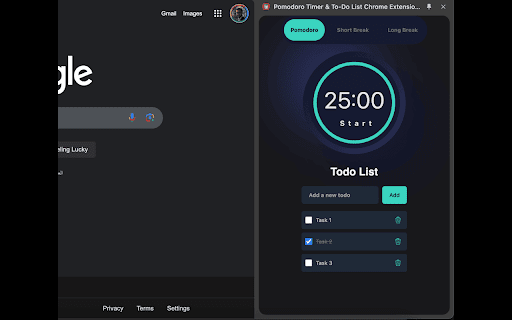
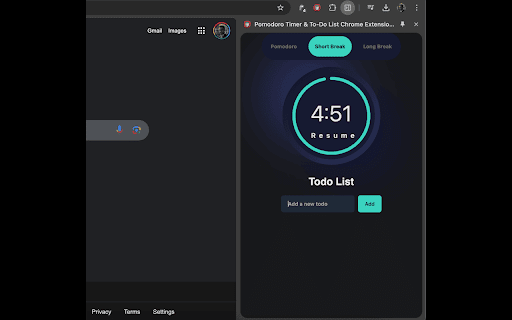
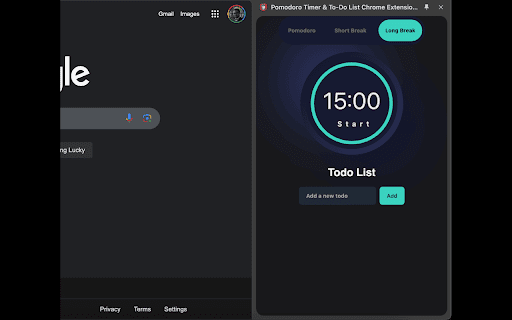
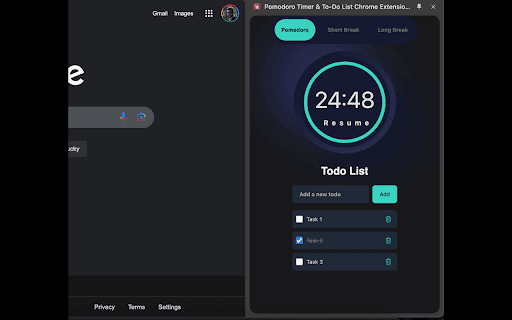
This is a browser-based productivity utility that allows users to set timed focus intervals and manage actionable to-do lists. It provides features like recurring tasks, sub-tasks, and time tracking to help users organize workflows directly within their browser.

Developer:HinnHabib
Version:1.0.4
Size:125KiB
Last updated:

Overview

Installs

855

Rating

3.8

5 reviews

Languages

1 locales

Includes English

Market analysis

Review-backed positioning, friction, and market signals for this Chrome extension.

Backed by review samples

Macro category

Automation & Workflow Efficiency

Pricing friction

Low review signal

Complaint intensity

Moderate review signal

Listing & review signals
Observed signals from store listing text and review samples.

Listing positioning

The extension positions itself as an all-in-one productivity suite combining Pomodoro timers with task management features. It emphasizes science-backed focus techniques and cross-device syncing to manage work, study, and daily checklists.

Inferred product pattern

Standard browser-based productivity dashboard extension.

Review-backed pain points

Users struggle with core reliability, specifically that the timer stops functioning when the popup window is closed, and report configuration issues regarding custom time settings.

Observed feature gaps

Lack of background execution persistence for the timer and UI/UX optimization regarding screen space usage.

Tags
Pomodoro TimerTo-Do ListTask ManagerFocus ToolTime Tracker
Target users

- Students

- Remote Workers

- Task-oriented Professionals

Primary use cases

- Time-boxed focus sessions

- Daily task management

- Habit tracking through recurring tasks

Positive themes

- Utility of integrated timer and task management

Negative themes

- Inability to save custom timer settings

- Timer functionality failing when the extension popup is closed

- High UI footprint on the screen

Observed friction

- Performance complaints detected

- None observed; the listing describes the tool as free.

Evidence boundary: Analysis based on limited user reviews from the Chrome Web Store, highlighting functional instability in the timer and task settings. The sample size is very small, representing only a fraction of the total user base, which may not capture the full range of product performance.
Complaint summaries
Review-backed complaint signals grouped by operational area.

Support

No official support feedback, but users are expressing confusion over basic customization features.

Reliability

The timer is reported as non-functional when the extension window is closed, undermining the core utility.

Privacy

No privacy-related complaints found.

Access & pricing

- Free usage observed

- No account requirement observed

- Free plan or free usage claimed

Store listing facts

Listing assets

- Screenshots: 4

- Videos: 0

- Languages: 1

Trust signals

- Privacy policy

- Developer contact

Store metadata

- Version: 1.0.4

- Size: 125KiB

- Last updated:

Listing SEO keywords

Search intent keywords
Keyword signals for evaluating how users may discover, compare, or search for this extension category.

Core discovery

Pomodoro timer chrome extensiontodo list extensionbrowser focus timertask manager chromeproductivity timer

Comparison

Pomodoro timer vs physical timerbest chrome task managers

Problem

timer stopped workingcannot save settings chrome extension

Alternative

Focusmate alternativesTodoist chrome extension

Similar extensions

Jump to related discovery paths:

Screenshots

Pomodoro Timer & To-Do List Chrome Extension – Boost Focus & Productivity screenshot

Links

Recommended Chrome extensions

Related listings from the same category, trending peers, and the same publisher portfolio.

Browse workflow
Color Picker - Web Development icon

Color Picker - Web Development

HinnHabib

Free eyedropper tool for capturing website colors. Features live color picking, plus color history.

Installs

7K+

Rating

4.3

Lottie Preview & Testing tool icon

Lottie Preview & Testing tool

HinnHabib

Preview & Test Lottie Animations directly in your browser

Installs

900

Rating

Free Download Manager icon

Free Download Manager

Free Download Manager.ORG

Free Download Manager integration with browser

Installs

3.0M+

Rating

4.2

TeraBox Download Assistant icon

TeraBox Download Assistant

terabox-developers

Supports screenshots, uploads, and other TeraBox features

Installs

3.0M+

Rating

2.3

夸克网盘-网页嗅探 icon

夸克网盘-网页嗅探

广州市动悦信息技术有限公司

识别到网页资源时,可一键存夸克网盘

Installs

3.0M+

Rating

1.7

Pop up blocker for Chrome™ - Poper Blocker icon

Pop up blocker for Chrome™ - Poper Blocker

dingosolutions

Block popups, ads, cookie requests, trackers, notifications, ads on social media & more. A clean browsing experience starts today.

Installs

2.0M+

Rating

4.8

AI Grammar Checker & Paraphraser – LanguageTool icon

AI Grammar Checker & Paraphraser – LanguageTool

lt-extension-publisher

Instantly Enhance Your Texts with LanguageTool’s Grammar Checker and Paraphrasing Tool

Installs

2.0M+

Rating

4.7

Sound Booster - increase volume up icon

Sound Booster - increase volume up

Sound-ultimate.com

Volume Booster helps boost sound video or music on any tab! Increase volume and bass booster, equalizer. Volume control.

Installs

2.0M+

Rating

4.5

Momentum icon

Momentum

Momentum

Transform your browser into a beautifully designed tab that helps you feel calm, keep focus, and stay energized.

Installs

2.0M+

Rating

4.5

Evernote Web Clipper icon

Evernote Web Clipper

Evernote

Use the Evernote extension to save things you see on the web into your Evernote account.

Installs

2.0M+

Rating

4.7