Axure Cloud Extension icon

Axure Cloud Extension Chrome Extension Analysis

Developer & Designer Tools

Chrome extension ID: fiidicpfcmmoobdpadllfjklbdegfjaf

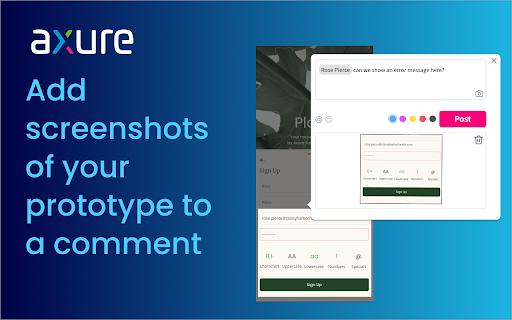
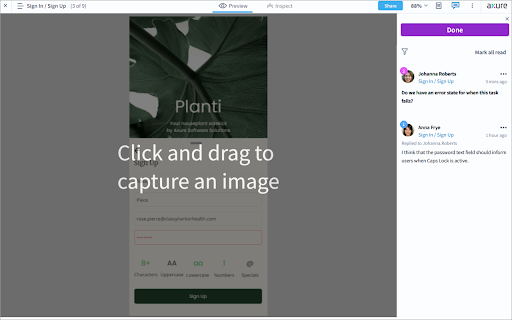
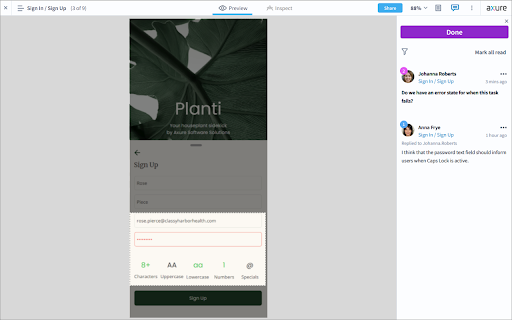
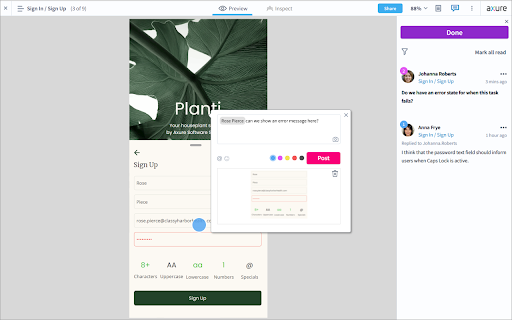
This is a specialized browser extension developed by Axure Software Solutions. It integrates a screenshot capture function into the Axure Cloud commenting interface specifically for prototype review workflows.

Version:1.2.1
Size:18.74KiB
Last updated:

Overview

Installs

10K+

Rating

3.3

17 reviews

Languages

1 locales

Includes English (United States)

Market analysis

Review-backed positioning, friction, and market signals for this Chrome extension.

Backed by review samples

Macro category

Developer & Designer Tools

Pricing friction

Low review signal

Complaint intensity

Moderate review signal

Listing & review signals
Observed signals from store listing text and review samples.

Listing positioning

The extension is positioned as a productivity utility for Axure Cloud users to provide visual context in discussions. It claims to allow users to easily capture and attach screenshots of prototypes directly to comments using a camera icon.

Inferred product pattern

Proprietary ecosystem companion utility designed to add a specific functional capability to a paid SaaS platform.

Review-backed pain points

Users report difficulty finding the camera icon required to trigger the tool. There is also frustration regarding the inability to capture external web pages or upload existing images.

Observed feature gaps

Lack of support for capturing content outside of Axure Cloud, inability to upload local images to comments, and a lack of native integration within the core platform.

Tags
UX DesignPrototypingScreenshot ToolCollaboration
Target users

- UX Designers

- UI Designers

- Product Managers

- Axure RP Users

Primary use cases

- Adding visual context to prototype feedback

- Capturing specific prototype states for discussion

- Collaborating on UX design reviews within Axure Cloud

Positive themes

- Improved communication efficiency

- Ease of demonstrating specific prototype issues

Negative themes

- UI discoverability issues

- Restrictive capture scope

- Poor user experience

- Frustration with separate plugin requirement for paid software

Observed friction

- Performance complaints detected

- One reviewer expressed frustration that a tool with a high monthly fee requires an external plugin for basic interaction features.

Evidence boundary: Analysis based on official store listing and 8 sampled user reviews. The small number of reviews (17 total) provides a limited perspective on the overall user experience.
Complaint summaries
Review-backed complaint signals grouped by operational area.

Support

No direct support response complaints, but users expressed confusion and inability to use the product due to missing UI elements.

Reliability

Reports of UI breakage where zooming the layout prevents the user from panning the screen.

Privacy

No privacy or security complaints observed.

Access & pricing

- Free usage observed

- Login needed for core features

- Free plan or free usage claimed

Store listing facts

Listing assets

- Screenshots: 4

- Videos: 0

- Languages: 1

Trust signals

- Privacy policy

- Developer contact

- Official website

Store metadata

- Version: 1.2.1

- Size: 18.74KiB

- Last updated:

Listing SEO keywords

Search intent keywords
Keyword signals for evaluating how users may discover, compare, or search for this extension category.

Core discovery

Axure Cloud screenshotsAxure prototype feedbackUX design commenting tool

Comparison

Axure Cloud screenshot vs manual uploadAxure Cloud feedback tools

Problem

Axure Cloud camera icon missinghow to attach screenshots to Axure Cloud

Alternative

Axure Cloud screenshot alternativesUX prototype collaboration tools

Similar extensions

Jump to related discovery paths:

Screenshots

Axure Cloud Extension screenshot

Links

Recommended Chrome extensions

Related listings from the same category, trending peers, and the same publisher portfolio.

Browse workflow