WebSocket DevTools icon

WebSocket DevTools Chrome Extension Analysis

Developer & Designer Tools

Chrome extension ID: fmnaobbfmjaaaebelkacpmmmpaaefbod

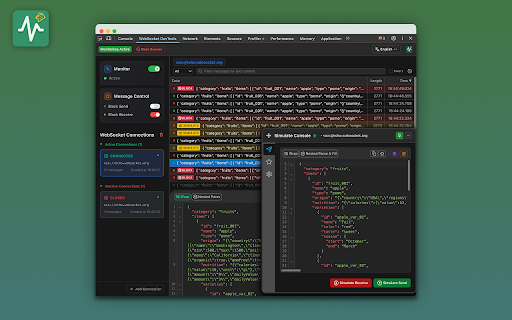
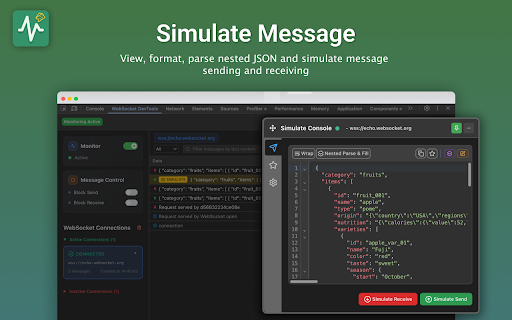
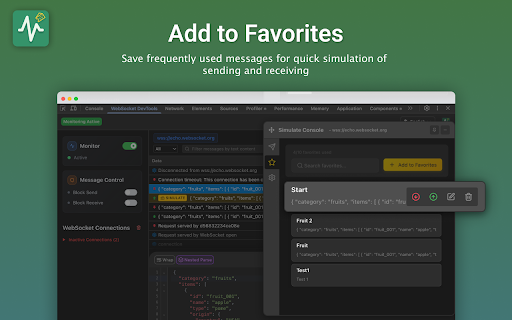
WebSocket DevTools is a developer utility designed to monitor, intercept, and manipulate WebSocket traffic. It offers features such as message simulation, background monitoring, and a favorites system for frequently used messages.

Developer:Brian Luo
Version:1.0.6
Size:471KiB
Last updated:

Overview

Installs

10K+

Rating

4.8

25 reviews

Languages

7 locales

Includes Deutsch, English, français, 中文(中国)...

Market analysis

Review-backed positioning, friction, and market signals for this Chrome extension.

Backed by review samples

Macro category

Developer & Designer Tools

Pricing friction

Low review signal

Complaint intensity

Moderate review signal

Listing & review signals
Observed signals from store listing text and review samples.

Listing positioning

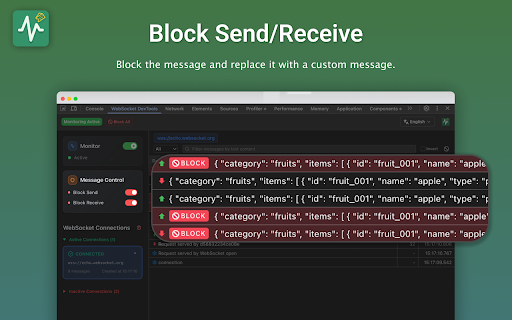
The product is positioned as a professional-grade WebSocket debugging tool that integrates natively with Chrome DevTools. It highlights advanced traffic control capabilities, including message simulation, blocking, and real-time monitoring.

Inferred product pattern

A developer-centric network utility providing enhanced visibility and control over WebSocket communication protocols.

Review-backed pain points

Users have reported that the tool occasionally fails to intercept messages after restarts or reconnections, and some experience UI freezing when playing live video.

Observed feature gaps

Users expressed interest in seeing specific reasons or error codes for why WebSocket connections are disconnected.

Tags
WebSocket DebuggerNetwork MonitoringDeveloper ToolsTraffic Control
Target users

- Web Developers

- Backend Engineers

- QA Engineers

- Network Protocol Testers

Primary use cases

- Real-time WebSocket message monitoring

- Simulating network issues and message patterns

- Intercepting and blocking WebSocket traffic

- Debugging client-server communication

Positive themes

- Effective message simulation

- Convenient DevTools integration

- Useful for solving WebSocket capture pain points

Negative themes

- Intermittent interception failures

- Discrepancies in socket detection compared to network tab

- Loss of message visibility after reconnections

Observed friction

- Performance complaints detected

- No pricing information or friction observed in the provided data.

Evidence boundary: Analysis based on store listing features and user reviews regarding debugging functionality, simulation, and intermittent technical issues. The analysis is based on a limited number of reviews.
Complaint summaries
Review-backed complaint signals grouped by operational area.

Support

Users have requested more direct communication channels or community groups for troubleshooting.

Reliability

Reports of intermittent issues with message interception and visibility following connection reconnections.

Privacy

No privacy or security complaints observed.

Access & pricing

- No clear monetization signal

- No account requirement observed

- No clear pricing signal

Store listing facts

Listing assets

- Screenshots: 4

- Videos: 1

- Languages: 7

Trust signals

- Privacy policy

- Developer contact

- Official website

Store metadata

- Version: 1.0.6

- Size: 471KiB

- Last updated:

Listing SEO keywords

Search intent keywords
Keyword signals for evaluating how users may discover, compare, or search for this extension category.

Core discovery

WebSocket debuggerWebSocket monitoring toolWebSocket traffic controlWebSocket message simulationWebSocket interceptor

Comparison

WebSocket debugger vs Chrome DevTools

Problem

WebSocket connection dropsWebSocket debugging issuesWebSocket message interception failure

Alternative

WebSocket inspectorNetwork traffic simulator

Similar extensions

Jump to related discovery paths:

Screenshots

WebSocket DevTools screenshot

Links

Recommended Chrome extensions

Related listings from the same category, trending peers, and the same publisher portfolio.

Browse developer