Grok to Markdown icon

Grok to Markdown Chrome Extension Analysis

AI & Writing Assistants

Chrome extension ID: galloooddjgocojmhlgfhnekfmfdphge

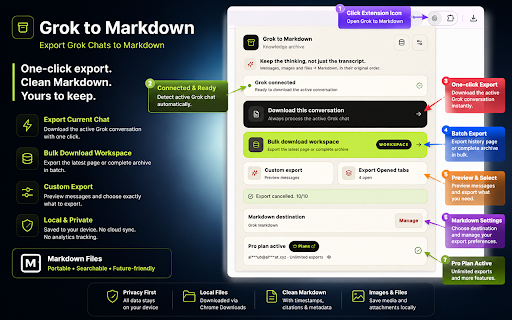
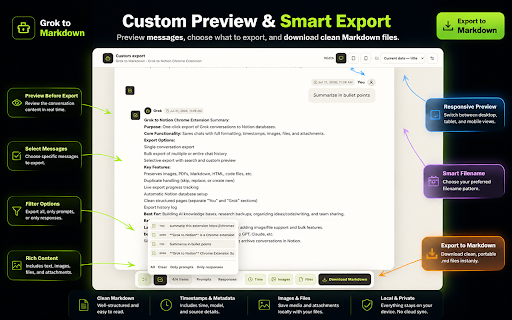
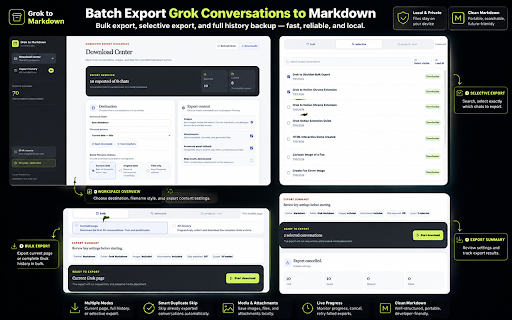
A Chrome extension designed to save and export Grok AI chat history. It supports one-click exports, batch processing, and multiple file formats including Markdown, HTML, and plain text, including image support.

Developer:aluoapp
Version:4.0.0
Size:406KiB
Last updated:

Overview

Installs

689

Rating

4.4

14 reviews

Languages

1 locales

Includes English

Market analysis

Review-backed positioning, friction, and market signals for this Chrome extension.

Backed by review samples

Macro category

AI & Writing Assistants

Pricing friction

Moderate review signal

Complaint intensity

Moderate review signal

Listing & review signals
Observed signals from store listing text and review samples.

Listing positioning

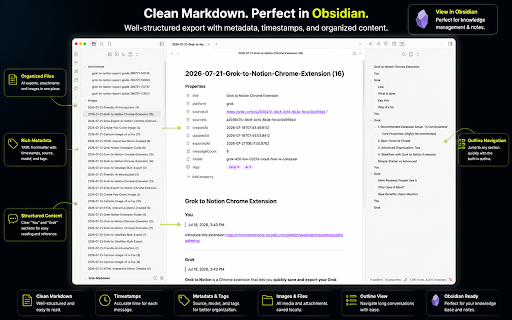
The product positions itself as a seamless tool for exporting Grok AI conversations into local formats like Markdown and HTML. It emphasizes batch downloading, data ownership, and easy integration into knowledge management workflows like Obsidian or Notion.

Inferred product pattern

A utility extension for converting AI chat web content into structured local files for knowledge management.

Review-backed pain points

Users report unreadable Markdown outputs caused by excessive XML tags, failed conversation fetches, and the inability to selectively export only the final response in a regenerated chat.

Observed feature gaps

Lack of selective export for regenerated answers and potential formatting issues within Markdown files.

Tags
AI ExportMarkdown ConverterKnowledge ManagementChat Backup
Target users

- Knowledge Workers

- Content Creators

- Researchers

- Project Managers

Primary use cases

- Archiving AI conversations

- Building personal knowledge bases

- Sharing AI-generated insights

Positive themes

- Reliable batch export with pagination support

- Seamless integration with Obsidian and Notion workflows

- Useful for full-text searching via plain text export

Negative themes

- Unreadable Markdown files due to Grok-specific XML-like tags

- Inclusion of all regenerated answers rather than just the final selected answer

- Highly limited functionality in the free version

Observed friction

- Free-tier complaints detected

- Performance complaints detected

- Users have expressed dissatisfaction with the limitations and perceived 'neutered' state of the free mode.

Evidence boundary: Evidence derived from store description regarding formats and features, and user reviews regarding formatting errors, free-tier limitations, and export behavior. The total number of reviews is relatively small (16 comments).
Complaint summaries
Review-backed complaint signals grouped by operational area.

Support

no-review fallback

Reliability

Some users reported failures when attempting to fetch conversations.

Privacy

no-review fallback

Access & pricing

- Free entry with paid features

- Account required for core usage

- Limited free usage observed

Store listing facts

Listing assets

- Screenshots: 4

- Videos: 0

- Languages: 1

Trust signals

- Privacy policy

- Developer contact

- Official website

- Support link

Store metadata

- Version: 4.0.0

- Size: 406KiB

- Last updated:

Listing SEO keywords

Search intent keywords
Keyword signals for evaluating how users may discover, compare, or search for this extension category.

Core discovery

Grok exportSave Grok chatGrok to MarkdownGrok history backupGrok to Obsidian

Comparison

ChatGPT to NotionGrok download extension

Problem

save Grok conversationbackup Grok AI chatsexport Grok to HTML

Alternative

AI chat exporterMarkdown chat downloader

Similar extensions

Jump to related discovery paths:

Screenshots

Grok to Markdown screenshot

Links

Recommended Chrome extensions

Related listings from the same category, trending peers, and the same publisher portfolio.

Browse tools
Export Gemini AI Chats to PDF icon

Export Gemini AI Chats to PDF

aluoapp

Instantly bulk export and convert your AI chats into clean PDF documents. Perfect for archiving, printing, and sharing.

Installs

7K+

Rating

4.3

Perplexity to obsidian - Batch Export icon

Perplexity to obsidian - Batch Export

aluojack

Bulk Export all your PerlexityAI conversations to markdown files with one click

Installs

2K+

Rating

4.3

HID Credential Management Extension icon

HID Credential Management Extension

hid-global-chrome-web-store

Browser extension for HID credential management solution.

Installs

2.0M+

Rating

1.3

Pie Adblock - A Powerful Free Ad Blocker icon

Pie Adblock - A Powerful Free Ad Blocker

Pie Extensions

Pie Adblock blocks ads & pop-ups, plus YouTube & Twitch video ads. You can customize your ad experience with Pie!

Installs

2.0M+

Rating

4.9

Google Dictionary (by Google) icon

Google Dictionary (by Google)

dictionary-extension-dev

View definitions easily as you browse the web.

Installs

2.0M+

Rating

4.4

AI Chat for Search icon

AI Chat for Search

AI Chat for Search Team

Display AI Chat response alongside search engine results

Installs

2.0M+

Rating

4.6

WPS浏览器助手:文档在线阅读编辑 icon

WPS浏览器助手:文档在线阅读编辑

金山PDF

PDF、Excel、Word、PPT等文档无需下载即可在线预览,还能对文档进行编辑、打印、转换等处理。

Installs

2.0M+

Rating

3.0

Planet Search icon

Planet Search

Free VPN Planet

Enchanced default search engine.

Installs

2.0M+

Rating

3.4

Lightshot (screenshot tool) icon

Lightshot (screenshot tool)

Skillbrains

Simple and convenient screenshot tool. Select an area, edit your screenshot and upload it to the server.

Installs

2.0M+

Rating

4.4

Screen Recorder & Screenshot App for Chrome | Scrnli icon

Screen Recorder & Screenshot App for Chrome | Scrnli

scrnli

Screen recorder for Chrome: capture, edit, share screenshots and videos instantly

Installs

1.0M+

Rating

4.7