StreamSpeed icon

StreamSpeed Chrome Extension Analysis

Automation & Workflow Efficiency

Chrome extension ID: gamoagmfeikdnkmoddkieabhajepkbpj

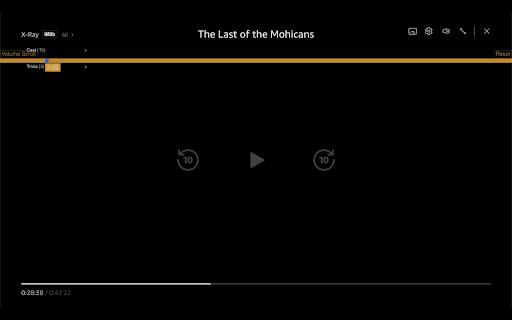
StreamSpeed is a Chrome extension designed to enhance streaming media consumption by allowing users to adjust video playback speed from 0.1x to 16x and control volume. It supports major platforms including Netflix, HBO Max, Amazon Prime Video, Disney+, and YouTube, offering controls via a slider, keyboard shortcuts, and an optional scroll-based volume feature.

Developer:gutbookvonnegut
Version:4.1.1
Size:39.66KiB
Last updated:

Overview

Installs

1K+

Rating

4.4

12 reviews

Languages

1 locales

Includes English (United States)

Market analysis

Review-backed positioning, friction, and market signals for this Chrome extension.

Backed by review samples

Macro category

Automation & Workflow Efficiency

Pricing friction

Low review signal

Complaint intensity

Moderate review signal

Listing & review signals
Observed signals from store listing text and review samples.

Listing positioning

The store listing positions StreamSpeed as a versatile tool for fine-tuning video playback speed and volume across popular streaming services like Netflix, YouTube, and Disney+. It highlights benefits ranging from efficient content consumption (speeding up audiobooks, DIY videos) to detailed analysis (slow motion replays) and convenient volume control.

Inferred product pattern

A browser extension designed to provide advanced control over video playback speed and volume for popular streaming services, aiming to enhance content consumption efficiency and analytical capabilities for users.

Review-backed pain points

Review-backed pain points include inconsistent functionality on certain streaming platforms, notably Disney+, and UI design flaws such as a visually disruptive stripe and slider overflow. Users also reported the extension interfering with normal browser scrolling functionality.

Observed feature gaps

Observed feature gaps include a lack of consistent compatibility across all promised streaming platforms (despite ongoing updates for fixes) and potential UI integration issues with native website designs or at extreme speed settings. The interference with standard browser scrolling indicates a gap in seamless user experience design.

Tags
Video Speed ControllerStreaming UtilityPlayback ControlVolume ControlContent Consumption
Target users

- Streamers and binge-watchers

- Learners consuming educational content or audiobooks

- Content analysts requiring slow-motion playback

- Users seeking enhanced control over media playback

Primary use cases

- Speeding up video content for quicker consumption or skipping ads

- Slowing down video to observe details in action scenes or magic tricks

- Adjusting video volume conveniently using mouse scroll, especially from a distance

- Enhancing overall control and efficiency for streaming media playback

Positive themes

- Effective and reliable functionality on various streaming platforms

- Successful operation where other speed controllers fail

- Utility for slow-motion replays and speeding through ads

- Works as advertised

Negative themes

- Incompatibility or intermittent issues with specific streaming services like Disney+

- Aesthetic and integration problems with the user interface (e.g., 'ugly orange stripe', slider overflow)

- Interference with native browser functionalities, such as vertical scrolling

Observed friction

- Performance complaints detected

- No payment observed or mentioned in the store listing or reviews. The product appears to be free, with an optional Ko-fi donation link.

Evidence boundary: The analysis is based on the store listing's short and long descriptions, update notes, and a sample of 10 user reviews. The analysis is based on a limited number of user reviews (12 comments total).
Complaint summaries
Review-backed complaint signals grouped by operational area.

Support

Review-backed data on support, account, or refund complaints is not available.

Reliability

Users reported reliability concerns, specifically noting that the extension does not consistently work on Disney+ and can interfere with the browser's vertical scrolling functionality.

Privacy

Review-backed data on privacy complaints is not available.

Access & pricing

- Free usage observed

- No account requirement observed

- Free plan or free usage claimed

Store listing facts

Listing assets

- Screenshots: 2

- Videos: 0

- Languages: 1

Trust signals

- Privacy policy

- Developer contact

Store metadata

- Version: 4.1.1

- Size: 39.66KiB

- Last updated:

Listing SEO keywords

Search intent keywords
Keyword signals for evaluating how users may discover, compare, or search for this extension category.

Core discovery

video playback speed controllerstreaming video enhanceryoutube speed controlnetflix speed adjustmentdisney plus speed changerprime video speedhbo max speedvolume control extensionslow motion videofast forward video

Comparison

StreamSpeed vsbest video speed controlleralternative video speed extension

Problem

streaming video too faststreaming video too slowcan't adjust netflix speedyoutube speed not workingdisney plus speed issuesvideo volume control problemslow motion replay issue

Alternative

video speed controller alternativenetflix speed up alternativeyoutube speed changer alternative

Similar extensions

Jump to related discovery paths:

Screenshots

StreamSpeed screenshot

Links

Recommended Chrome extensions

Related listings from the same category, trending peers, and the same publisher portfolio.

Browse entertainment
ZeroDelay icon

ZeroDelay

João Gustavo França

This extension syncs YouTube live streams in real-time by accelerating viewer-delayed streams caused by data reception delays.

Installs

100K+

Rating

4.9

Online video downloader - download video icon

Online video downloader - download video

konimatoan

Free online tool to download videos from the Internet. Downloading videos is easy! Video downloader for every platform.

Installs

100K+

Rating

3.4

FastSave icon

FastSave

wilosadi

Repost Instagram stories, save video, photo and Reels. Browse Instagram site like a mobile app.

Installs

100K+

Rating

3.4

TwoSeven Extension icon

TwoSeven Extension

twoseven.xyz

Opens up exciting new possibilities of watching together on twoseven.xyz

Installs

100K+

Rating

3.3

Elevate for Strava icon

Elevate for Strava

Thomas Champagne

Elevate your strava experience and goals! Track your fitness and progressions over time. Analyse deeper your activities. And more...

Installs

100K+

Rating

4.9

Better Lyrics (Lyrics for YouTube Music) icon

Better Lyrics (Lyrics for YouTube Music)

Boidushya

Enhance YouTube Music with beautiful time-synced lyrics, multilingual support, real-time translations and more

Installs

90K+

Rating

4.9

600% Sound Volume Booster icon

600% Sound Volume Booster

Aliaksandr

Tab audio booster (up to 600%). Optional Turbo: EQ, toolbar boost & higher cap; checkout in the extension when you upgrade.

Installs

90K+

Rating

4.6

YouTube LiveChat Flusher (Danmaku Chat) icon

YouTube LiveChat Flusher (Danmaku Chat)

_y_s

Revolutionize your YouTube viewing experience with Danmaku-style chat.

Installs

80K+

Rating

4.3

Ad Skipper for Prime Video [QVI] icon

Ad Skipper for Prime Video [QVI]

dogooodapp

Automatically block ads on Prime Video

Installs

80K+

Rating

4.3

YouTube No Translation icon

YouTube No Translation

YouGo

Keep YouTube content in its original language: titles, descriptions, audio... No more unwanted translations.

Installs

80K+

Rating

4.8