Font Finder icon

Font Finder Chrome Extension Analysis

Developer & Designer Tools

Chrome extension ID: gdloiclnenchnhcmapnomnlkjhggkjof

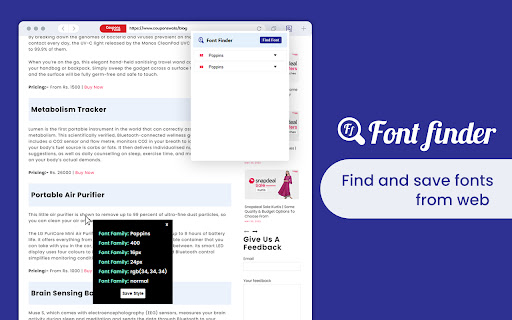
Font Finder is a browser extension that allows users to click on any text on a webpage to instantly inspect its CSS font properties and RGB color values. It includes functionality to capture and save font metadata, simplifying the process of replicating or analyzing website typography.

Version:1.3
Size:73.29KiB
Last updated:

Overview

Installs

10K+

Rating

4.3

12 reviews

Languages

54 locales

Includes Deutsch, English, English (United Kingdom), English (United States)...

Market analysis

Review-backed positioning, friction, and market signals for this Chrome extension.

Backed by review samples

Macro category

Developer & Designer Tools

Pricing friction

Low review signal

Complaint intensity

Moderate review signal

Listing & review signals
Observed signals from store listing text and review samples.

Listing positioning

The listing positions Font Finder as an essential utility for web developers, designers, and freelancers to extract precise typography and color styling from webpages. It highlights efficiency and ease of use, promising a quick workflow for identifying font families, sizes, weights, and line heights.

Inferred product pattern

Single-purpose web design utility extension.

Review-backed pain points

Users have reported frustration with the initial setup and lack of clear instructions on how to activate the tool within the browser environment.

Observed feature gaps

The extension lacks intuitive guidance for first-time users, leading to difficulties in finding the primary activation feature.

Tags
Font InspectorWeb DesignTypographyCSS HelperDeveloper Tool
Target users

- Web Developers

- UI/UX Designers

- Freelancers

Primary use cases

- Identifying font family and style

- Extracting RGB color codes

- Analyzing CSS layout specifications

- Saving font styles for project references

Positive themes

- Fast and efficient font recognition

- High utility for professional design and development workflows

- Ease of saving and copying styles

Negative themes

- Difficult onboarding and unclear usage instructions

- Poor user experience regarding extension initialization

Observed friction

- No pricing friction reported; the tool appears to be free to use.

Evidence boundary: Evidence is derived from Chrome Web Store user reviews and the product description. Positive sentiment is supported by professional users, while negative sentiment is limited to onboarding friction. Review sample size is relatively small, which may not capture the breadth of the user base experience.
Complaint summaries
Review-backed complaint signals grouped by operational area.

Support

Some users find the documentation and initial setup instructions inadequate.

Reliability

None reported.

Privacy

None reported.

Access & pricing

- No clear monetization signal

- No account requirement observed

- Free plan or free usage claimed

Store listing facts

Listing assets

- Screenshots: 1

- Videos: 0

- Languages: 54

Trust signals

- Privacy policy

- Developer contact

- Official website

Store metadata

- Version: 1.3

- Size: 73.29KiB

- Last updated:

Listing SEO keywords

Search intent keywords
Keyword signals for evaluating how users may discover, compare, or search for this extension category.

Core discovery

find font on websitechrome extension for fontscheck font family extensioncss inspector tool

Comparison

font finder vs whatfontbest font identifier chrome

Problem

cannot find font on websitehow to inspect font styles

Alternative

font identifier extensionsweb typography tools

Similar extensions

Jump to related discovery paths:

Screenshots

Font Finder screenshot

Links

Recommended Chrome extensions

Related listings from the same category, trending peers, and the same publisher portfolio.

Browse developer