Why Salesforce icon

Why Salesforce Chrome Extension Analysis

Developer & Designer Tools

Chrome extension ID: ghakkjfjpnhpggbkfkeplbefkipfoaod

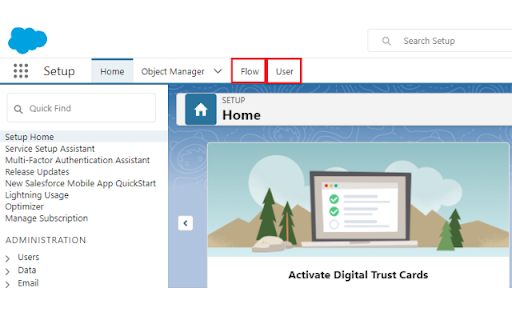
Why Salesforce is a productivity tool that adds customizable tabs to the Salesforce setup sidebar. It enables users to bypass deep-menu navigation by creating direct links to internal Salesforce objects, significantly reducing the time spent on repetitive typing and clicking.

Version:1.7.1
Size:255KiB
Last updated:

Overview

Installs

9K+

Rating

4.8

46 reviews

Languages

1 locales

Includes English (United States)

Market analysis

Review-backed positioning, friction, and market signals for this Chrome extension.

Backed by review samples

Macro category

Developer & Designer Tools

Pricing friction

Low review signal

Complaint intensity

Moderate review signal

Listing & review signals
Observed signals from store listing text and review samples.

Listing positioning

The extension positions itself as an essential utility for Salesforce administrators and developers to streamline navigation. It fills a perceived functional gap by allowing users to create custom, persistent tabs for frequently accessed areas like Flows and User settings within the Salesforce setup menu.

Inferred product pattern

Single-purpose developer utility providing UI overlays for SaaS platforms.

Review-backed pain points

The primary pain point is the breakage or incorrect configuration of pre-set default tabs, requiring users to manually update URL paths depending on their specific Salesforce org settings.

Observed feature gaps

Lack of environment-aware tab configurations (syncing issues between Sandbox vs. Production) and a missing import/export feature for saved tab configurations.

Tags
SalesforceProductivityWorkflowAdmin Tools
Target users

- Salesforce Administrators

- Salesforce Developers

- CRM Power Users

Primary use cases

- Adding custom sidebar tabs for Salesforce setup

- Reducing clicks for navigation

- Quick access to Flow and User management pages

Positive themes

- Increased navigation efficiency

- Customizable tab configurations

- High utility for daily CRM management

- Replaces tedious manual search

Negative themes

- Broken default links (specifically the User tab)

- URL path inconsistencies across different Salesforce environments

- Minor UI/Rendering issues with HTML/labels

Observed friction

- None; the extension appears to be free without observed pricing friction.

Evidence boundary: Evidence is drawn from 10 user reviews which highlight high satisfaction with the core utility offset by minor frustrations regarding URL configuration in varied Salesforce environments. Review data reflects a niche user base of Salesforce power users; technical issues are often user-fixable rather than fundamental software defects.
Complaint summaries
Review-backed complaint signals grouped by operational area.

Support

No official support complaints; users generally self-resolve broken links by manually editing URLs within the extension settings.

Reliability

Occasional reports of broken default links and display issues following browser or Salesforce platform updates.

Privacy

None observed.

Access & pricing

- Free usage observed

- No account requirement observed

- Free plan or free usage claimed

Store listing facts

Listing assets

- Screenshots: 1

- Videos: 1

- Languages: 1

Trust signals

- Privacy policy

- Developer contact

- Official website

Store metadata

- Version: 1.7.1

- Size: 255KiB

- Last updated:

Listing SEO keywords

Search intent keywords
Keyword signals for evaluating how users may discover, compare, or search for this extension category.

Core discovery

Salesforce productivity toolSalesforce sidebar extensionSalesforce flow shortcutCRM admin efficiency tool

Comparison

Salesforce inspector alternativeSalesforce navigation tools

Problem

Salesforce setup slow navigationSalesforce search repetitiveSalesforce UI pain points

Alternative

Salesforce browser extensions for admins

Similar extensions

Jump to related discovery paths:

Screenshots

Why Salesforce screenshot

Links

Recommended Chrome extensions

Related listings from the same category, trending peers, and the same publisher portfolio.

Browse developer
Salesforce Inspector Reloaded icon

Salesforce Inspector Reloaded

Thomas Prouvot

Productivity tools for Salesforce administrators and developers to inspect data and metadata directly from the Salesforce UI.

Installs

500K+

Rating

4.8

Axure RP Extension for Chrome icon

Axure RP Extension for Chrome

Axure Software Solutions, Inc.

An extension that allows viewing of locally published Axure RP prototypes (HTML files) from Google Chrome.

Installs

500K+

Rating

3.3

Angular DevTools icon

Angular DevTools

Angular

Angular DevTools extends Chrome DevTools adding Angular specific debugging and profiling capabilities.

Installs

400K+

Rating

3.7

daily.dev | Where developers discover what's next icon

daily.dev | Where developers discover what's next

Daily Dev Ltd.

Developer news, personalized to your stack, in every new tab. Join 400,000+ developers. Free and open source.

Installs

400K+

Rating

4.8

SelectorsHub icon

SelectorsHub

Sanjay Kumar | SelectorsHub Founder

Locators Plugin to Auto Generate and Verify Playwright Locators, XPath & CSS Selectors.

Installs

400K+

Rating

4.8

SAML-tracer icon

SAML-tracer

SimpleSAMLphp

A debugger for viewing SAML messages

Installs

400K+

Rating

4.5

CSS Peeper icon

CSS Peeper

CSS Peeper

Inspect website styles in seconds. Supercharge your workflow, and save hours of work.

Installs

400K+

Rating

4.1

Font Finder icon

Font Finder

unixeco

An easy-to-use font inspector to get CSS styles of the selected element

Installs

400K+

Rating

4.5

Netmirror Extension icon

Netmirror Extension

netmirror.art

Add, modify or remove a header for any request. https://netmirr.net/ Netmirror Mod Header (HTTP Headers) is an extension that can…

Installs

400K+

Rating

4.2

Fake Filler icon

Fake Filler

Fake Filler

A form filler that fills all inputs on a page with fake/dummy data.

Installs

400K+

Rating

4.4