Presentation editor PPTWork for PPT slides icon

Presentation editor PPTWork for PPT slides Chrome Extension Analysis

Automation & Workflow Efficiency

Chrome extension ID: glmfkanjkeedalikadkjlmijemmiknce

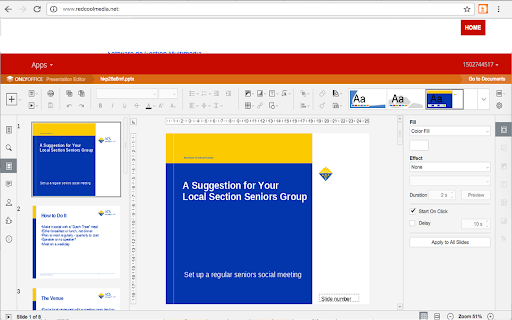
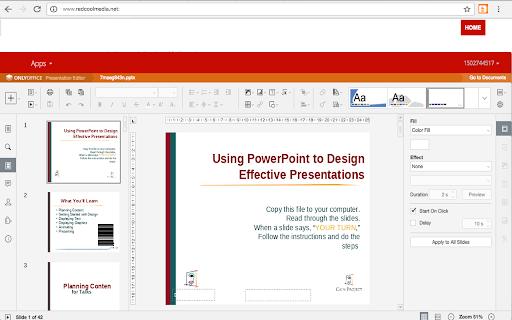
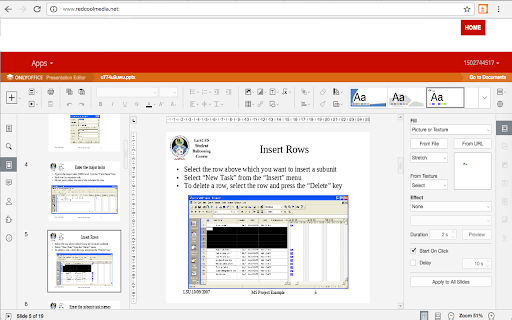
PPTWork is a Chrome extension providing an online environment to create, edit, and manage PPT, PPTX, and ODP files. It allows users to perform standard operations such as slide management, text formatting, and object manipulation directly in the browser.

Developer:RedcoolMedia
Version:1.9.8
Size:330KiB
Last updated:

Overview

Installs

8K+

Rating

4.1

28 reviews

Languages

18 locales

Includes Deutsch, English, Nederlands, Türkçe...

Market analysis

Review-backed positioning, friction, and market signals for this Chrome extension.

Backed by review samples

Macro category

Automation & Workflow Efficiency

Pricing friction

Low review signal

Complaint intensity

Moderate review signal

Listing & review signals
Observed signals from store listing text and review samples.

Listing positioning

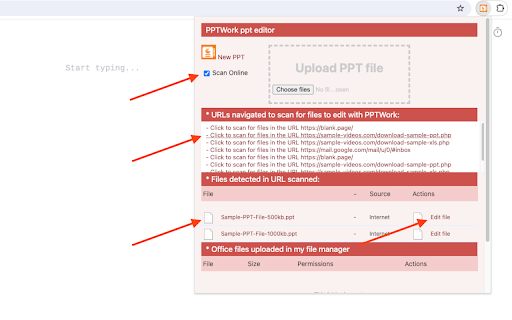
The product is positioned as an online presentation editor that replicates desktop-like editing capabilities within a browser. It highlights support for Microsoft PowerPoint and LibreOffice ODP formats and features a mechanism to scan web pages for editable presentation files.

Inferred product pattern

A web-based productivity tool that extends browser capabilities to allow for cloud-based presentation editing and file discovery.

Review-backed pain points

Users reported significant performance issues, specifically slow loading and slow creation of new presentations, as well as difficulties importing existing files.

Observed feature gaps

Reviews indicate a lack of specific expected features and the absence of a fullscreen editing mode.

Tags
PPT EditorPresentation ToolOnline SlidesOffice Utility
Target users

- Office workers

- Students

- Users requiring web-based presentation editing

Primary use cases

- Editing existing PPTX files online

- Creating new slide presentations in-browser

- Converting web-based presentations for editing

Positive themes

- User-friendly interface

- General usefulness

Negative themes

- Slow performance and loading times

- Limited feature set

- Lack of fullscreen mode

- Importing difficulties

Observed friction

- Performance complaints detected

- No pricing friction mentioned in available reviews.

Evidence boundary: Analysis based on the Chrome Web Store listing description and user reviews regarding performance and functionality. The analysis is limited by a small sample size of user reviews.
Complaint summaries
Review-backed complaint signals grouped by operational area.

Support

No support-related complaints were identified in the reviews.

Reliability

Users reported reliability issues regarding slow loading speeds and the inability to successfully import files.

Privacy

No privacy complaints were observed in the reviews.

Access & pricing

- No clear monetization signal

- No clear access signal

- No clear pricing signal

Store listing facts

Listing assets

- Screenshots: 4

- Videos: 1

- Languages: 18

Trust signals

- Privacy policy

- Developer contact

- Official website

Store metadata

- Version: 1.9.8

- Size: 330KiB

- Last updated:

Listing SEO keywords

Search intent keywords
Keyword signals for evaluating how users may discover, compare, or search for this extension category.

Core discovery

online PPT editoredit PPTX in browseronline presentation makerODP editor online

Comparison

PowerPoint online alternativeGoogle Slides alternative

Problem

slow PPT editoronline slide editor lag

Alternative

Google SlidesMicrosoft PowerPoint OnlineLibreOffice Online

Similar extensions

Jump to related discovery paths:

Screenshots

Presentation editor PPTWork for PPT slides screenshot

Links

Recommended Chrome extensions

Related listings from the same category, trending peers, and the same publisher portfolio.

Browse workflow