NotebookLM Style Prompter icon

NotebookLM Style Prompter Chrome Extension Analysis

AI & Writing Assistants

Chrome extension ID: gnabmloccaeppfcanmpblacgcjhfnchm

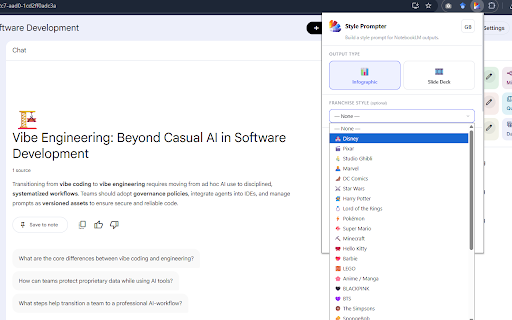
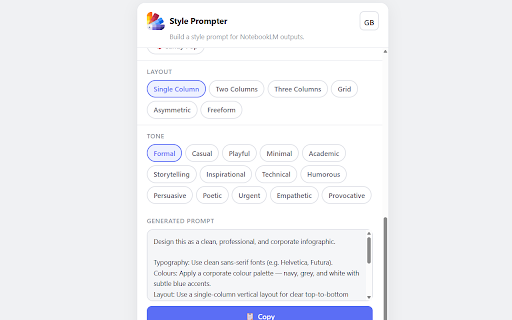
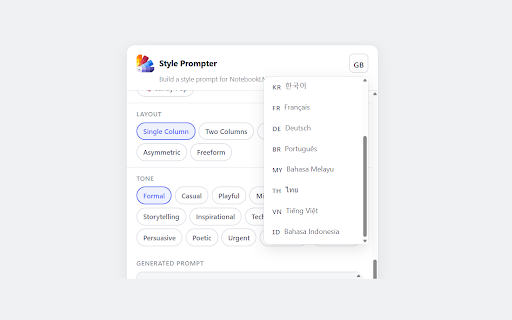
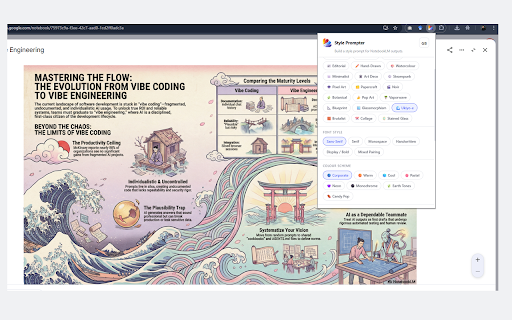
NotebookLM Style Prompter is a tool that allows users to customize the visual output of NotebookLM by selecting themes, tones, and languages. It functions as a prompt generator that produces copy-pasteable strings to be used within the NotebookLM interface.

Developer:keemanxp
Version:1.1.0
Size:73.68KiB
Last updated:

Overview

Installs

3K+

Rating

4.0

4 reviews

Languages

1 locales

Includes English

Market analysis

Review-backed positioning, friction, and market signals for this Chrome extension.

Backed by review samples

Macro category

AI & Writing Assistants

Pricing friction

Low review signal

Complaint intensity

Low review signal

Listing & review signals
Observed signals from store listing text and review samples.

Listing positioning

The extension positions itself as a specialized utility for generating structured style prompts for NotebookLM's infographic and slide deck features. It emphasizes a user-friendly, offline-first experience that requires no account or data collection.

Inferred product pattern

Single-purpose utility extension focused on enhancing output for a specific third-party AI platform.

Review-backed pain points

No negative review-backed pain points are available.

Observed feature gaps

No feature gaps identified from the available reviews.

Tags
NotebookLMPrompt EngineeringInfographicsSlide Decks
Target users

- NotebookLM Users

- Content Creators

- Educators

- Presentation Designers

Primary use cases

- Generating prompts for AI-generated infographics

- Customizing AI slide deck outputs

- Localizing prompt styling for non-English NotebookLM users

Positive themes

- Ease of use

- Effective for users who lack prompting skills

- High utility for specific content workflows

Negative themes

No negative theme data.

Observed friction

- None; the extension is free and claims to be offline-only.

Evidence boundary: Evidence is derived from the store listing's feature claims and a set of positive user reviews confirming the utility and ease of use of the tool. The evidence is based on a limited number of reviews; therefore, it may not represent the entire user experience or edge-case performance issues.
Complaint summaries
Review-backed complaint signals grouped by operational area.

Support

No support complaints reported.

Reliability

No reliability complaints reported.

Privacy

No privacy complaints reported; the listing explicitly claims no data collection.

Access & pricing

- Free usage observed

- No account requirement observed

- Free plan or free usage claimed

Store listing facts

Listing assets

- Screenshots: 4

- Videos: 0

- Languages: 1

Trust signals

- Privacy policy

- Developer contact

Store metadata

- Version: 1.1.0

- Size: 73.68KiB

- Last updated:

Listing SEO keywords

Search intent keywords
Keyword signals for evaluating how users may discover, compare, or search for this extension category.

Core discovery

NotebookLM prompt generatorNotebookLM infographicsAI slide deck promptscustomizing NotebookLM

Comparison

NotebookLM alternativesAI prompt tools

Problem

how to prompt NotebookLMimprove NotebookLM output

Alternative

NotebookLM tipsAI presentation tools

Similar extensions

Jump to related discovery paths:

Screenshots

NotebookLM Style Prompter screenshot

Links

Recommended Chrome extensions

Related listings from the same category, trending peers, and the same publisher portfolio.

Browse education
NotebookLM Quiz Exporter icon

NotebookLM Quiz Exporter

keemanxp

Export quizzes from Google NotebookLM (Gemini Notebook) to multiple formats for teaching, studying, and sharing

Installs

10K+

Rating

4.5

Voice In - Voice Typing & Speech-to-Text Dictation icon

Voice In - Voice Typing & Speech-to-Text Dictation

Dictanote

Voice typing in ChatGPT, Gmail, Google Docs & 10,000+ sites. Dictate emails, notes & AI prompts in 50+ languages.

Installs

600K+

Rating

4.4

Translate for Chrome -Translator, Dictionary icon

Translate for Chrome -Translator, Dictionary

Translator App.

Translate words, phrases or text on any webpage. Full page translator and dictionary, text to speech (TTS) using Google Translate.

Installs

600K+

Rating

4.7

GPTZero: AI Detection & Writing Replay icon

GPTZero: AI Detection & Writing Replay

chrome-extension-publisher

Bring AI detection, citation checks, live essay feedback, and writing replays directly into Google Docs and your workflow.

Installs

400K+

Rating

4.7

Cite This For Me: Web Citer icon

Cite This For Me: Web Citer

Chegg Writing Tools

Automatically create website citations in the APA, MLA, Chicago, or Harvard referencing styles at the click of a button.

Installs

400K+

Rating

3.8

Trancy - AI Translator & Dual Subtitles icon

Trancy - AI Translator & Dual Subtitles

Trancy

Trancy provides bilingual subtitle for platforms like YouTube, Disney+, as well as AI translator for websites.

Installs

300K+

Rating

4.7

Google Meet Attendance List icon

Google Meet Attendance List

MeetList

Easiest way to save the attendance list for your meetings or lectures

Installs

300K+

Rating

4.7

edpuzzle icon

edpuzzle

Edpuzzle

Import your favorite educational YouTube video into Edpuzzle with a click!

Installs

300K+

Rating

4.2

rikaikun icon

rikaikun

Erek Speed

rikaikun shows the reading and English definition of Japanese words when you hover over Japanese text in the browser.

Installs

200K+

Rating

4.7

Revision History: Writing Process Visibility for Google Docs & Slides icon

Revision History: Writing Process Visibility for Google Docs & Slides

Revision History

Built for teachers: See how students write, not just what they wrote. View the writing process in Google Docs & Slides.

Installs

200K+

Rating

3.7