Show YouTube comments while watching icon

Show YouTube comments while watching Chrome Extension Analysis

Niche Lifestyle & Gaming Hacks

Chrome extension ID: gonknbphdaoahjnamfjpaincammofgae

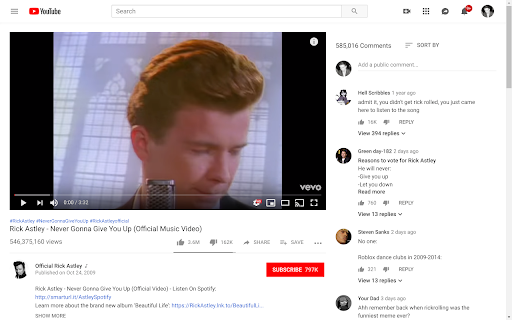
A Chrome extension that modifies the YouTube user interface to display comments in a sidebar next to the video player. This allows users to read and write comments without interrupting the video playback.

Developer:Tanguy Kurylo
Version:1.0.5
Size:7.54KiB
Last updated:

Overview

Installs

20K+

Rating

4.6

178 reviews

Languages

1 locales

Includes English

Market analysis

Review-backed positioning, friction, and market signals for this Chrome extension.

Backed by review samples

Macro category

Niche Lifestyle & Gaming Hacks

Pricing friction

Low review signal

Complaint intensity

Moderate review signal

Listing & review signals
Observed signals from store listing text and review samples.

Listing positioning

The product positions itself as a solution for users tired of scrolling or pausing YouTube videos to read comments. It claims to optimize the viewing experience by moving comments to the right of the video and shifting suggested videos underneath.

Inferred product pattern

Third-party UI modification tool for a major platform.

Review-backed pain points

Users frequently report that the extension stops working following YouTube site updates. Some users are frustrated by the lack of a simple toggle to turn the feature on or off without disabling the extension entirely.

Observed feature gaps

Absence of an integrated on/off toggle switch, lack of support for portrait-oriented monitors, and a non-pinned comment typing area.

Tags
YouTube UIVideo LayoutComment ViewerProductivity Hack
Target users

- Active YouTube viewers

- Community commenters

- Users with wide monitors

Primary use cases

- Reading comments while watching a video

- Engaging with the community without scrolling

- Customizing the YouTube layout for better efficiency

Positive themes

- Improved multitasking (watching and reading simultaneously)

- Quick developer response to bug reports

- Completely free usage

Negative themes

- Frequent breakage due to YouTube layout updates

- Lack of a toggle switch to revert to default view

- Compatibility issues with portrait monitors

Observed friction

- Performance complaints detected

- Privacy complaints detected

- No pricing friction observed as the product is described as free by both the developer and users.

Evidence boundary: Extracted data from the store listing and a sample of 20 user reviews including high, low, and helpful ratings. Review samples are limited in number and some are dated, potentially reflecting older versions of the software.
Complaint summaries
Review-backed complaint signals grouped by operational area.

Support

No direct support channel complaints, though users use the review section to request fixes for layout breakages.

Reliability

Significant reliability issues tied to external changes in YouTube's layout, leading to temporary functionality loss.

Privacy

One user expressed concern that the extension reads browsing history.

Access & pricing

- Free usage observed

- No account requirement observed

- Free plan or free usage claimed

Store listing facts

Listing assets

- Screenshots: 1

- Videos: 0

- Languages: 1

Trust signals

- Developer contact

Store metadata

- Version: 1.0.5

- Size: 7.54KiB

- Last updated:

Listing SEO keywords

Search intent keywords
Keyword signals for evaluating how users may discover, compare, or search for this extension category.

Core discovery

YouTube comments on rightYouTube layout modifierread YouTube comments while watching

Comparison

Sidesy alternativeYouTube sidebar comments

Problem

stop scrolling for commentsYouTube comments hiddenwatch and read comments at once

Alternative

YouTube UI extensionsYouTube comment layout change

Similar extensions

Jump to related discovery paths:

Screenshots

Show YouTube comments while watching screenshot

Recommended Chrome extensions

Related listings from the same category, trending peers, and the same publisher portfolio.

Browse social