Mouse Highlight & Annotation Tool icon

Mouse Highlight & Annotation Tool Chrome Extension Analysis

Automation & Workflow Efficiency

Chrome extension ID: hdemffpjganbmfojpcodnblmokkdbadc

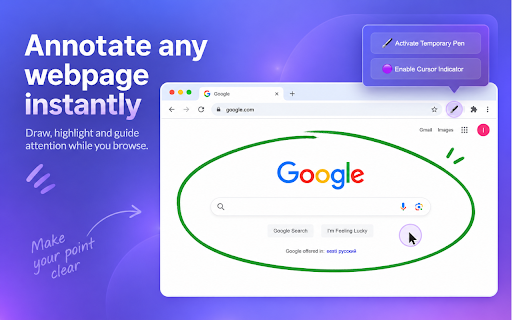
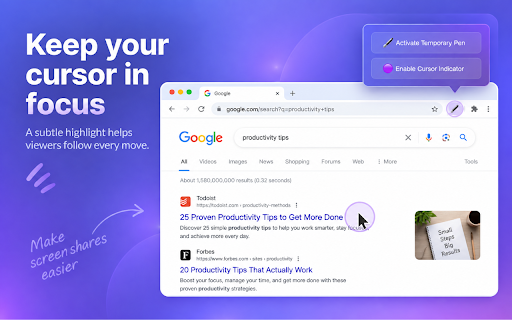
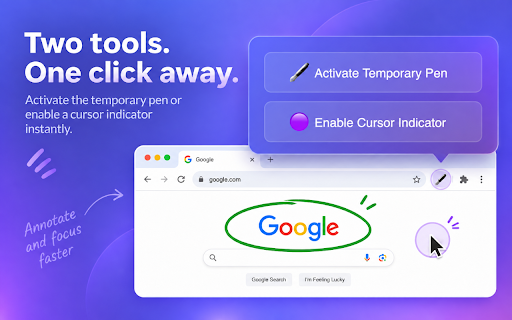
A Chrome extension that provides a cursor highlight overlay and a temporary drawing tool for any webpage. It allows users to point out key elements and make ephemeral markups without leaving permanent traces on the screen.

Developer:Peipus agency
Version:1.0.0
Size:88.67KiB
Last updated:

Overview

Installs

171

Rating

5.0

1 reviews

Languages

3 locales

Includes English, português (Brasil), русский

Market analysis

Review-backed positioning, friction, and market signals for this Chrome extension.

No review samples found

Macro category

Automation & Workflow Efficiency

Pricing friction

Low review signal

Complaint intensity

Low review signal

Listing & review signals
Observed signals from store listing text and review samples.

Listing positioning

The product is positioned as a lightweight utility for enhancing visual communication during live demos and screen sharing. It emphasizes a clutter-free experience by using annotations that automatically fade after one second.

Inferred product pattern

Single-purpose visual aid utility for browser-based presentations.

Review-backed pain points

Review-backed data is not available.

Observed feature gaps

The listing explicitly mentions 'Coming Soon' features: customizable colors, adjustable fade durations, and additional keyboard shortcuts.

Tags
Cursor HighlightWeb AnnotationPresentation ToolScreen SharingUX Review
Target users

- Teachers

- Presenters

- UX Reviewers

- Remote Workers

Primary use cases

- Directing attention during live presentations

- Sketching temporary annotations on webpages

- Highlighting important points during screen shares

Positive themes

- Review-backed data is not available

Negative themes

- Review-backed data is not available

Observed friction

- No pricing friction observed; the tool is presented as a free utility.

Evidence boundary: Analysis based entirely on the public store listing; no user reviews were available. Lack of user reviews prevents verification of actual performance, stability, or user satisfaction.
Complaint summaries
Review-backed complaint signals grouped by operational area.

Support

No review data available.

Reliability

No review data available.

Privacy

No review data available.

Access & pricing

- Free usage observed

- No account requirement observed

- Free plan or free usage claimed

Store listing facts

Listing assets

- Screenshots: 3

- Videos: 0

- Languages: 3

Trust signals

- Privacy policy

- Developer contact

- Official website

Store metadata

- Version: 1.0.0

- Size: 88.67KiB

- Last updated:

Listing SEO keywords

Search intent keywords
Keyword signals for evaluating how users may discover, compare, or search for this extension category.

Core discovery

mouse highlighterbrowser annotation tooltemporary web drawingscreen sharing highlighter

Comparison

cursor highlight vs screen markerbest web annotation for demos

Problem

how to highlight mouse on screentemporary screen drawing for chrome

Alternative

mouse pointer highlighter alternativeweb page annotation tool

Similar extensions

Jump to related discovery paths:

Screenshots

Mouse Highlight & Annotation Tool screenshot

Links

Recommended Chrome extensions

Related listings from the same category, trending peers, and the same publisher portfolio.

Browse communication
CSV to Google Sheets – Open CSV Instantly icon

CSV to Google Sheets – Open CSV Instantly

Peipus agency

Open CSV files in Google Sheets in 1–2 clicks. Skip manual upload and import steps and start working instantly.

Installs

912

Rating

5.0

Grammarly: AI Writing Assistant and Grammar Checker App icon

Grammarly: AI Writing Assistant and Grammar Checker App

Grammarly

Grammarly for Chrome helps you write with confidence. Get AI support for grammar, clarity, and tone, from first draft to final edit.

Installs

36.0M+

Rating

4.5

Loom – Screen Recorder & Screen Capture icon

Loom – Screen Recorder & Screen Capture

Loom

Record your screen and camera with one click. Share that content in an instant with a link.

Installs

7.0M+

Rating

4.6

Quillbot: AI Writing Assistant to Grammar Check, Paraphrase & Translate icon

Quillbot: AI Writing Assistant to Grammar Check, Paraphrase & Translate

quillbot

Write better emails, essays and messages with Quillbot's Grammar Checker, Paraphrasing Tool, Generative AI, Summarizer and more!

Installs

5.0M+

Rating

4.7

DeepL: translate and write with AI icon

DeepL: translate and write with AI

team-browser-extensions

Translate while you read and write with DeepL Translate, the world’s most accurate translator.

Installs

4.0M+

Rating

4.7

Mailtrack® – Email Tracker for Gmail icon

Mailtrack® – Email Tracker for Gmail

Mailsuite

The original Mailtrack®: free, unlimited email tracking for Gmail. Trusted by millions, GDPR-compliant and Google-audited.

Installs

3.0M+

Rating

4.4

HubSpot Sales icon

HubSpot Sales

signals-extension-publishing

Email tracking, CRM for Gmail, and sales productivity tools in your inbox

Installs

1.0M+

Rating

4.4

Connecteur Antidote icon

Connecteur Antidote

Druide informatique

Intégrez Antidote à votre navigateur pour corriger vos textes en temps réel et consulter ses dictionnaires et guides linguistiques.

Installs

700K+

Rating

3.0

Fathom AI Note Taker for Google Meet icon

Fathom AI Note Taker for Google Meet

Fathom

Records, transcribes & summarizes meetings FREE

Installs

500K+

Rating

4.9

GMass: Powerful mail merge for Gmail icon

GMass: Powerful mail merge for Gmail

GMass, Inc.

A powerful mass email and mail merge system for Gmail.

Installs

400K+

Rating

4.8