MS Teams Video & Transcript Downloader icon

MS Teams Video & Transcript Downloader Chrome Extension Analysis

Automation & Workflow Efficiency

Chrome extension ID: hmljlkhcebhkkhbbafiheolbneecoinp

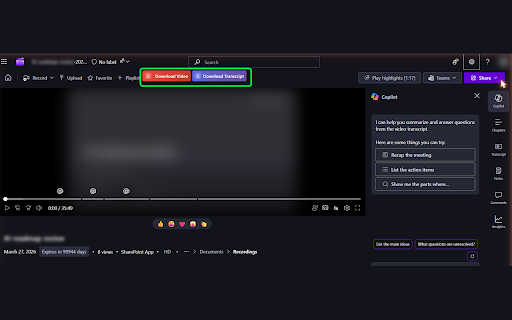
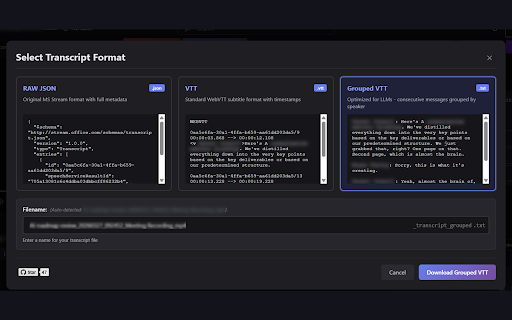
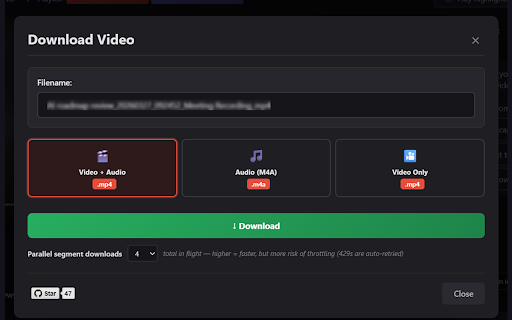
This Chrome extension enables users to download Microsoft Teams meeting videos, audio, and transcripts from Teams, SharePoint, and Microsoft Stream platforms. It offers multiple output formats including MP4, M4A, JSON, VTT, and Grouped Text, featuring in-browser processing, parallel segment fetching, and automatic detection for DRM-protected or untranscribed content.

Developer:brendan.gooden
Version:1.5.1
Size:40.86KiB
Last updated:

Overview

Installs

7K+

Rating

4.9

43 reviews

Languages

1 locales

Includes English

Market analysis

Review-backed positioning, friction, and market signals for this Chrome extension.

Backed by review samples

Macro category

Automation & Workflow Efficiency

Pricing friction

Low review signal

Complaint intensity

Low review signal

Listing & review signals
Observed signals from store listing text and review samples.

Listing positioning

The store listing positions the product as an essential solution for a common problem: downloading Microsoft Teams meeting videos, audio, and transcripts when native download options are disabled or restricted by organizational permissions. It highlights its in-browser functionality, support for various formats, and strong commitment to privacy and open-source principles.

Inferred product pattern

A utility tool that extends Microsoft Teams, SharePoint, and Stream functionalities to allow users to download meeting recordings, audio, and transcripts that are otherwise restricted by native platform settings. It emphasizes user control over their data and privacy.

Review-backed pain points

The primary review-backed pain point is the occurrence of an 'HTTP 401' error during content download, which can prevent users from accessing their desired files. However, this was a single report compared to numerous positive experiences.

Observed feature gaps

No clear feature gaps are observed from the store listing or the available review samples. The extension appears to comprehensively address its stated problem.

Tags
Teams DownloaderVideo SaverTranscript ExtractorMeeting ProductivitySharePoint Utility
Target users

- Professionals

- Students & Educators

- Accessibility users

- AI Enthusiasts

- Analysts

- Content Creators

Primary use cases

- Saving meeting recordings for offline viewing

- Extracting audio from meetings

- Downloading transcripts for reference

- Processing transcripts with AI tools

- Creating subtitles or captions

- Keeping copies of videos uploaded to Stream/SharePoint/OneDrive

Positive themes

- Successfully downloads content that was previously inaccessible due to restrictions

- Saves significant time and hassle by bypassing native download limitations

- Appreciated for being simple, free, and open-source

- Effective and works as advertised

Negative themes

- Encountered 'Error: Manifest fetch failed: HTTP 401' during video download attempt

Observed friction

- The extension is highlighted in reviews as free and open-source, and the listing makes no mention of payment, indicating no pricing friction.

Evidence boundary: Analysis is based on the Chrome Web Store listing, including the title, short and long descriptions, and a sample of 10 user reviews (one 1-star, nine 5-star) with associated metadata. The sample of reviews is limited to 10 entries, with only one low-rating review. This restricts the ability to identify a broader range of potential pain points, feature requests, or common negative experiences.
Complaint summaries
Review-backed complaint signals grouped by operational area.

Support

No support, account, or refund complaints were observed in the review samples. The listing directs users to GitHub for bug reports and feature requests.

Reliability

One review reported an 'HTTP 401' error preventing a download. However, the majority of reviews confirm the extension's reliable functionality in successfully downloading content.

Privacy

No privacy or security complaints were found in the review samples. The listing explicitly states that the extension uses local processing, collects no tracking data, and is open source.

Access & pricing

- Free usage observed

- No account requirement observed

- Free plan or free usage claimed

Store listing facts

Listing assets

- Screenshots: 3

- Videos: 0

- Languages: 1

Trust signals

- Developer contact

- Official website

Store metadata

- Version: 1.5.1

- Size: 40.86KiB

- Last updated:

Listing SEO keywords

Search intent keywords
Keyword signals for evaluating how users may discover, compare, or search for this extension category.

Core discovery

MS Teams download videoTeams transcript downloaderSharePoint video saveMicrosoft Stream downloaderTeams meeting recording download

Problem

Teams download button disabledcannot download Teams recordingmissing Teams transcript downloadSharePoint video download restrictedMicrosoft Stream video save issue

Alternative

Teams video downloader alternativeSharePoint recording export tool

Similar extensions

Jump to related discovery paths:

Screenshots

MS Teams Video & Transcript Downloader screenshot

Links

Website: github.com

Recommended Chrome extensions

Related listings from the same category, trending peers, and the same publisher portfolio.

Browse developer
Salesforce Inspector Reloaded icon

Salesforce Inspector Reloaded

Thomas Prouvot

Productivity tools for Salesforce administrators and developers to inspect data and metadata directly from the Salesforce UI.

Installs

500K+

Rating

4.8

Axure RP Extension for Chrome icon

Axure RP Extension for Chrome

Axure Software Solutions, Inc.

An extension that allows viewing of locally published Axure RP prototypes (HTML files) from Google Chrome.

Installs

500K+

Rating

3.3

Angular DevTools icon

Angular DevTools

Angular

Angular DevTools extends Chrome DevTools adding Angular specific debugging and profiling capabilities.

Installs

400K+

Rating

3.7

daily.dev | Where developers discover what's next icon

daily.dev | Where developers discover what's next

Daily Dev Ltd.

Developer news, personalized to your stack, in every new tab. Join 400,000+ developers. Free and open source.

Installs

400K+

Rating

4.8

SelectorsHub icon

SelectorsHub

Sanjay Kumar | SelectorsHub Founder

Locators Plugin to Auto Generate and Verify Playwright Locators, XPath & CSS Selectors.

Installs

400K+

Rating

4.8

SAML-tracer icon

SAML-tracer

SimpleSAMLphp

A debugger for viewing SAML messages

Installs

400K+

Rating

4.5

CSS Peeper icon

CSS Peeper

CSS Peeper

Inspect website styles in seconds. Supercharge your workflow, and save hours of work.

Installs

400K+

Rating

4.1

Font Finder icon

Font Finder

unixeco

An easy-to-use font inspector to get CSS styles of the selected element

Installs

400K+

Rating

4.5

Netmirror Extension icon

Netmirror Extension

netmirror.art

Add, modify or remove a header for any request. https://netmirr.net/ Netmirror Mod Header (HTTP Headers) is an extension that can…

Installs

400K+

Rating

4.2

Fake Filler icon

Fake Filler

Fake Filler

A form filler that fills all inputs on a page with fake/dummy data.

Installs

400K+

Rating

4.4